

What Is an AI Coworker?
 Dott
Somewhere in the last year, every AI product got a promotion on its homepage. Slack calls Slackbot "an AI teammate." Viktor calls itself "the AI employee that lives in Slack and Microsoft Teams" and works from "his own computer in the cloud." Lindy calls itself an AI employee and adds that "people also call it an AI coworker." If you are trying to figure out whether to buy one, the job titles don't help much when they are pasted onto everything from a search box to a coding agent.
I have a stake in the phrase too. I build Merlin, our homepage calls it "your AI coworker in Slack, Linear, and GitHub," and I use it in our own Slack and Linear every day. Because we put the word on our front door, I owe you a definition you can hold us and every other vendor to.
If you just want the plain-English version before you look at another pricing page, start here.
The short answer
An AI coworker is an AI agent the whole team can hand work to. Five traits separate it from a chatbot or a personal assistant: it works where your team already talks (like Slack, Linear and GitHub), anyone on the team can hand it work, it finishes the work inside your team's real systems, it remembers what your team taught it in a shared memory scoped to where it learned it, and it works in the open where people can watch, steer and trace what it did. Drop any one of those five and you still have a useful tool or an assistant, just a single-player one.
Chatbot, assistant, agent, coworker at a glance
"Who can hand it work" is the column I'd read first, because that is where a personal tool turns into a team one.
| Type | Best for | Who can hand it work | What it finishes | What it remembers |
|---|---|---|---|---|
| Chatbot | Quick questions and drafting text | One person in a private chat window | A reply in the chat | Only the current conversation |
| AI assistant | Summarizing, searching and drafting inside an app | One logged-in user at a time | Drafts, summaries and small single-app actions | Personal preferences or nothing |
| AI agent | Multi-step tasks that use tools and run commands | Usually the person at the keyboard or a single trigger | Code changes, reports, tickets or workflows | Session context and local project files |
| AI coworker | Shared work across a team's channels, issues and repos | Anyone on the team in a shared thread or issue | Pull requests, ticket updates and answers back in the thread | Shared team memory, scoped to the channel or workspace |
The line that trips people up is the one between an AI agent and an AI coworker. Claude Code and OpenAI's Codex are my favorite examples of AI agents: give either one a terminal and a repository, and it will read files, run tests and put together a real fix. Still, out of the box, each one works for the person sitting at that keyboard. When a product manager wants something from it, the product manager asks an engineer, who pastes the question into their terminal, waits, and pastes the answer back into Slack. An AI coworker takes that same agent capability and puts it in the room with the rest of the team.
That shift is already showing up at work. In Slack's June 2025 Workforce Index, 40% of desk workers said they had worked with an AI agent. And in Microsoft's 2025 Work Trend Index, 82% of leaders said they were confident they would use digital labor to expand workforce capacity in the next 12 to 18 months.
The five traits of an AI coworker
1. It works where the team already talks
If you have to open a separate web app and log into a private chat to use it, it's a tool on your desk. A coworker shows up in the places where work is already being discussed: a Slack thread, a Linear issue, a GitHub pull request or Microsoft Teams. The request starts in the conversation, and the result lands back in that same conversation so nobody has to copy and paste context between tabs.
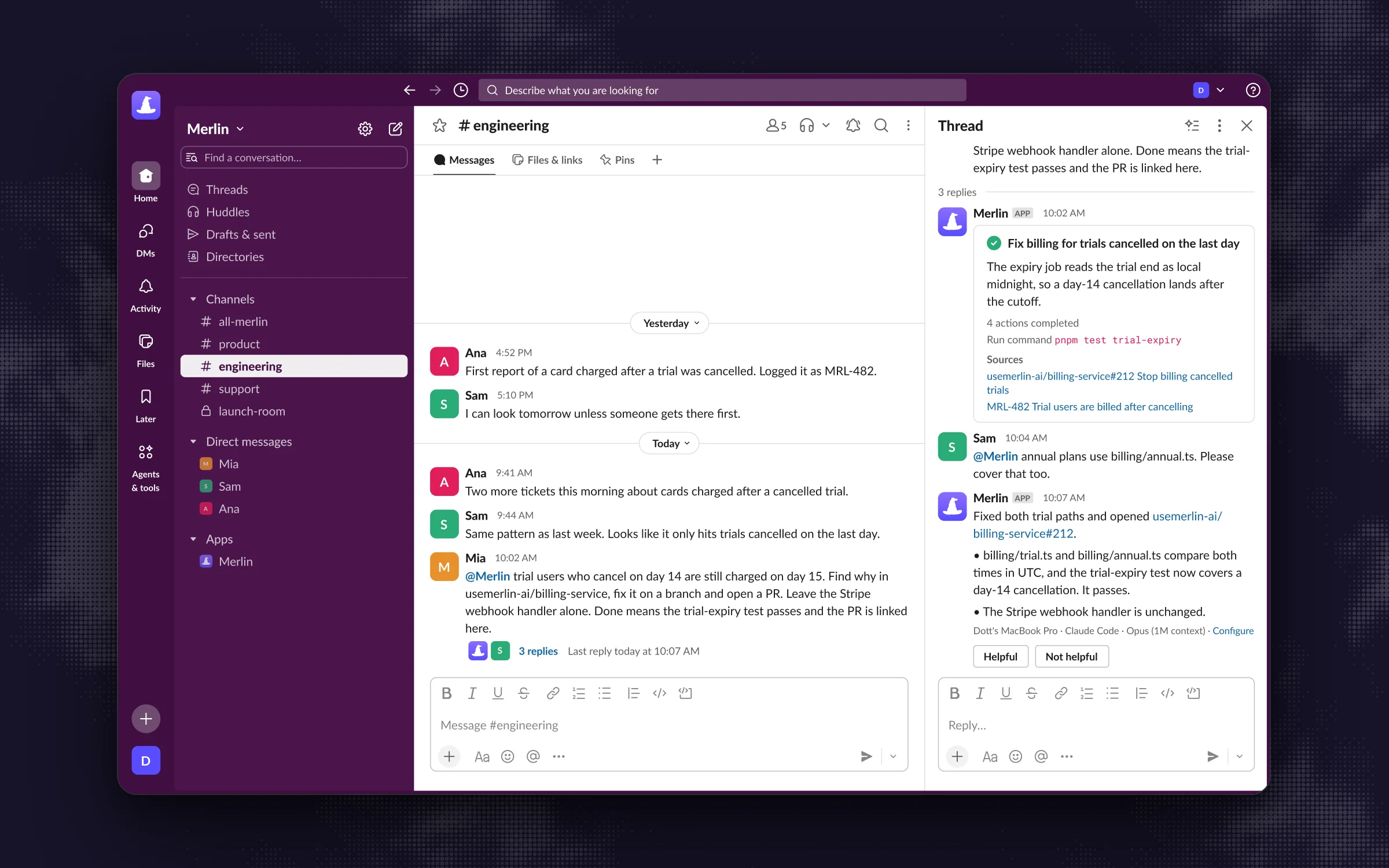 Mia asks, Sam adds context halfway through, and the result lands in the same thread.
2. Anyone on the team can hand it work
Most capable coding and ops tools stay locked behind one role. The engineers have the terminal agents, data has the SQL notebook, ops has the automation builder, and everyone else waits in line. With a coworker, a designer can @mention it in a thread to ask why a button looks off on staging, a PM can delegate a Linear ticket, and an engineer can jump into the same thread to nudge the approach. You don't need a local dev setup to ask a technical question.
3. It finishes the work in your systems
A chatbot tells you how you might fix the bug. A coworker reads the repository, runs the test suite, opens the pull request and links it on the ticket, or updates the spreadsheet and posts the chart. The output is the thing your team actually needed done, sitting in the system where your team keeps its work.
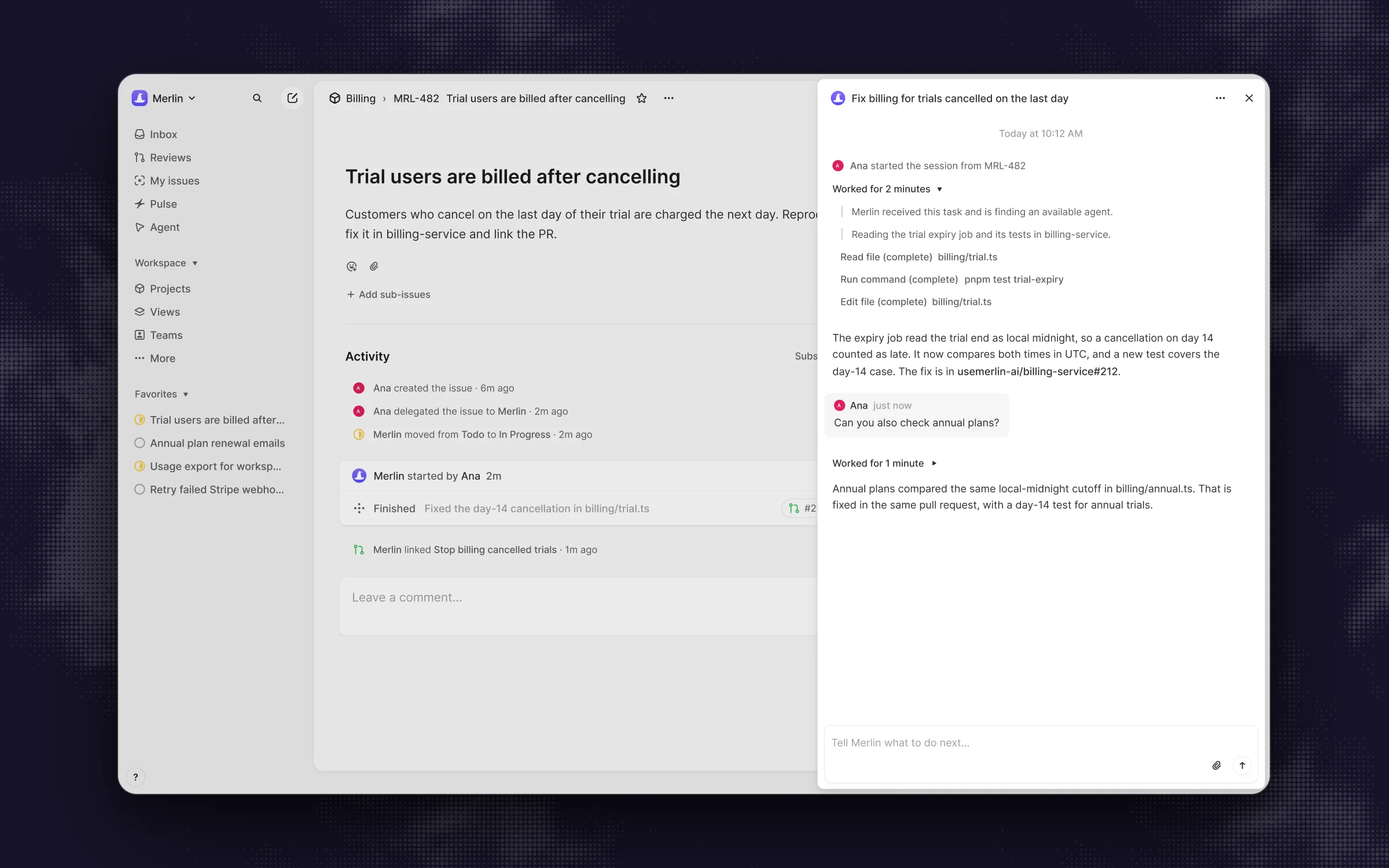 A delegated Linear issue: the work, the pull request and the follow-up all stay on the issue.
4. It remembers what the team taught it
If five people have to tell an AI the same deployment rule five times in five private chats, it has amnesia. A coworker keeps short, durable facts from the work it does with your team, so when someone corrects it once in #engineering, the next person who asks in #engineering gets the benefit. Good memory is also scoped: what it learns in a private channel stays in that private channel, and a bad note can be read and deleted by a human.
5. It works in the open
When a human teammate picks up a task, you can see their comments on the issue, tell them "hold on, annual plans work differently" before they go too far, and read the pull request afterwards. An AI coworker should work the same way. Live progress in the thread, steering mid-run without starting over, and a clear trace of what ran and who kicked it off matter more than a flashy demo.
The part most definitions skip
When you search "what is an AI coworker," almost every page on the first screen is written by a vendor selling one, and almost none of them bring up the two questions that decide whether the product will actually work for your team.
- Where the work runs. Most AI coworkers run in the vendor's cloud, on a fresh virtual machine or container. That is the easiest way to get started, and for search, SaaS workflows and greenfield code it is often plenty. The catch shows up when the work needs your real environment: local repositories, internal services behind a VPN, staging databases, local scripts or the MCP servers your engineers already configured. Either you spend a week handing keys and network access to a new cloud, or the agent runs on your team's own machines where all of that already works.
- Whose model it uses, and who pays for it. Many teams are already paying for Claude Code or ChatGPT plans for their engineers. Most AI coworker products ignore that and bill you a second time for model usage, either per seat or in a bucket of vendor credits whose exchange rate you have to learn by trial and error. Always check whether a tool can use the model plans you already pay for.
This is the angle we took with Merlin, and it comes with a real trade-off. Merlin runs on your team's own machines (macOS, Windows or Linux) through our desktop app or CLI, and it drives the Claude Code and Codex already installed there (how Merlin works). We don't host a model, so model usage stays on each machine owner's own Claude or ChatGPT plan, and Merlin itself is a flat workspace subscription starting at $9 a month (pricing). The flip side is our biggest prerequisite: if nobody on your team runs Claude Code or Codex yet, Merlin isn't the right first step. A cloud-hosted coworker like Viktor, Lindy or Slackbot will get you going faster.
How to tell an AI coworker from a renamed chatbot
Definitions like this one are a starting point. Next time you are looking at a product that calls itself an AI coworker, run these five questions on it during the trial:
- Can two people talk to it in the same thread? Have one person start a task in Slack or Linear and a second person reply mid-run with extra context. If the second person gets ignored or starts a separate session, it's a single-player bot in a group channel.
- What does it leave behind when it finishes? Ask it to do a small piece of real work. Check whether you get a pull request, an updated ticket or a finished artifact, or just a paragraph of advice telling you how to do the work yourself.
- Does a correction stick for the next teammate? Tell it one team convention in a channel, then have someone else ask a related question in that same channel tomorrow. And ask the vendor where that memory lives and how to delete a wrong note.
- What can it reach on day one? Ask what happens when a task touches an internal service, a private package registry or a local tool. Count how many credentials you would have to upload to a new vendor cloud to make the demo real.
- How does the bill grow when the whole team uses it? Price out a normal week with 20 people asking questions in public channels. Per-seat plans punish casual askers, and credit buckets can turn a busy sprint into a surprise invoice.
Three things most definitions skip
- One coworker beats a cast of named bots. Some platforms ask you to build
@SalesBot,@DocsBot,@BugBotand@OpsBotand teach your team which one to call. In practice, nobody remembers the roster. A single handle that knows the channel it is in gets used much more. - It still needs a manager. Calling software a coworker is useful shorthand for how you interact with it, and terrible shorthand for accountability. A human on your team still owns every pull request merged, every customer message sent and every permission granted (security is worth reading for any tool you try, ours included).
- The billing model decides who gets to ask. When a tool charges $30 or $60 per seat, companies buy seats for five power users and leave the other 25 people out, which brings back the human clipboard problem. Workspace pricing or using existing model plans lets the occasional asker participate.
FAQ
Every AI coworker is an AI agent, but not every agent is a coworker. An AI agent is any software that can plan steps and use tools to finish a task, and many of the best ones (like Claude Code or Codex in a terminal) are built for one person at a keyboard. An AI coworker is an agent that lives in shared spaces like Slack, Linear or GitHub so the whole team can hand it work and steer it together.
Mostly marketing taste. Vendors use "AI coworker," "AI teammate" and "AI employee" to point at the same idea: an agent that takes tasks in your team's chat or issue tracker and returns finished work. "AI employee" tends to be used by products that run autonomously on a schedule in their own cloud computer, while "AI coworker" or "AI teammate" usually emphasizes working alongside people in threads.
In our own Slack, it takes the glue work off people's plates. A PM gets a codebase question answered or a small fix drafted without interrupting an engineer's afternoon, and an engineer still reviews and merges the pull request. It takes work off the backlog, and someone on the team still has to own the decision.
It depends on where the coworker runs and whose permissions it uses. Before installing any product, check three things: whether your code and data are copied into a vendor cloud or stay on your own machines, who in your workspace is allowed to trigger actions, and whether the agent asks before doing anything irreversible. You can see how we handle runtime sharing, channel memory and access controls in Merlin's security docs.
Current products price in one of three ways: per user seat (often $15 to $60 per person per month), per workspace with usage credits on top (commonly $40 to $500 a month plus credit packs), or a flat workspace fee while model usage stays on your existing AI plans. Merlin uses the third model: Starter is $9 a month for up to 3 people, Team is $59 for up to 50, and Scale is $99 for up to 200, with a 14-day free trial and model usage on your team's own Claude or ChatGPT plans (pricing).
Not to use one day to day. Once an AI coworker is in Slack or Linear, anyone in the channel can @mention it in plain English. Whether you need an engineer for setup depends on the product: cloud coworkers like Slackbot, Viktor or Lindy can be connected by an admin in a few minutes, while Merlin requires at least one teammate who already runs Claude Code or Codex on a machine they share with the workspace (prerequisites).
That's the test I use when a new "AI coworker" lands in my feed. If your team already runs Claude Code or Codex and wants to turn that setup into a coworker in Slack, Linear and GitHub, give Merlin a look, and if you run the five questions above on another tool, tell me how it scored.
Try Merlin for free
Hand work to Claude Code and Codex from Slack, Linear and GitHub. Free for 14 days, no API keys, no card required.
Get started for free