

What "Agents as Coworkers" Actually Means
 Dott
Dott
Spend five minutes looking at AI products for teams right now and you will feel like you are reading job boards. Viktor greets you with "Not a tool. A hire." and explains that "he has his own computer in the cloud where he writes and runs code." Lindy pitches "Hire Lindy, get it done." Devin is "your team's autonomous software engineer" that "tests end to end on its own computer." Salesforce calls the whole category digital labor, with an agent "acting as a virtual employee to augment the human workforce." If you lead an engineering or operations team, someone is going to ask to bring one of these teammates into your Slack channels and codebases soon.
An agent becomes a coworker when it fits into the lines of authority your team already has. It acts with a real person's permissions, anyone in the conversation can steer or stop it, and a named human answers for what it ships. The human name, the avatar and "its own computer" are the cheapest part of the metaphor, and leaning on them is what makes teams check its work less. If you want the five traits that define an AI coworker, you can start with that guide, while the harder job for a team lead is the org-chart engineering that keeps one safe in your channels.
The products that shipped agents to teams kept a human on the hook
When companies that build daily work tools added agents to their platforms, they all ran into the same question: when an agent breaks a build or closes a customer ticket with a hallucinated answer, whose name is on the mistake? Across issue trackers, code hosts and enterprise directories, they arrived at the exact same design rule.
Linear published a formal set of Agent Interaction Guidelines built around a blunt principle: "An agent cannot be held accountable." When Linear shipped its agent SDK, it changed how issue assignment works so that "assignment now reflects accountability." When a teammate delegates an issue to an agent, that human stays the primary assignee, and the agent attaches underneath as a contributor working on their behalf. Agents in Linear do not count as billable seats, cannot sign in to the app, and cannot reach admin settings or manage users.
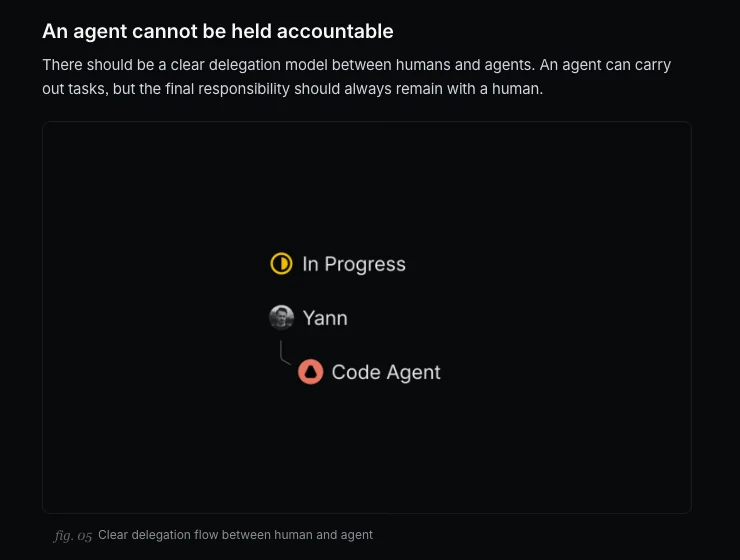 Linear's guidelines draw the delegation line literally: the agent works under a person, and the person stays on the issue.
GitHub drew the same boundary in code review. Only users with write access to a repository can trigger GitHub Copilot's cloud agent, and the agent can only push to a single branch. More importantly, GitHub prevents the person who asked Copilot to open a pull request from being the one who approves it, and the agent itself cannot approve or merge anything. By default, GitHub Actions workflows wait until a human reviews the agent's code before running, though since March 2026 repository admins can opt out of that workflow gate if they trust their setup. Even if you ask the agent to write the code, a second human has to sign their name to put it in production.
Microsoft went the furthest into identity architecture and still refused to let an agent stand alone. In Microsoft Agent 365, every agent identity and blueprint requires at least one human sponsor: "the business representative accountable for the agent's purpose and lifecycle." Even when an organization sets up Entra agent users for "long-term digital employees that function as team members with mailboxes, chat access, and inclusion in HR systems," Microsoft hard-codes a ceiling: those accounts cannot be assigned privileged administrator roles.
Whose permissions it borrows decides what it can safely do
Once you know which human is on the hook, the next question is what keys the agent holds while it works. Prompts and system instructions feel like rules, but they are just polite suggestions to a statistical model. As Merlin's security documentation puts it, task instructions and memory guide the agent, they do not enforce permissions. What an agent can touch comes down to the identity token or local environment it runs under.
Different products solve this by lending the agent very different keys:
| Product | Acts with whose permissions | Where a human stays answerable |
|---|---|---|
| Slackbot | The asking user's own Slack access ("I only surface what you have access to") | The asker reads and acts on the answer |
| GitHub Copilot cloud agent | Triggered only by users with write access, pushes to a single branch | The person who asked cannot approve its pull request, and workflows wait for a human review by default |
| Linear agents | An app user that cannot sign in, reach admin functions or manage users | Delegating keeps the human as the primary assignee |
| Devin | Organization-level GitHub permissions, the same whoever starts the session | Admins choose whether pull requests open as Devin or as the linked user |
| Microsoft Agent 365 | Its own Entra Agent ID, or on behalf of a signed-in user | Every agent identity needs at least one accountable human sponsor |
| Merlin | The runtime owner's machine: their files, Git credentials, skills and MCP tools | The owner decides private or public, and the result returns to the thread or issue it came from |
Look closely at that middle column and you will see two opposite philosophies. Slackbot pitches itself as "your AI teammate," and Slack's trust principles keep the access rule simple: it only works with content the person asking already has permission to view. If an intern asks Slackbot a question, it searches with the intern's eyes.
Devin's GitHub integration takes the wider road: "Devin uses the permissions granted at the organization level, not the permissions of the individual user running a session." Admins can choose whether pull requests open under Devin's name or the linked user's name, which looks tidy in Git history, while the underlying access remains organization-wide. If you grant the app write access to forty repositories, anyone allowed to start a Devin session can point it at all forty.
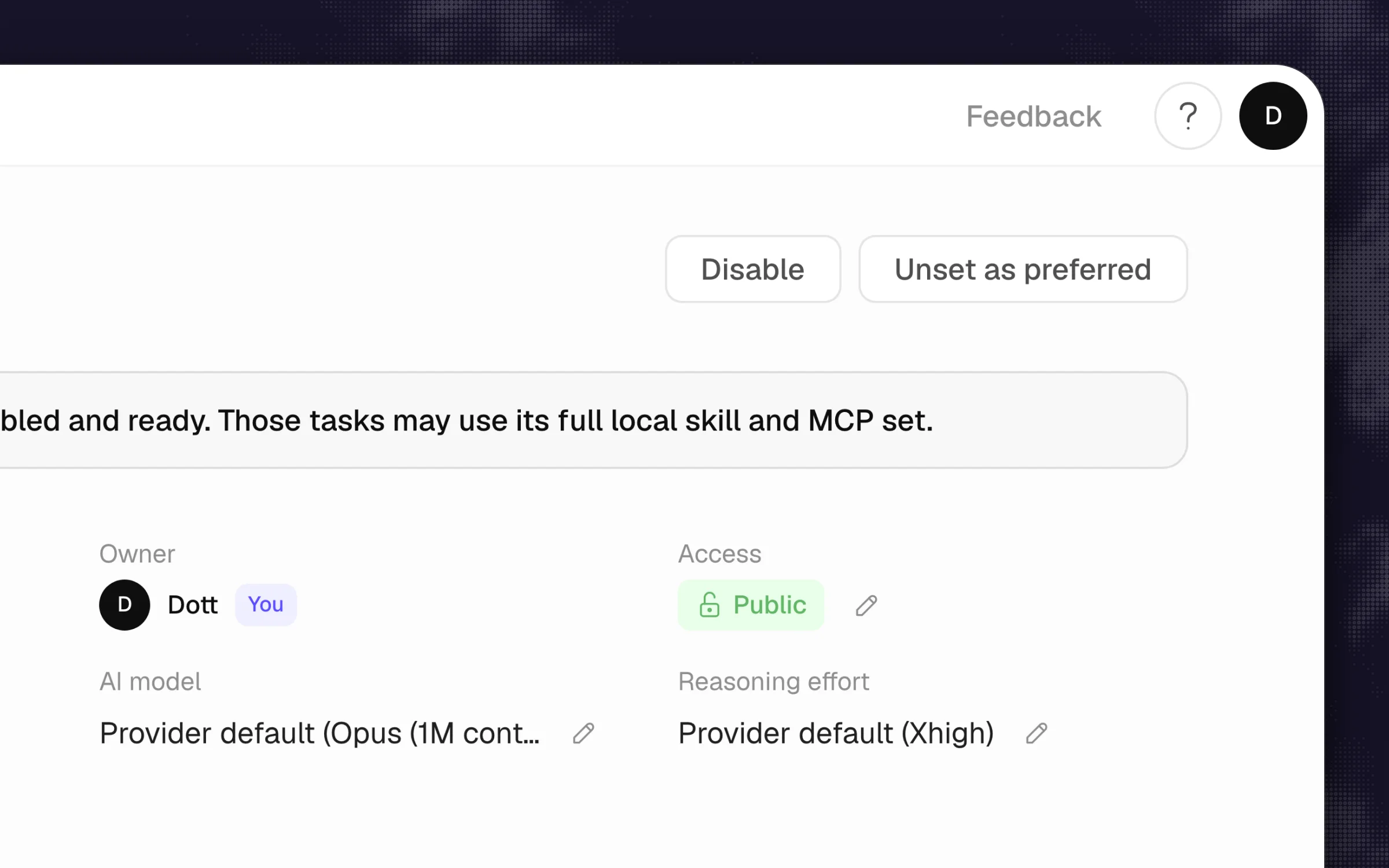 In Merlin the borrowed authority has a name on it: the runtime's owner, and a Private or Public switch only that owner can flip.
Merlin takes a third route because of how it runs: it drives the Claude Code and Codex already installed on your teammates' own machines, on each owner's own Claude or ChatGPT plan. Every device and runtime belongs to a specific person and starts out private, accepting only its owner's requests. When a repository gets checked out, the runtime uses the device owner's own Git credentials.
That makes the authority line unmistakable, and it also exposes Merlin's real trade-off. When an engineer flips their runtime from private to public so the rest of the workspace can use it, they are lending their actual workbench to the team. Authorized work from teammates can use that runtime's enabled local skills, MCP tools, credentials and files without asking the device owner for a mid-run approval on each command. Each conversation gets its own working directory under Merlin's local state. That folder is no operating-system sandbox or separate user account. A public runtime in Merlin is like handing a colleague your unlocked laptop: convenient for a five-person startup, and dangerous if the owner holds production database keys in their shell environment.
A coworker can be interrupted by anyone in the room
According to the June 2025 Slack Workforce Index, 40% of desk workers have worked with an agent and 23% have offloaded tasks for an agent to complete on their behalf. When that work moves out of a solo terminal and into a team channel, single-player controls break down. If Mia kicks off an agent run in #engineering and walks away to grab coffee, Sam needs to be able to chime in when Sam spots a missing requirement, or hit the brakes if the agent starts editing the wrong service.
Both of the major model labs build their agent guidance around this checkpoint loop. Anthropic's engineering guide notes that effective agents "pause for human feedback at checkpoints or when encountering blockers." OpenAI's practical guide to building agents says that when an agent hits its failure thresholds, "For a coding agent, this means handing control back to the user," and adds separately that "Actions that are sensitive, irreversible, or have high stakes should trigger human oversight until confidence in the agent's reliability grows." Linear's guidelines turn it into etiquette: an agent should always disclose that it is an agent, and when someone asks it to disengage, it must "step back, immediately."
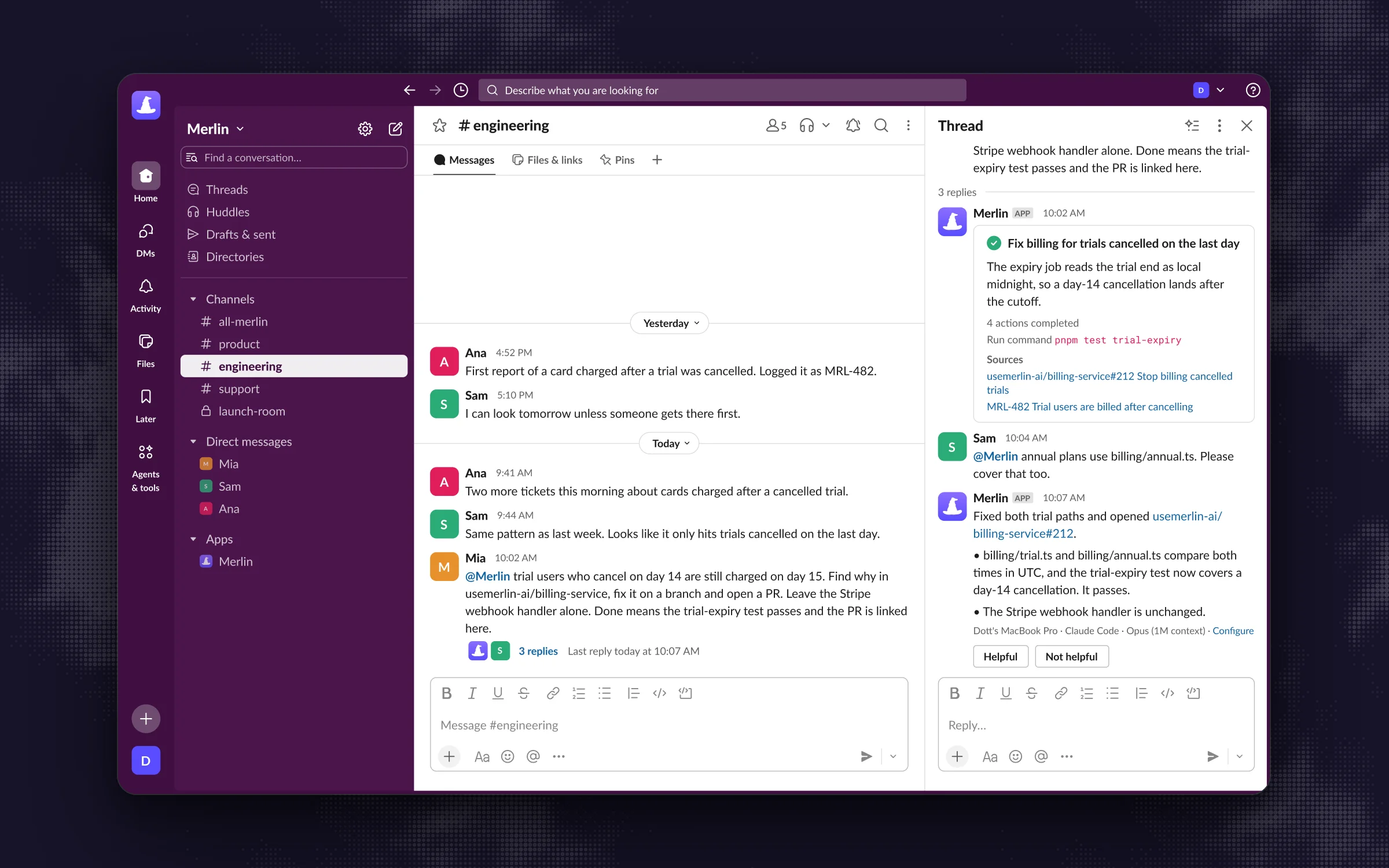 A second person steers the same run halfway through, the way you'd lean over a colleague's shoulder.
In a multiplayer workspace, handing control back means handing it back to the room. In Merlin's Slack integration, any follow-up message in the thread during active work steers the current task, so a second engineer can add a constraint mid-flight without waiting for the first run to finish and fail. Any member of the workspace can click the stop control to cancel the run while keeping whatever progress was already posted, the same follow-up and stop controls carry over to Linear sessions, and on GitHub a later mention from any admitted participant can steer active work. If an agent cannot be interrupted by a bystander who sees it heading off a cliff, it has no business working in a shared channel.
The employee costume makes people check less
You might wonder why the marketing language matters if you get the permissions and the stop buttons right. It matters because calling an agent an employee changes how carefully your humans read its work.
In May 2026, researchers at the BCG Henderson Institute tested this across more than 1,200 managers. When the exact same AI system was introduced and framed as an employee, managers caught 18% fewer errors in its output. Individual accountability for mistakes dropped by 9 percentage points, while accountability blamed on the AI jumped by 8 points. MIT Technology Review highlighted the same trap in June 2026: people who treated an agent as a colleague saw themselves as less responsible for checking what it produced.
The psychology makes total sense. When a human coworker says "I ran the migration and checked the logs," you trust them because they have a career, they sit in postmortems, and they feel the pain of a weekend outage. An agent feels none of that. When a vendor gives an agent a human name, a cheerful face and a line in the company directory, it triggers our social instinct to defer to a peer, right at the moment when we should be reading its diff like a hawk.
Where this breaks down
The strongest argument against tying an agent to a human's permissions comes from security and identity architects, and they have a real point. If an agent borrows a senior engineer's identity, it inherits everything that engineer can touch, which violates the principle of least privilege. Giving the agent its own distinct identity, as Microsoft Entra Agent ID does when it "treats agents as first-class identities," or as Viktor does when it only sees the channels it is invited to, lets an admin scope the agent to the exact three buckets and two repositories its job requires. It also makes audit logs cleaner, because you never have to guess whether the runtime's owner ran that DROP TABLE command or an agent running on their public runtime did.
That objection is right whenever an agent runs unattended in the back office. If you have a scheduled job triaging incoming support emails at 3 a.m. or a compliance bot sweeping repositories every Sunday, there is no single human "asker" in the thread whose permissions it should borrow. Giving that agent a dedicated service account or an Entra Agent ID with narrow access is much safer than running it on a founder's laptop.
Notice what stays true even in that setup: the permission token belongs to the bot, while the accountability still belongs to a person. Microsoft's own agent identity model requires a named human sponsor for every single agent identity and blueprint, and blocks Entra agent user accounts from holding privileged administrator roles. Separate credentials for the machine is good security hygiene. Separate responsibility is a fantasy.
What I'd do
According to Microsoft's 2025 Work Trend Index, 36% of leaders and 21% of employees already expect to manage agents in their jobs. Before you invite an agent into your team's Slack workspace, Linear project or GitHub org, set the ground rules in writing:
- Write down the four-part contract before day one. For every agent you connect, record whose permissions it acts with, who is allowed to trigger it, how anyone in the room can stop it mid-run, and which human's name goes on the postmortem if it causes an incident.
- Separate the asker from the approver. Copy GitHub Copilot's cloud agent rule across your whole workflow: the person who prompts the agent to write code, draft a customer reply or change a config cannot be the sole person who approves and merges it.
- Assign one human owner per agent or runtime. Follow Microsoft's sponsor rule and Linear's primary assignee rule. Every shared runtime, scheduled job or bot account gets one human owner who reviews its access monthly.
- Start with private or read-only access, then widen slowly. In Merlin, keep new runtimes private until you know which local skills and credentials live on that machine, or dedicate a clean machine with scoped Git and MCP credentials before flipping a runtime to public. In cloud tools like Devin or Lindy, connect one repository or one Slack channel first and widen access once the workflow settles.
- Drop the new-hire theater. Skip the welcome announcement in
#general, the human portrait and the fake job title. Introduce the agent as a shared power tool, name the engineer who owns its configuration, and remind the team that whoever merges its output owns the result.
If you are wiring up an unattended back-office workflow with no human in the loop, give the agent its own tightly scoped service identity and assign a sponsor to watch its logs. If you are bringing an agent into the daily conversations where your engineers and PMs plan, code and ship, pick a setup that keeps the work in a shared thread, borrows only the permissions you intend to lend, and leaves a human unmistakably in charge.
Try Merlin for free
Hand work to Claude Code and Codex from Slack, Linear and GitHub. Free for 14 days, no API keys, no card required.
Get started for free