

Claude Code in Slack: Why It Keeps Breaking for Teams
 Dott
Someone on your team connected Claude Code to Slack on a Tuesday afternoon, showed a two-minute demo in #engineering, and everyone clapped. By Friday, it was answering from the wrong repository, forgetting what it did twenty minutes ago, or logging everybody out at 3 p.m.
"Claude Code in Slack" means any setup where a Slack mention starts a Claude Code session and the result comes back to the thread: Anthropic's own @Claude app (the earlier version or Claude Tag), an open-source bot on someone's machine, or a homemade webhook on the Agent SDK. Almost every one of those options was built around a single user, and when a whole team piles into the same channel, they break in the same five places:
- The thread forgets what it was doing. Replies start fresh, time out after half an hour, or die when a laptop restarts.
- Nothing carries over to the next thread. Next week's conversation has no idea what the team decided today.
- Everyone runs as one person. One login, one GitHub identity, or one shared bill takes the hit for the whole channel.
- Nobody knows which machine does the work. A fresh cloud box lacks your local tools, while a laptop goes to sleep at 6 p.m.
- Slack's own plumbing leaks into the agent. Three-second timeouts trigger duplicate runs, and partial thread context leaves the bot guessing.
What a team actually wants from Claude Code in Slack
When one developer hooks their own Slack handle up to their own Claude Code terminal, everything is implicit. It is their login, their laptop, their repositories, and their bill.
A team of ten or thirty people in a shared channel needs the unwritten parts spelled out. Anyone in the channel should be able to hand work to Claude Code, and when someone replies in the thread ten minutes later, it should land in the same running session. Decisions from Monday's bug hunt should still be known on Thursday without someone pasting a wall of context into every new thread. Each request needs to run with the right access and on a machine that actually has the repo, the .mcp.json tools, and the staging credentials. And at the end of the month, you want to know who asked for a pull request and what the bill will be.
How teams connect Claude Code to Slack today
If you search for "claude code slack" right now, most results still describe Anthropic's December 2025 research preview as if nothing has changed. Quite a bit has changed, and teams today usually end up on one of five setups.
1. The earlier Claude Code in Slack app
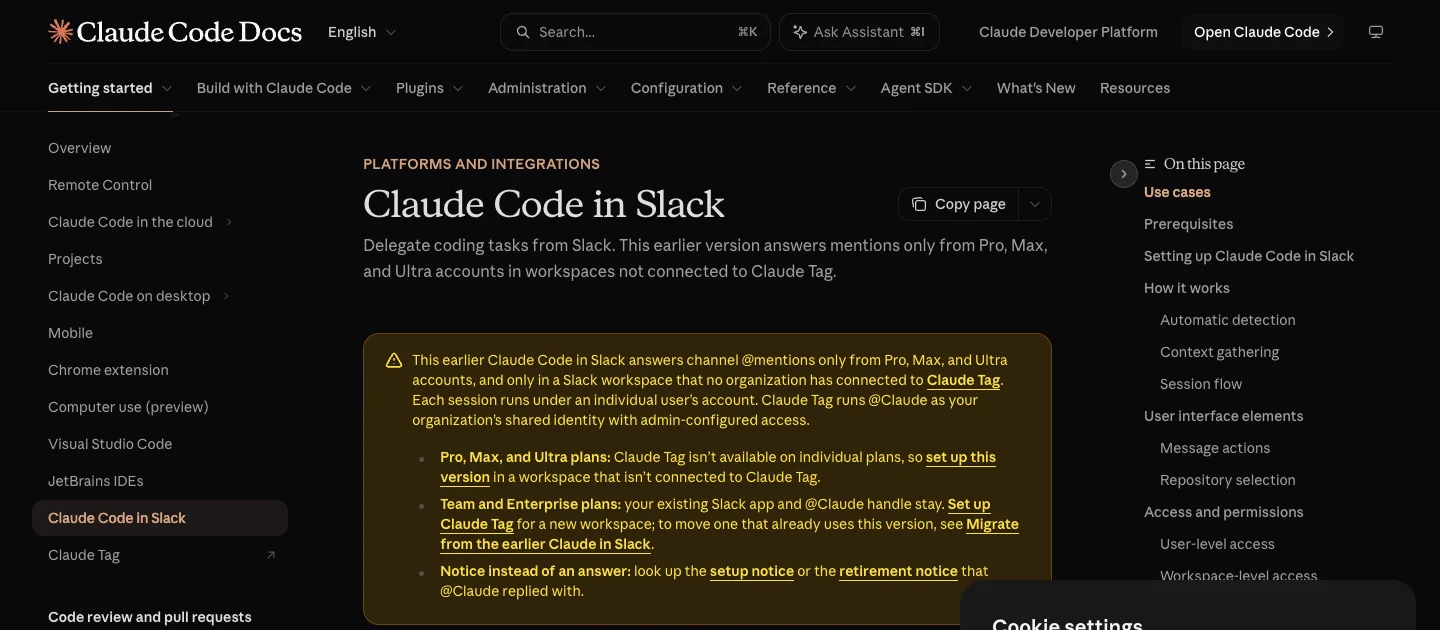 The earlier Claude Code in Slack app now carries a notice: it only answers individual Pro, Max and Ultra accounts, in workspaces that never connected Claude Tag.
Per Anthropic's Slack documentation (checked on November 10, 2026), the original @Claude app now answers channel mentions only from individual Pro, Max, and Ultra accounts, and only in Slack workspaces that no organization has connected to Claude Tag. If an organization in your workspace did connect Claude Tag, the legacy bot stopped answering in channels on October 5, 2026 and replies with: "The legacy Claude in Slack bot is retired effective October 5, 2026 and no longer responds in channels." Where it still runs, each user connects their own Claude account and GitHub at claude.ai/code individually, and each mention spins up a fresh web session under that person's plan.
2. Claude Tag
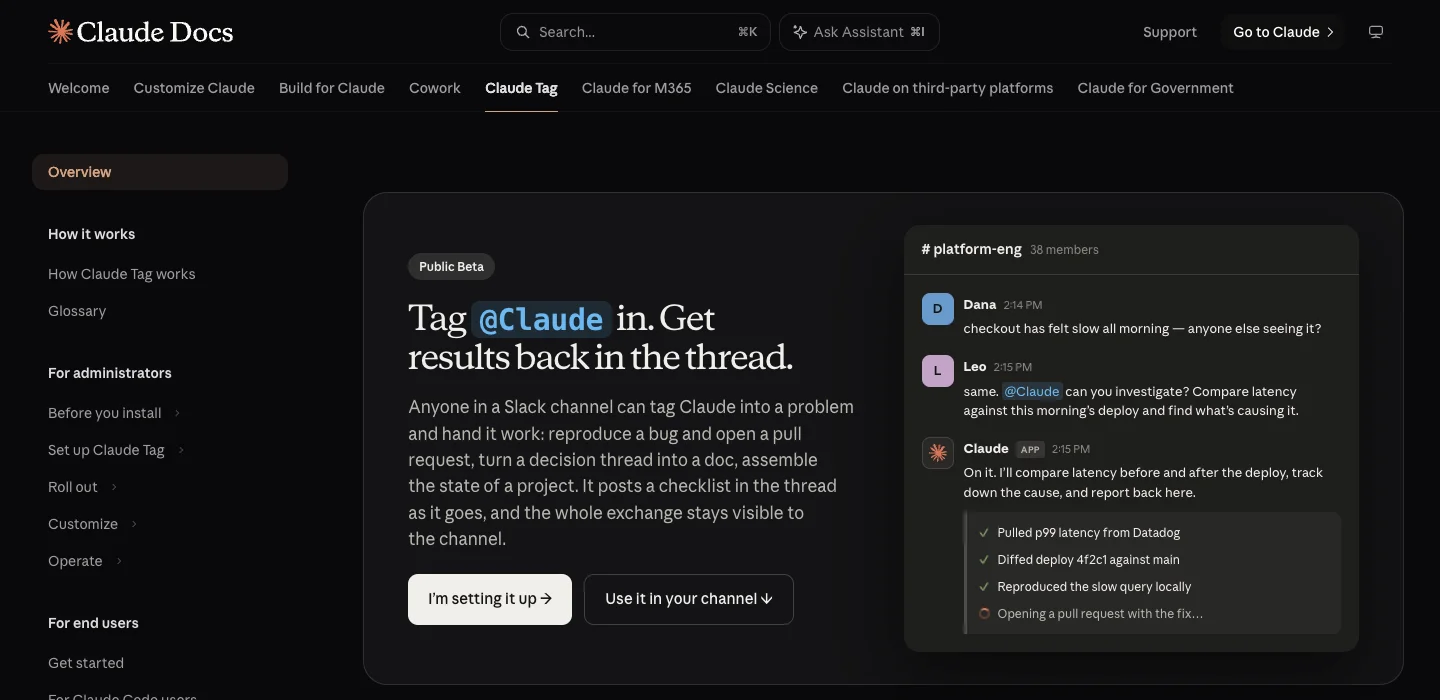 Claude Tag runs @Claude as one shared identity for the whole organization, in a cloud sandbox per thread.
Anthropic announced Claude Tag on June 23, 2026 in public beta for Team and Enterprise plans (it isn't available on Free, Pro, Max, or Ultra). It uses the same @Claude handle, but turns it into one shared identity for the organization. Each thread runs in an ephemeral cloud sandbox rather than on your computer, and channel work draws from an organization usage balance that an owner funds.
3. Open-source local bridges
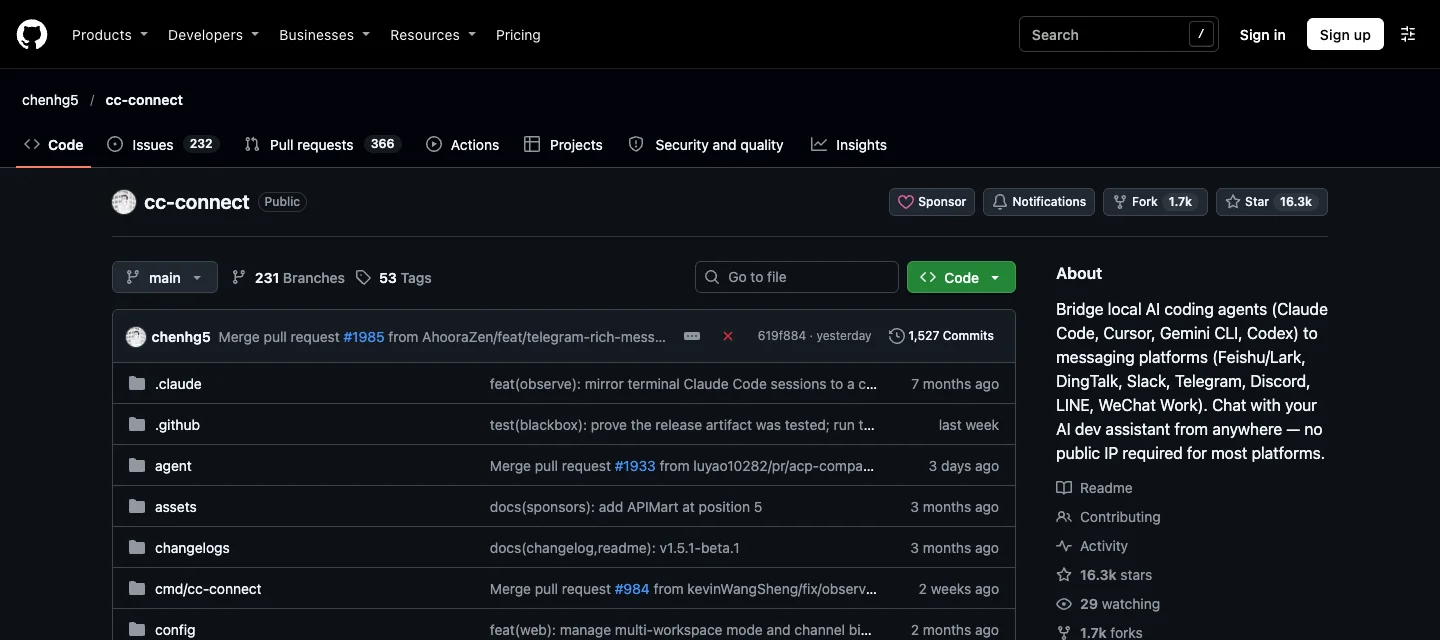 The most-starred open-source bridge runs Claude Code on whoever's machine starts it, under that machine's login.
Because teams want their own local setup in Slack without moving to an Enterprise plan, open-source bridges have taken off. cc-connect (16.3k stars on GitHub as of November 10, 2026) and earlier projects like mpociot/claude-code-slack-bot (180 stars, last commit June 2025) run on a developer's machine or a spare Mac mini, connect to Slack over Socket Mode, and pipe channel mentions straight into the local claude CLI under that host machine's login.
4. Homemade webhooks on the Agent SDK
Plenty of engineering teams wire up a small internal service using Slack's Events API or Bolt, calling the Claude Agent SDK or claude -p in a container with a shared Anthropic API key or a mounted credentials file. Some open-source templates even pitch "One API key for the whole team" right in the README.
5. The Slack MCP server (the lookalike)
Teams often install Slack's official MCP server expecting to @mention Claude in a channel. That goes the other direction: it lets a running Claude session search channels and send messages using your OAuth token. As Anthropic's Channels documentation explains, a standard MCP server is queried during a task and nothing is pushed to the session from Slack (and the official Channels push preview covers Telegram, Discord, and iMessage, leaving Slack out).
The five places it breaks
Once three or four teammates start tagging the bot in the same channel, the failure modes show up fast.
1. The thread forgets what it was doing
In Slack, a thread is the unit of work. You ask the agent to investigate a flaky test, a teammate adds a stack trace ten minutes later, and after lunch you ask it to open the PR. When the session state underneath doesn't match the Slack thread, the conversation falls apart.
In Anthropic's migration table, the earlier Claude Code in Slack app has "Sessions: Spawned per request", and each session can create only one pull request. Every follow-up is a brand-new run.
Local bridges try to map threads to local sessions, but trip over timeouts and process state. By default, cc-connect's Slack config scopes sessions per channel plus user (session_scope), so when a second teammate replies in your thread, they don't hit your session, and idle sessions reset after 30 minutes anyway. If two messages hit a running session at once, cc-connect issue #1498 documents that it "returns 'session is busy' with no queue/retry" and an error hook "resets the session file to empty JSON." In mpociot/claude-code-slack-bot, sessions live in memory for 30 idle minutes, and issue #1 ("All settings lost on bot restart/crash/update") was closed as not planned.
Homemade Agent SDK bots run into file locality. Anthropic's Agent SDK session docs note that "Session files are local to the machine that created them." If a second container picks up the next reply, or if your worker changes directories, it fails with Error: No conversation found with session ID.
Claude Tag actually ties the Slack thread to a single session so replies continue where they left off (how it works). Its catch is the sandbox lifecycle and context ceiling: "A few minutes after a session finishes its turn, its sandbox is released", so any unpushed files outside the repo vanish, and a thread locks in its skills, plugins, and custom instructions when it starts. When a busy debugging thread gets long, troubleshooting notes it stops with: "This conversation is too long for me to process... please start a new thread to continue."
2. Nothing carries over to the next thread
Even if a single thread stays alive for an hour, teams have dozens of threads a week. Nobody wants to re-explain every Monday that your staging database uses port 5433 or that migrations require a specific flag.
The earlier Slack app has "Memory: None". Open-source bots and homemade webhooks only remember whatever somebody manually commits to a CLAUDE.md file in the repository, which never captures the day-to-day operational facts that come up in Slack.
Claude Tag adds per-channel memory, which is a real step forward, though its troubleshooting guide warns that the per-channel memory budget is limited and "long entries crowd out everything else." And if your team discusses an incident in #alerts and moves the fix to #backend, channel memory in one room doesn't automatically brief the other unless you manage it carefully.
3. Everyone runs as one person
When a whole channel shares a bot, three things get tangled together: who is authenticated, whose name goes on the GitHub pull request, and who pays.
On local bridges and homemade bots that share a single Claude login, the auth failures are brutal. Claude Code's legal and compliance docs state that plan limits "assume ordinary, individual usage of Claude Code and the Agent SDK" and direct products built on the Agent SDK to use API key auth. When teams try to run a shared headless loop on one OAuth login anyway, they hit authentication_error: OAuth token has expired after 10 to 15 minutes, which "halts all in-progress tasks simultaneously". Point several container instances at one shared credentials file and everyone gets "cascaded to logged-out, repeatedly, several times a day". Run it on an always-on Mac mini and users report the login "gets wiped blank every 2-7 days", or fails under a launchd daemon with 403 ... Request not allowed. If you switch the bot to a single shared API key, organization-level rate limits mean one person's big refactor gives everyone else a 429 error.
Claude Tag solves the login crash by moving to an organization identity, which creates the opposite problem: everyone becomes the same user. As Anthropic's guide for Claude Code users puts it: "A pull request comes from the Claude GitHub App rather than from you, and a query against a connected service runs with the channel's credentials no matter who asked." And because the GitHub App opens the PR instead of the human who asked for it, Anthropic's GitHub admin docs point out a governance wrinkle: "the person who asked Claude for a change can approve and merge it alone." Billing is pooled too. On Team plans, Claude won't respond in channels until an owner funds a usage balance, while on Enterprise it "bills to your invoice with no upper bound until you set a spend limit", and "there's no published per-task cost guidance" (the billing models are compared in more detail in the Claude Tag vs Merlin breakdown).
4. Nobody knows which machine does the work
Claude Code shines in a terminal because it sits inside a real working environment: your ~/.claude skills, your shell variables, your VPN connection, your local MCP servers, and the repositories you already cloned and built.
Move to Claude Tag's cloud sandbox and none of that comes along. Per Anthropic's docs for Claude Code users, "your ~/.claude directory, your personal settings.json, your shell environment, and the MCP servers you configured locally" never load. Even a .mcp.json file checked right into your repository is "Not loaded, even when .mcp.json is checked into the repository", and effort level is "Not configurable." When you migrate from the earlier Slack app, previously connected repos do not carry over, so code requests "have nothing to clone until you configure them." Network access goes through an Agent Proxy that "carries HTTP and HTTPS only", so SSH or a database's native wire protocol cannot cross it, and a private GitHub Enterprise Server without a public address cannot be connected. During busy hours, threads can sit on a message that begins "Still waiting for available capacity" unless you set up beta self-hosted environments.
Move to an open-source bot on someone's laptop and you get the local environment back, right until that person closes their MacBook lid to catch a train. Or you hit classic single-machine quirks: in mpociot/claude-code-slack-bot, a hardcoded path from the author's laptop caused the bot to fail on other machines, and crashes surfaced only as a generic Claude Code process exited with code 1.
5. Slack's own plumbing leaks into the agent
Slack is a chat app with strict webhook rules, and coding tasks take minutes. That mismatch causes three headaches that have nothing to do with the model.
- Three-second timeouts and duplicate runs. Slack's Events API requires an HTTP 2xx within three seconds, or it retries up to three times with an
x-slack-retry-numheader. In my judgement, any homemade webhook that runs a multi-minute Claude Code task inline before acknowledging the request will miss that three-second window, and Slack's retries will happily kick off the same code change two or three times unless the bot acknowledges first and deduplicates. Using Socket Mode avoids public webhooks, though the connection still refreshes every few hours and Socket Mode apps cannot be listed in the public Slack Marketplace. - Missing thread context. When you tag a bot midway through a twenty-message discussion, you expect it to read the thread above. On the earlier Claude Code in Slack app, Anthropic's docs explain that in a thread it gathers only "your messages and its own in that thread", so to give it something a teammate wrote, you have to "paste its text into the message." It also guesses which repository to use from conversation context, which is why "Wrong repository selected" has its own troubleshooting entry. Open-source bridges hit the same wall: cc-connect issue #1749 notes that a bot mentioned in a running thread "receives only the mention text ... it answers with 'I don't have that context' or, worse, confidently answers the wrong question."
- Too many cooks (or zero permissions). In Claude Tag, anyone in the channel can steer a running session from the thread, while channels that include Slack guests are ignored by default (troubleshooting). In the earlier Slack app, Anthropic warns that "Claude may follow directions from other messages in the context, so users should make sure to only use Claude in trusted Slack conversations." Meanwhile, open-source bridges often swing wide open: cc-connect's Slack guide ships an example with
allow_from = "*"and offers abypassPermissionsmode documented as "auto-approve everything (alias: yolo)", which is exciting when anyone in#generalcan run shell commands on your laptop.
Setup by break point at a glance
Here is how the five setups behave across each failure mode (checked on November 10, 2026).
| Setup | 1. Thread state | 2. Cross-thread memory | 3. Identity and billing | 4. Where it runs | 5. Slack plumbing |
|---|---|---|---|---|---|
Earlier @Claude app | New session per request, one PR max, retired where Claude Tag is connected | None | Each user sets up and bills their own Pro, Max, or Ultra plan | Anthropic web session, sends complex tasks to the web UI | Reads only your messages and its own in a thread, guesses repo, channels only |
| Claude Tag (beta) | Continues in thread, sandbox released a few minutes after turn, hard length cap | Per-channel memory with a limited budget | One shared org identity and GitHub App, owner-funded usage balance (Team and Enterprise only) | Ephemeral cloud sandbox (or beta self-hosted runner), ignores local ~/.claude and .mcp.json, HTTP/HTTPS proxy only | Reads thread, anyone in channel can steer, silent in channels with guests |
| Open-source local bridge | Often scoped per user, 30-minute idle timeout, lost on restart or busy error | Manual CLAUDE.md commits only | Shares host machine's login, prone to OAuth expiry and daemon 403 errors | One developer's laptop or Mac mini, dies when machine sleeps | Often misses earlier thread messages, example configs frequently allow all users and auto-approve |
| Homemade Agent SDK webhook | Session files tied to one machine and directory, breaks across containers | Manual CLAUDE.md commits unless you build a database | Shared API key hits org rate limits (429), shared OAuth files cascade logouts | Your container or server, only has the tools you bake into the image | Must ack within 3 seconds and deduplicate x-slack-retry-num or tasks run twice |
| Slack MCP server | Tied to your local terminal session | Local terminal only | Your personal Slack OAuth and Claude login | Your local terminal | Outbound tool only, cannot be @mentioned from Slack |
A checklist for a team-ready setup
Before you roll any Claude Code integration out to an engineering channel (or if you are putting together a broader Slack AI agent rollout checklist), ask these eight questions:
- Does a reply in the thread continue the same session, and does it survive a restart?
- Does the agent remember a team decision in next week's thread, and who can see that memory?
- Whose identity does each request run as, and can you tell who asked for a change?
- Whose plan or balance pays, and what happens when it runs out?
- Which machine runs the work, and what happens when it's asleep?
- Does it get the tools the work needs (local MCP servers, VPN-only services, your effort setting)?
- Who in the channel can trigger or steer it, and with what permissions?
- Does it handle Slack's own behaviour (fast acks, retries, the whole thread as context)?
Look at how the options land against that list. Claude Tag answers questions 1, 2, and 8 cleanly out of the box, at the cost of running in an ephemeral cloud sandbox without your local .mcp.json or SSH tools, pooling everyone behind one GitHub App identity, and requiring a Team or Enterprise usage balance. Open-source bridges and homemade bots keep your local environment for question 6, but leave you to engineer session persistence, auth rotation, and Slack retry handling yourself.
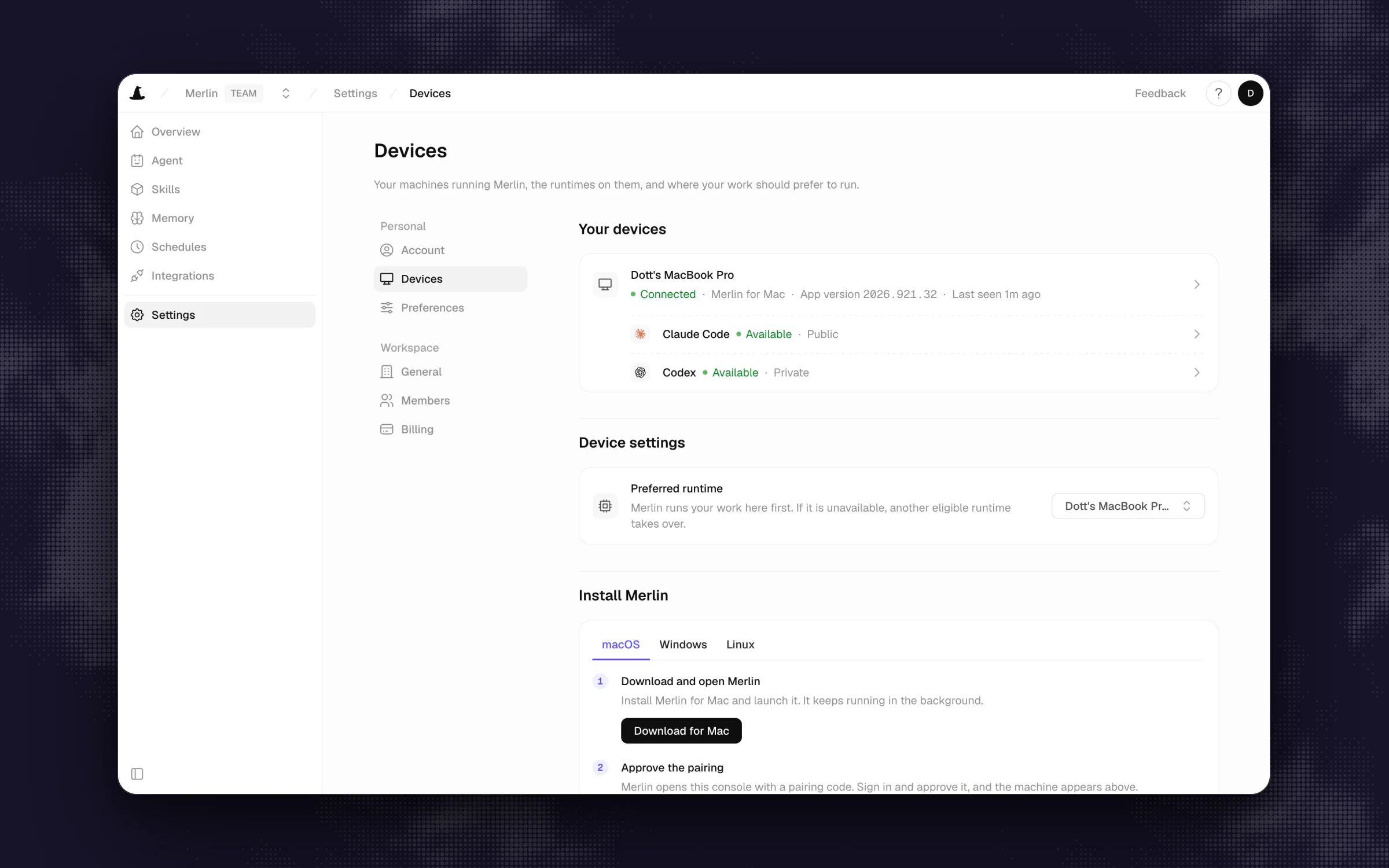 In Merlin, each machine reports which agents it can run, so the team can see where a request will land.
Merlin is one option that answers most of the list by keeping work on the team's own machines. Instead of a cloud sandbox or a single shared laptop, Merlin connects the Claude Code and Codex setups already installed on teammates' machines to Slack through a desktop app or CLI daemon:
- Thread continuity and routing: A Slack thread maps to one conversation and stays with the runtime already doing the work.
- Per-user identity and explicit machine sharing: Every request is tied to the Slack person who asked. On devices and runtimes, a machine owner can keep their runtime private (only their own Slack requests run there) or mark it public so teammates can route work to it using that machine's local repositories, credentials, skills, and MCP servers.
- Scoped memory: Memory stores short facts per Slack channel. Public-channel notes form shared workspace memory, while private-channel notes stay inside that channel.
- Predictable billing: Model usage stays on each machine owner's existing Claude or ChatGPT plan, and Merlin charges a flat workspace subscription (Starter at $9, Team at $59, and Scale at $99 per workspace per month on pricing, checked on November 10, 2026).
Merlin has real limits to weigh against that checklist too. It does not host a cloud runtime, so the machine chosen for a task must be online and connected (if a scheduled automation's runtime is offline or busy, that run is skipped). It supports only Claude Code and Codex. When a teammate routes work to someone else's public runtime, that work counts against the runtime owner's plan and limits, and different machines on a team may have different local files or credentials if you aren't careful. Workspace memory also starts turned off until an owner or admin enables it.
When the simple setup is fine
You don't always need a multi-machine setup. If you are a solo developer who just wants to kick off a background task from your phone while walking the dog, an open-source bridge like cc-connect on an always-on desktop at home is free.
And if your company is already on a Claude Team or Enterprise plan, your repositories live on GitHub.com (or a GitHub Enterprise Server with a public address), your workflows only need HTTP/HTTPS tools, and you want zero local machines to look after, Claude Tag's cloud sandboxes are the lowest-maintenance path.
FAQ
Yes. Teams connect Claude Code to Slack through Anthropic's official @Claude app (the earlier per-user version or the newer Claude Tag beta for Team and Enterprise), through open-source local bridges like cc-connect, through homemade webhooks built on the Claude Agent SDK, or through team routers like Merlin that connect teammates' local Claude Code installs to Slack channels.
No. Anthropic's earlier Slack app requires an individual Pro, Max, or Ultra plan, while Claude Tag requires a Team or Enterprise plan plus a funded organization usage balance. Open-source bots are free software, but still consume your Anthropic API credits or paid subscription limits.
Anthropic's earlier Claude Code in Slack app works in public and private channels only and does not answer in direct messages (Slack docs). Third-party tools and open-source bridges vary depending on how their Slack app scopes are configured.
They share the same @Claude Slack app, but work differently underneath. The December 2025 version ran separate sessions per user under individual Pro, Max, or Ultra accounts, and was retired on October 5, 2026 in any workspace connected to Claude Tag (migration guide). Claude Tag replaces it for Team and Enterprise organizations with a single shared identity, persistent thread sessions, and an organization usage balance.
No. Slack's MCP server lets an already-running Claude session search Slack channels and post messages using your account, and nothing is pushed from Slack to start a session (Channels docs). To start work by mentioning a bot in Slack, you need a Slack app or bridge listening to Slack events.
In practice, it breaks quickly. Anthropic's compliance docs state that individual plans assume individual usage, and teams that point a multi-user headless bot at a single OAuth login regularly hit tokens that expire mid-run (one report saw it after 10 to 15 minutes of use), cascading logouts across containers, or 403 errors when running as a background daemon.
If you are the only person using the bot, a local bridge on your own machine will do the job, while Claude Tag fits teams already on Claude Team or Enterprise that want a zero-maintenance cloud sandbox, and Merlin fits teams that want to share the local Claude Code environments already running on their engineers' machines.
Try Merlin for free
Hand work to Claude Code and Codex from Slack, Linear and GitHub. Free for 14 days, no API keys, no card required.
Get started for free