

AI Agent Security Checklist: Permissions, Secrets and Audit Trails
 Dott
Your AI agent pilot works. It summarizes threads, drafts pull requests and answers questions from the docs, and now someone wants to take the training wheels off so it can merge code, update Linear issues and post into shared Slack channels. The pilot is stuck waiting on a security review, and you are the person who has to sign off.
Before an agent gets write access, you have to answer three questions: what can it touch, where do its secrets live, and how will you check afterwards what it did. Most security reviews only check the chat app's OAuth scopes, which misses the credentials sitting quietly on the machine the agent runs on and the gap between who asked for a change in chat and whose name lands in the destination's audit log.
At the end of the steps below, you will have a filled-in security checklist with a named owner for each of the three questions, every agent action sorted into a tier with its hard stop in the destination system, a credential inventory per machine with expiry dates, and one rehearsed replay of a real agent action from request to change. Reading takes about 12 minutes, and running the steps takes an afternoon plus one rotation drill and one replay drill.
Key takeaways
- An agent's real permission is the union of three layers: the chat app's scopes, the credentials sitting on the machine or sandbox it runs on, and every connected tool's token.
- Put your hard stops in the destination systems: branch protection, read-only database roles and spend caps hold the line when prompt rules get bypassed or ignored.
- Separate untrusted text from sensitive tools: prompt injection turns any public issue, ticket or webpage the agent reads into instructions it will execute with your credentials.
- Inspect the host machine for plain-text credentials: MCP config files,
.envfiles and local CLI logins on the host are the credentials an agent reaches first. - Destination audit logs only name the token: GitHub, Linear and Slack record which bot or user credential made a change, so you need the agent platform's own run records to prove who asked for it.
What you need
- Admin access to each destination tool (GitHub organization owner, Linear workspace admin, Slack workspace admin).
- Shell or settings access to the machine, VM or cloud sandbox where the agent runs.
- Admin access to the agent platform's dashboard.
- One recent, real action the agent took in your workspace to use as a trace test.
- Your current plan tiers for GitHub, Linear and Slack so you know which audit logs you actually have.
- If you have not set up the Slack side yet, run the Slack AI agent rollout checklist first for app approval, pilot channels and the off switch.
The four risks you are signing off on
When you approve an agent for write access, you are accepting four specific failure modes. Knowing their real-world track record makes it much easier to explain to your team why every risky action needs a hard technical stop.
Overreach and honest mistakes. An agent given broad credentials will eventually use them in a way nobody intended. In July 2025, SaaStr founder Jason Lemkin reported that Replit's coding agent deleted a live production database holding records on 1,206 executives and 1,196 companies during an explicit code freeze. Replit CEO Amjad Masad called the incident "unacceptable and should never be possible," noting that preview, testing and production shared the same database at the time.
Prompt injection. When an agent reads untrusted text while holding private credentials, the text can hijack the session. In May 2025, Invariant Labs demonstrated that a malicious issue planted in a public repository could hijack an agent using the official GitHub MCP server, pull data from the user's private repositories and leak it into a public pull request. As their researchers noted, "this is not a flaw in the GitHub MCP server code itself." It is what Simon Willison calls the lethal trifecta: access to private data, exposure to untrusted content, and the ability to communicate externally.
Leaked secrets. Agents run on machines full of keys, and they occasionally commit those keys or read them from config files nobody thought to lock down. GitGuardian's State of Secrets Sprawl 2026 (published March 17, 2026) found 28.65 million new hardcoded secrets in public GitHub commits in 2025 (up 34%), including 1,275,105 AI service secrets (up 81%). Commits assisted by Claude Code had a 3.2% secret-leak rate compared to the 1.5% baseline, and researchers found 24,008 unique secrets sitting in MCP configuration files on public GitHub (2,117 of them still valid). Over 64% of secrets that were valid in 2022 were still valid in January 2026.
Untraceable actions. When an agent acts through a shared token or an engineer's personal login, the destination tool logs the token owner as the actor. If an agent closes a customer ticket or merges a broken migration at 2:00 a.m., and you cannot link that commit back to the chat message or schedule that triggered it, your incident review hits a wall.
If your compliance or security team wants a formal framework to cite in the sign-off doc, the OWASP Top 10 for Agentic Applications for 2026 (published December 9, 2025) maps directly to these failure modes: Agent Goal Hijack (ASI01), Tool Misuse and Exploitation (ASI02), Identity and Privilege Abuse (ASI03), Unexpected Code Execution (ASI05) and Memory and Context Poisoning (ASI06).
The checklist on one page
Download the working copy in Markdown or PDF and fill in the owner column as you go through the ten steps below.
| Section | Checks | Who owns it | Pass condition |
|---|---|---|---|
| 0. Risks acknowledged | 4 boxes | Engineering lead or CTO | Each failure mode has an enforced stop in the destination tool or sandbox |
| 1. Permissions | 7 boxes | Tool admins (GitHub, Linear, Slack) | One person can state for every tool what the agent reads, what it changes and what blocks it |
| 2. Secrets | 7 boxes | Runtime or infrastructure owner | Every reachable credential has an owner, a narrow scope, an expiry date and a rehearsed rotation |
| 3. Audit trail | 6 boxes | Security or IT lead | You can pick any change the agent made last week and trace it to the person who asked in under ten minutes |
| 4. Before you widen | 3 boxes | Engineering lead | Off switch tested live, checklist scheduled to re-run whenever a new tool or repo is added |
How to secure an AI agent before it gets write access
1. Map the three layers of access
Most reviews check the Slack or GitHub app install screen and stop there, which leaves the machine and connected-tool layers invisible. Open a blank doc and list every tool and credential across all three layers for your setup:
| Layer | Examples | Who controls it | What people forget |
|---|---|---|---|
| The surface app | Slack, Linear or GitHub app scopes | Workspace admin at install | Scopes are the smallest layer |
| The machine or sandbox it runs on | git credentials, cloud CLI sessions, .env files, SSH keys, the provider login | Whoever owns the machine | The agent can use whatever this user can |
| Connected tools | MCP servers, CLIs, API keys in the environment | Whoever configured them | MCP config files hold live tokens |
In Merlin, requests run on Claude Code or Codex on a machine a workspace member connected. Provider credentials, personal MCP configurations, repository contents and the shell environment stay on that device (what stays on the device). Each conversation gets its own working directory under Merlin's local state, which keeps files tidy, though it is not an operating-system sandbox or a separate user account (local execution).
Pitfall: Auditing the Slack app scopes while ignoring the gh auth status or ~/.aws/credentials on the laptop or VM where the agent actually executes.
2. Decide who can ask, per channel
Once an agent runs on a machine with real credentials, anyone who can trigger the agent in chat is borrowing those credentials. You need a clear boundary around which teammates can invoke the agent and which runtimes they are allowed to reach.
In your agent platform, check how runtime sharing and channel access work. In Merlin, new runtimes start private so only the machine owner can run work on them, and making a runtime public delegates real execution capability to eligible workspace members without asking the device owner for mid-run approval on each command (runtime sharing). Before flipping Access to Public on the runtime detail page, run through the pre-sharing runtime review and set each Slack channel's invocation mode (Mention only, Thread follow-ups or Proactive) on the Slack integration page. Note that a channel's mode only takes effect while the workspace Proactive responses setting is on. Otherwise every channel behaves as Mention only.
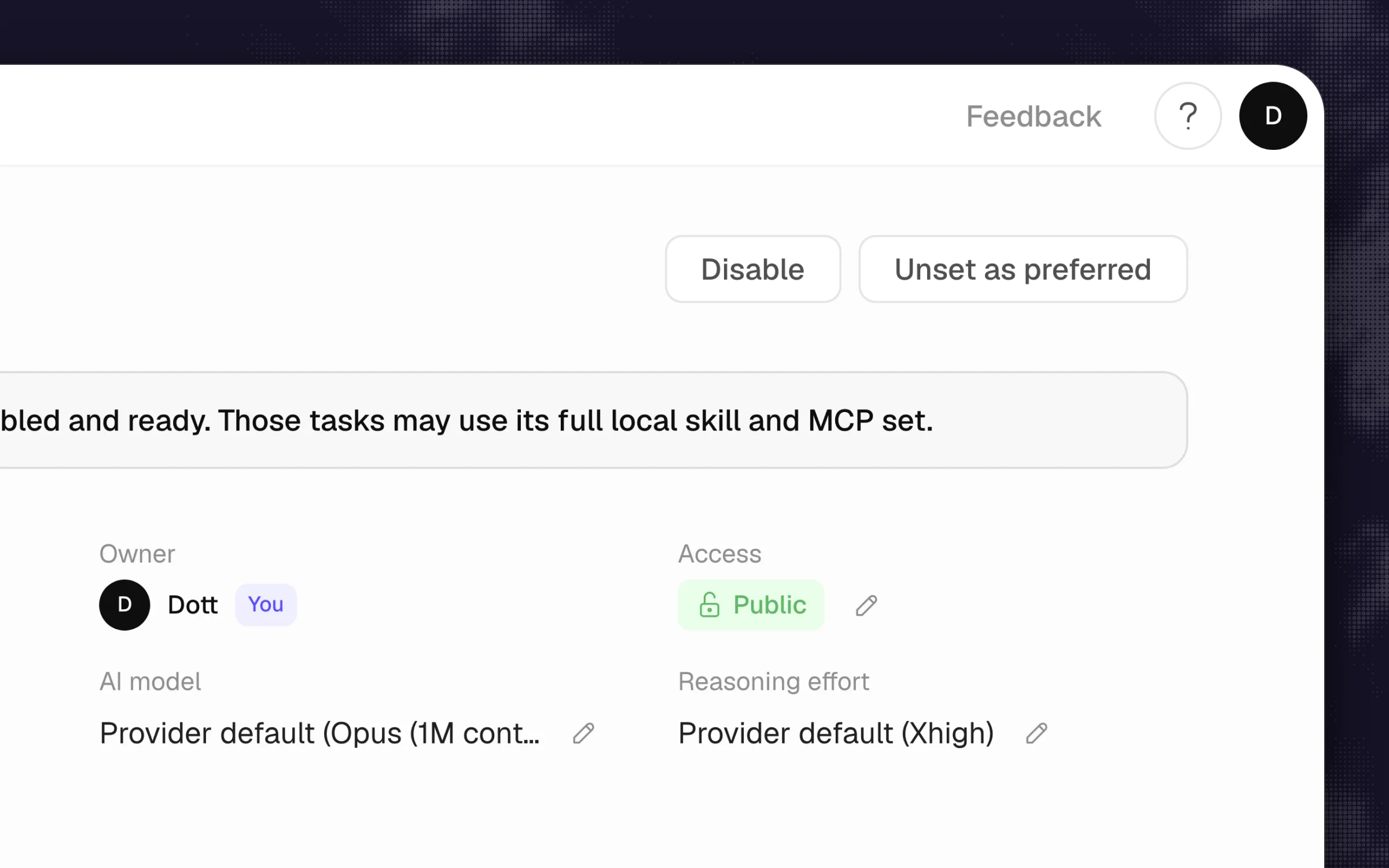 In Merlin, access is set per runtime. Making one public lets eligible teammates run work on that machine's own credentials, so treat that switch as a permissions decision.
Pitfall: Putting an agent tied to an engineer's personal workstation into a shared #general or external Slack Connect channel where guests can mention it.
3. Sort every action into three tiers
Write access is too broad a bucket to sign off on all at once. Splitting every action the agent might take into three tiers (read, reversible write, and irreversible or external) tells you where the agent can move fast and where it needs a hard gate.
Copy this table into your review doc and fill in the middle column with the exact tasks your team wants the agent to do:
| Tier | Examples | Default | Where the stop lives |
|---|---|---|---|
| Read | search code, read issues, query a read replica | Allowed | Scoped token, read-only role |
| Reversible write | open a draft PR, comment, create a branch, file an issue | Allowed and logged | Bot identity, labels |
| Irreversible or external | merge to main, deploy, delete records, pay, message a customer | Blocked or human-approved | Branch protection, required reviews, spend caps, approval in the destination |
Tip: Let the agent do as much Tier 2 (reversible write) work as it wants. Opening a draft pull request or posting a comment in an internal thread is easy to undo and gives you all the speed benefits without risking production.
4. Put the hard stops in the destination systems
Task instructions, system prompts and agent memory guide how the agent behaves, and they never enforce permissions (Merlin security model). Every Tier 3 action from the table above needs an enforcement rule inside the destination tool or the local agent harness itself.
Configure the stops directly in each tool:
- GitHub: In your repository settings under Branches, add a branch protection ruleset on
mainrequiring at least one human pull request review and passing status checks before merging, and block force pushes. - Databases: Give the agent's environment a connection string tied to a PostgreSQL or MySQL role granted
SELECTonly, pointed at a read replica or an isolated staging database. - Claude Code: In your managed or project settings, add
Read(./.env)to the deny list and setdisableBypassPermissionsModeso users cannot pass--dangerously-skip-permissions. Per Claude Code's permissions documentation, rules evaluate in order (deny, then ask, then allow). Keep in mind that a Bash deny rule matches command text and is not an OS-level boundary around every program on the machine. - Codex CLI: Start local sessions with the lower-risk preset so network access stays off unless explicitly enabled (Codex sandboxing docs):
codex --sandbox workspace-write --ask-for-approval on-request
Pitfall: Writing "never drop tables or merge without asking" in CLAUDE.md while leaving the agent connected to production with a superuser database URL.
5. Keep untrusted text away from sensitive tools
If an agent reads public GitHub issues, inbound support emails or untrusted web pages in the same session where it holds tokens for private repositories or customer data, a single prompt injection can exfiltrate your private data. Break the lethal trifecta by splitting those jobs across separate tokens or runtimes.
Follow the mitigation from Invariant Labs' GitHub MCP disclosure: scope credentials to one repository or one boundary per session. If an agent triages public issues or external support tickets, run that workflow on a runtime whose GitHub token can only see the public repository, with zero access to internal codebases or production MCP servers.
Pitfall: Connecting a single personal access token with access to all private repositories into an MCP server that you also use to summarize issues on a public open-source repo.
6. Inventory the secrets on every machine the agent runs on
Before you share a runtime or approve a cloud sandbox, find every credential sitting on that host. Remember GitGuardian's finding: 24,008 unique secrets showed up in MCP-related configuration files on public GitHub in 2025, with 2,117 of them still valid, because people forget those files store keys in plain text.
On the machine or container where the agent runs, inspect the places agents reach first:
# 1. Check active GitHub and cloud CLI sessions
gh auth status
aws sts get-caller-identity

# 2. Find local .env files in workspaces the agent can reach
find ~ -maxdepth 4 -name ".env*" 2>/dev/null

# 3. Inspect MCP config files for hardcoded API keys
ls -la ~/.claude.json ~/.cursor/mcp.json 2>/dev/null
Write down every credential you find, who owns it, what it can access and when it expires (device and connector credentials). Remove any credential the agent does not need for its job.
Pitfall: Leaving a senior engineer's long-lived AWS admin session or personal ~/.ssh/id_ed25519 key unlocked on a machine that serves as a shared team runtime.
7. Give the agent its own short-lived credentials and rehearse a rotation
Never let a shared agent act through a human engineer's personal login. Use a GitHub App installed on only the needed repositories, or a fine-grained token created under a dedicated bot (machine user) account so you can scope it tightly, set an automatic expiry date and revoke it without breaking a teammate's workday.
If you use a bot account in GitHub, sign in as that bot account, go to Settings > Developer settings > Personal access tokens > Fine-grained tokens and click Generate new token. Select only the repositories the agent works in, grant Pull requests: Read and write and Contents: Read and write, and set Expiration to 30 or 90 days. Organization owners can enforce a maximum token lifetime across the org, and expired tokens are revoked automatically (GitHub PAT docs).
Once the token is wired in, rehearse a rotation right now: revoke the token, put the replacement in place, and verify that both interactive mentions and scheduled automations still succeed.
Tip: GitGuardian found that over 64% of secrets valid in 2022 were still valid in January 2026. In my experience, teams leave old keys alive when they are afraid rotating them will break something, so doing one practice rotation during setup proves you can swap a key in five minutes during an incident.
8. Make sure you can join who asked to what changed
Every destination's audit log records the credential owner, never the person who asked in chat. GitHub, Linear and Slack will tell you that release-bot or sam-cto merged the pull request, and none of them know that Sam asked for it in #support at 14:02.
Check what your destination tools actually keep on your current pricing plan:
| Destination | Audit log | Plan | Kept for | Shows who asked? |
|---|---|---|---|---|
| GitHub organization | Organization audit log, filterable by token_id | Organization accounts | 180 days | No, it shows the token's owner |
| Linear | Workspace audit log | Enterprise | 90 days | No, it shows the actor account |
| Slack | Audit Logs API | Enterprise Grid | Check your Enterprise Grid plan | No |
| The agent platform | Run or request records | Varies | Varies | Only place that can |
The join between who asked and what changed exists only in the agent platform's own run records. Verify that your agent logs every request with its source thread, timestamp and runtime. Merlin stores request records showing which thread, issue or pull request a request came from, which runtime handled it, and its status (what Merlin stores). For recurring jobs, the Run history tab on the automation page tracks each run's status and trigger metadata, while the full output stays in the destination Slack thread (read run history).
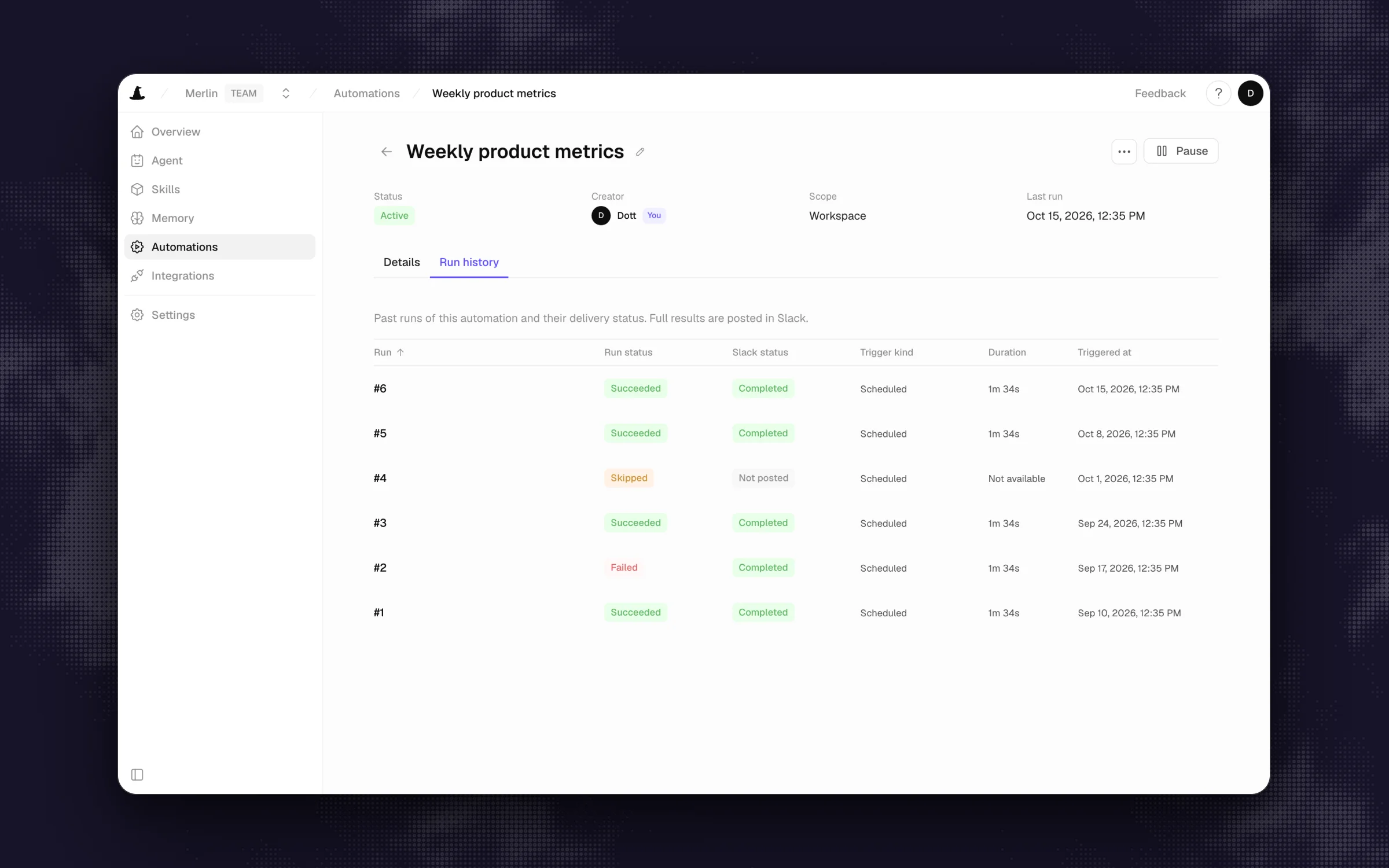 A run record that names the trigger and the destination is the half of the audit trail no destination system keeps. This one holds metadata, and the output lives in the Slack thread.
Pitfall: Assuming you can rely on Linear or Slack audit logs during an incident when your company is on a Business or Pro plan that does not include them.
9. Replay one real action end to end
An audit trail only counts if you can reconstruct a change before the trail goes cold. Before you sign off on the checklist, pick one real action the agent took this week and trace it backwards from the destination to the human who asked.
Run this ten-minute drill:
- Open the GitHub organization audit log (or pull request timeline) and find a commit or comment the agent made. If you use fine-grained PATs, filter the GitHub audit log by
token_id(added in March 2025) to isolate calls made by that specific token. - Note the exact timestamp and the repository or issue identifier.
- Open your agent platform's request or run history for that timestamp, find the matching run, and click through to the originating Slack thread or Linear comment.
- Confirm you can see the exact prompt the human wrote and every follow-up message in the thread.
Tip: Set a ten-minute timer for this step. If it takes longer than ten minutes on a calm Tuesday afternoon, it will take hours when something breaks in production.
10. Test the off switch and re-run the checklist on every change
The last gate before widening access is proving that anyone in the workspace can stop a runaway task in seconds, and that the runtime owner can cut off a compromised runtime completely.
Test both levels of the off switch live:
- Stop a single task: Trigger a harmless task in a test Slack channel and click the Stop control next to the loading indicator in the thread. In Merlin, any workspace member can stop a running task from the thread, or pause a channel from the integration settings so new mentions do not start work (Slack controls).
- Cut off a runtime: Have the runtime owner open the runtime detail page and click Disable (devices and runtimes). Disconnecting the device in settings revokes its credentials and stops future runs while preserving historical request records (deleting data).
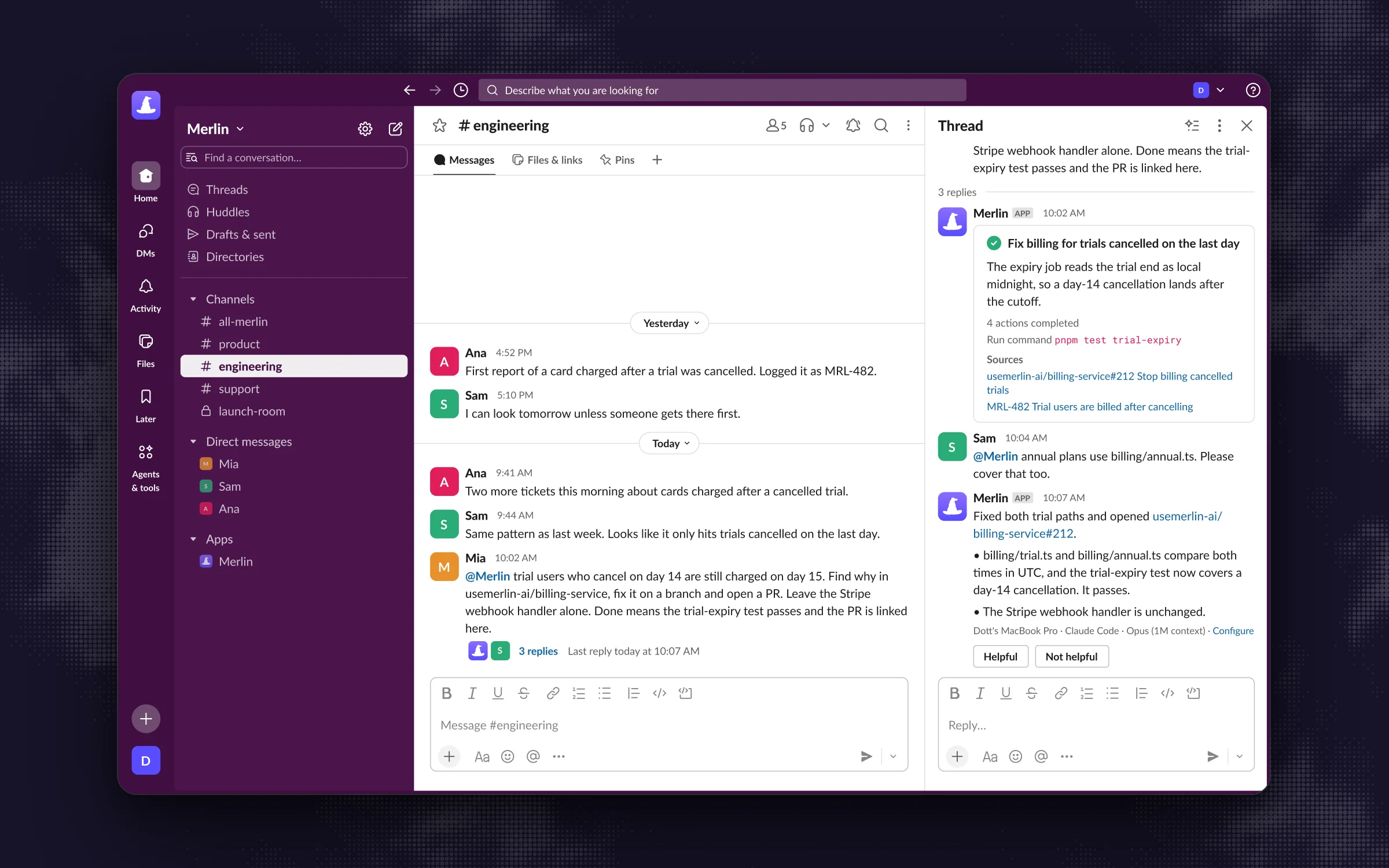 Stating boundaries in the request guides the agent. The stop control and the destination's own protections are what actually hold the line.
Attach your trace test from Step 9 to your completed checklist, and add a calendar reminder to re-run Steps 1, 6 and 7 whenever someone connects a new MCP server, repository or runtime.
Pitfall: Pausing the Slack channel during a bad run and walking away. Pausing a channel stops new mentions from starting work, and it does not cancel a task that is already running.
Common problems
The agent can see a repository nobody gave it. The agent is running on a machine where git or the gh CLI is signed into an engineer's personal account. Check gh auth status and ~/.gitconfig on the host machine, log out of the personal account, and authenticate with a GitHub App or a fine-grained token on a bot account scoped only to the repositories the agent should touch.
The audit log says the CTO merged the pull request. Whoever set up the pilot pasted their own personal access token or OAuth login into the agent's environment. Create a dedicated bot account or GitHub App with its own recognizable name, swap the credential in the runtime environment, and revoke the personal token.
A deny rule in the system prompt was ignored. System prompts, CLAUDE.md files and chat instructions guide the model and never act as a security boundary. Move the restriction out of the prompt and into the tool: use Claude Code's Read(...) deny rules in managed settings, Codex's --sandbox workspace-write flag, database role permissions or GitHub branch protection.
Rotating a token broke a scheduled automation. The credential lived in two places (for example, once in the shell profile and once inside an MCP config file like ~/.claude.json), and only one got updated. Add the file path of every config location to your Step 6 secret inventory so rotations update every copy at once.
We cannot tell which Slack request made this change. You are looking only at GitHub or Linear's audit log, which only records the token owner. Open your agent platform's request records (or have the agent include the originating Slack thread link in every pull request body and commit message) so the link is visible on both sides.
FAQ
The biggest practical risk is combining broad local credentials with untrusted input, a pattern security researchers call the lethal trifecta. When an agent runs on a machine with access to private repositories or production databases and reads an untrusted GitHub issue, ticket or webpage, a prompt injection can instruct the agent to leak private data or run destructive commands. Scoping tokens to a single repository and enforcing hard stops in destination tools closes most of that gap.
Limit an AI agent at three layers: give it a fine-grained token or GitHub App scoped only to the repositories and read/write actions it needs, lock down the local harness (such as Claude Code deny rules or Codex's workspace-write sandbox with network off), and enforce hard stops in the destination systems. Branch protection rules requiring human review, read-only database roles and API spend caps will stop a bad action even when the model misbehaves.
No. System prompts, custom instructions and memory files guide the agent's behavior, and they do not enforce permissions. A confused model or a prompt injection inside an issue the agent reads can override prompt instructions at any time. Any action that must never happen without approval needs to be blocked by the destination system's permissions or the local sandbox.
Store an agent's API keys in the host environment's secret manager or OS keychain, scoped to a dedicated service identity with a 30-to-90-day expiration date. Avoid committing keys into .env files or leaving long-lived tokens in shared MCP configuration files (~/.claude.json or ~/.cursor/mcp.json), where GitGuardian found 24,008 unique secrets on public GitHub in 2025.
A complete audit trail has to join the human request to the downstream change: who asked (user ID and channel or thread link), when they asked, which runtime and credential handled the work, and the resulting commit, comment or ticket ID in the destination tool. Because GitHub, Linear and Slack audit logs only record the token owner, your agent platform must keep request records to bridge the two sides.
If your pilot is waiting on sign-off today, grab the Markdown or PDF checklist, run the credential check on the host machine first, and trace one real pull request back to the Slack thread that started it.
Try Merlin for free
Hand work to Claude Code and Codex from Slack, Linear and GitHub. Free for 14 days, no API keys, no card required.
Get started for free