

How to Delegate a Linear Issue to an AI Agent and Get a PR Back
 Dott
You clicked delegate on three issues last week. One came back twenty minutes later as a clean pull request you merged before lunch. One came back as a 40-file diff nobody wanted to open. The third is still sitting in progress, waiting on a question nobody noticed.
Same agent, same model, same repository. When a delegated Linear issue turns into a mergeable pull request, the difference comes down to three things you control before and after the agent runs: how the issue is written, whether the agent can reach the repository with an instructions file and a check it can run, and who reviews the pull request at the end.
By the end of these steps, you will have a Linear issue written from a repeatable template, delegated to an agent while you stay the assignee, an agent session you can steer, a pull request linked back to the issue, and one clean review round to merge. Setting up the instructions file, workspace guidance and issue template takes about 30 minutes once, and delegating each issue after that takes about five minutes.
Key takeaways
- Delegating an issue in Linear leaves the human as the assignee, and that person stays responsible for getting the code merged.
- In a study of 600 rejected agent pull requests, about 5% were rejected for wrong or incomplete code, while 38% were never reviewed by anyone, 31% were duplicate or unwanted work, and 17% failed CI.
- An agent needs six things in the issue description: outcome, context, scope, done when, verify with, and hand back.
- Give the agent a way to check its own work by putting the exact test and lint commands in an AGENTS.md or CLAUDE.md file.
- Name the human reviewer before you delegate the issue, and send pull request review comments in one single batch.
- Stop correcting an agent after two failed attempts on the same problem: rewrite the issue with what you learned and start a fresh session.
What you need
- An agent installed in your Linear workspace with access to the issue's team. A workspace admin installs the agent and selects which teams can use it. Agents do not count as billable seats in Linear. If you have not connected one yet, see how to delegate Linear issues to Claude Code and Codex on your own machine.
- The GitHub integration connected in Linear. This links pull requests back to issues and moves issue statuses automatically.
- A repository the agent can build and test. Cloud agents need their vendor's cloud environment set up for the repository, while agents that run on your own machines need a local checkout with working Git credentials.
- An AGENTS.md or CLAUDE.md file in the repository root. This tells the agent how to install dependencies, run tests and follow project conventions.
- A named human reviewer for each issue you delegate. In Linear, this should be the issue's human assignee.
How delegation works in Linear
Linear separates the human owner from the AI worker. When you delegate an issue, the agent goes into the delegate field while the human teammate stays in the assignee field. As Linear's assigning docs put it: "The assignee remains responsible for the work, while the agent contributes on their behalf."
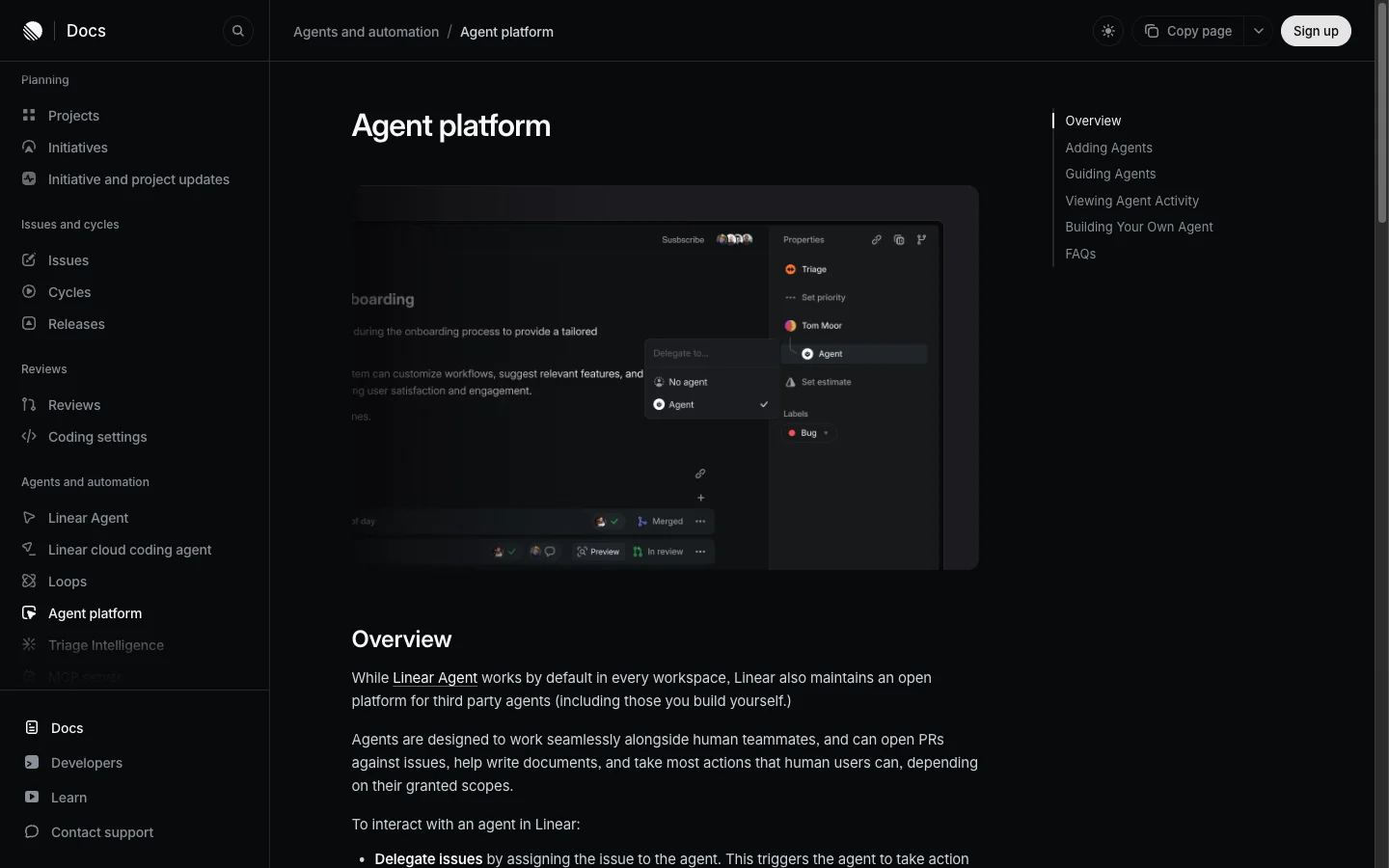 The agent sits under the human assignee in the issue's properties. Delegating adds the agent and leaves the owner in place.
Delegating an issue or mentioning an agent in a comment starts an agent session directly on the issue. That session tracks the run through six states: pending, active, error, awaitingInput, complete and stale (Linear agent interaction docs). Inside the session, you see the agent's thoughts, each tool action it takes, any questions it asks you, its final summary and any errors.
At the start of a run, Linear hands the agent a structured bundle called the promptContext. It contains the issue identifier, title, description, team, labels, parent issue, project, the comment thread that triggered the run, other comment threads on the issue, and your workspace or team agent guidance. Because the agent cannot hear the hallway conversation or read the Slack channel where the bug was reported, the issue description does almost all the heavy lifting.
Where delegated issues go wrong
By September 2026, more than 40% of pull requests on GitHub started with an agent's first draft, up from 17% in March, and as GitHub's Octoverse 2026 report notes, "review is how developers shape what comes back."
A study presented at the MSR 2026 conference, covering open-source repositories on GitHub and mostly pull requests from 2025, looked at 33,000 pull requests across five coding agents and found that 71.48% (24,014) were merged. When the authors read 600 of the rejected pull requests by hand, they found that 38% (228) were abandoned with no meaningful human reviewer interaction, 31% (188) were rejected for pull-request-level reasons like duplicate or unwanted work, and 22% (133) failed for code-level reasons, mostly CI or test failures (99 pull requests, or 17%). Incorrect implementations accounted for 3% (19) and incomplete ones for 2% (15).
A second MSR 2026 study of 11,048 closed agent pull requests found a similar split: "only 35.7% of rejected PRs reflected clear agentic failures, while 31.2% were driven by workflow constraints and 33.1% lacked observable decision rationale."
I read those numbers as three human and setup buckets:
- The issue. That 31% slice of duplicate and unwanted work is an issue problem. The task was vague, already solved elsewhere, or scoped too broadly before the agent ever wrote a line of code. The first study also noted that unmerged pull requests "tend to involve larger code changes, touch more files, and often do not pass the project's CI/CD pipeline validation."
- The context. The 17% that failed in CI or tests is mostly a context problem. If the agent cannot run the exact test suite and linter that CI runs, it guesses when it is finished and hands you a broken build.
- The review. The 38% that sat untouched until someone closed them is a review problem. When an issue is delegated without a human assignee committed to reading the diff, the pull request goes into a queue nobody owns.
That leaves about one rejection in twenty where the code itself was the reason.
How to delegate a Linear issue to an AI agent
1. Pick an issue an agent can finish
Linear's enablement guide starts with a simple rule: "Delegation works best on well-scoped issues with a clear description and acceptance criteria." Devin's documentation gives a helpful time box: "if a task would take you three hours or less, Devin can most likely do it. For longer tasks, break them into smaller sessions."
GitHub's best practices for Copilot recommend starting with tasks where you want to "fix bugs, alter user interface features, improve test coverage, update documentation, improve accessibility, or address technical debt." Save broad cross-repository refactors, security and authentication changes, incident response, and "tasks with ambiguous requirements, open-ended tasks, tasks that require working through uncertainty to find a solution" for a human.
Task type changes the merge rate more than which agent you pick: in a study of 7,156 agent pull requests, documentation tasks reached 82.1% acceptance compared to 66.1% for new features, a 16 percentage point gap that exceeds typical inter-agent variance for most tasks. For more starter ideas, see 10 engineering tasks an AI coworker can fully own.
Pick one bug, test gap or small UI change that fits inside a single pull request and has a clear verification check.
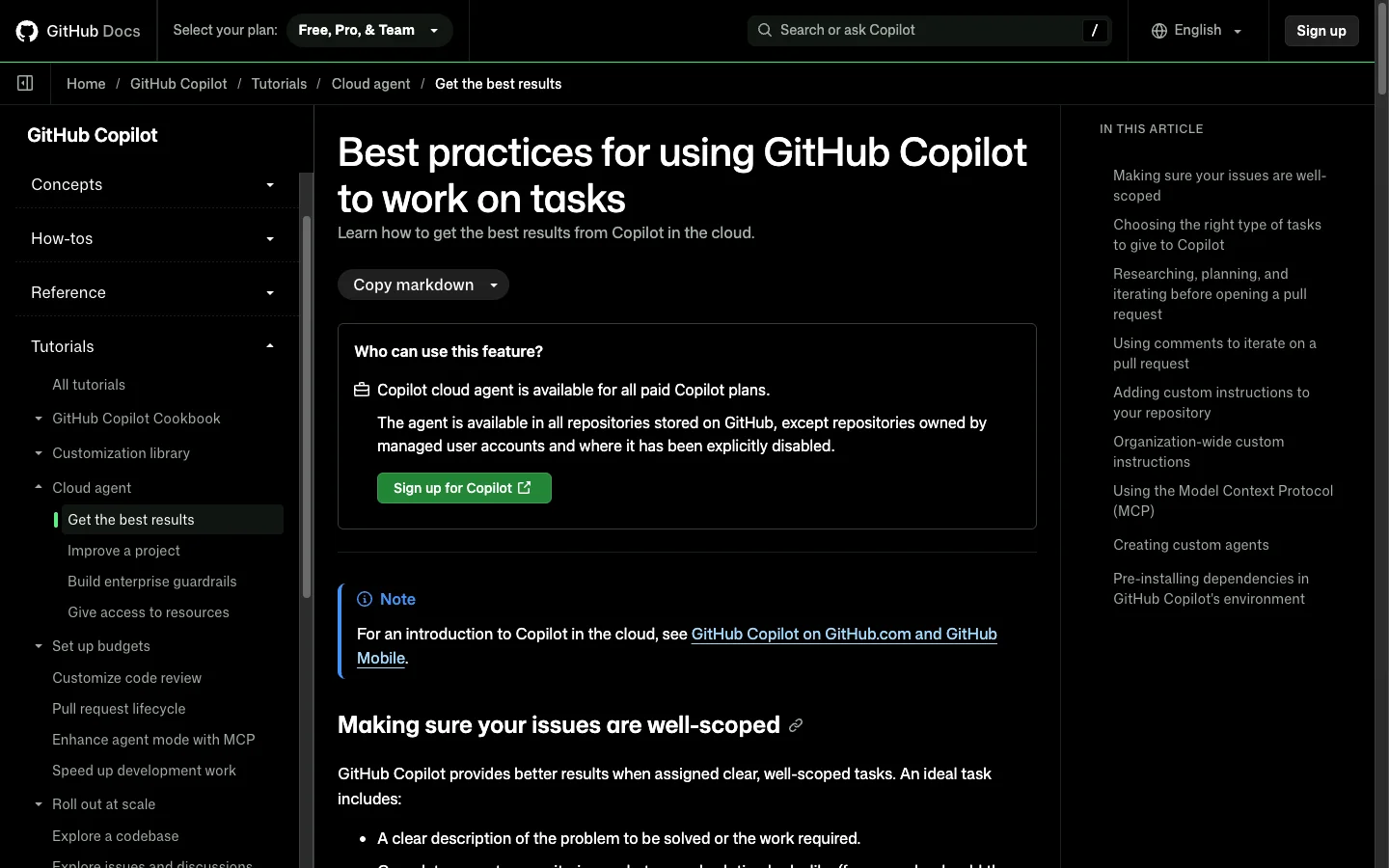 GitHub's guidance for its own agent starts with the issue, before anything about the agent. The advice carries over to any agent you delegate to from Linear.
Pitfall: if you cannot describe in one sentence how you would verify the result, the issue is not ready to delegate.
2. Give the agent your repository and a check to run
An agent that cannot install dependencies, build the project and run a test cannot tell whether its code works. As OpenAI's best practices guide notes: "Many quality issues are really setup issues, like the wrong working directory, missing write access, wrong model defaults, or missing tools and connectors."
Anthropic's Claude Code guide puts it plainly: "Claude stops when the work looks done. If it has nothing to run that tells it whether the work actually is done, 'looks done' is all it has to go on. In practice that makes you the test suite." Anthropic adds: "If your repo already has one of these, the single most useful line in your CLAUDE.md is the command that runs it." Devin's environment guide calls environment setup "the single highest-leverage thing you can do to improve Devin's effectiveness on your codebase," because, as GitHub warns, letting an agent install dependencies by trial and error "can be slow and unreliable."
Start by adding an instructions file to the root of your repository. AGENTS.md is "a simple, open format for guiding coding agents, used by over 60k open-source projects." Codex "reads AGENTS.md files before doing any work." Claude Code reads CLAUDE.md, and falls back to AGENTS.md when the repository has no CLAUDE.md. GitHub Copilot reads AGENTS.md, CLAUDE.md and its own copilot-instructions.md, and Cursor reads AGENTS.md in the project root and subdirectories.
OpenAI recommends including "repo layout and important directories", "How to run the project", "Build, test, and lint commands", "Engineering conventions and PR expectations", "Constraints and do-not rules", and "What done means and how to verify work", noting that "A short, accurate AGENTS.md is more useful than a long file full of vague rules." Anthropic recommends keeping the file under 200 lines.
Create an AGENTS.md or CLAUDE.md file in the root of your repository with your exact commands:
Install: pnpm install
Test one file: pnpm test path/to/file.test.ts
Test everything: pnpm test
Lint and types: pnpm lint, then pnpm typecheck
Branch from main. Pull request titles start with the Linear issue ID.
Never edit files under src/generated.
Ask before adding a dependency or changing the database schema.
If you use a cloud agent, configure its cloud environment once per repository: Codex runs "your setup script" in a container before the agent starts, Copilot runs a copilot-setup-steps.yml workflow, and Linear's cloud coding agent uses a coding environment configured per repository. Watch out for a security rule both OpenAI and Linear enforce on secrets: in Codex, "They are only available to setup scripts. For security reasons, secrets are removed before the agent phase starts," and Linear does the same for variables marked Secret. Any test the agent runs during its task must pass without live secret keys.
Merlin handles this step differently because it runs the Claude Code or Codex already installed on a teammate's machine, with no cloud container to configure. As Merlin's devices and runtimes docs explain: "Name the project in your request and Merlin moves the task into that checkout, where the project's own instructions files apply." Keep its limits in mind: the machine has to stay connected with an available runtime or the session reports a failure, it "only moves between projects on the same machine", and the run uses the local files, Git credentials and Claude or ChatGPT plan of the person who owns that machine.
Pitfall: run the agent on one small task in the repository yourself before you delegate from Linear. Whatever stops it there will stop it from Linear.
3. Add agent guidance in Linear
The instructions file holds what is true of the repository, guidance holds what is true of the team, and the issue holds what is true of this one task. In Linear's agent docs: "Agent guidance lets you provide instructions that agents will automatically receive when they work on issues in your workspace." Linear notes that "Guidance can specify which repository to use for certain code changes, how to reference issues in commits or pull requests, and what review process to follow." Keep Linear's own caveat in mind too: "All guidance is passed to the agent, but how it is interpreted or applied depends on the specific agent integration."
Open Linear's agent settings and fill in the Additional guidance field at the workspace level or per team (when both exist, team guidance takes priority). Put the three rules that stay the same for every issue on your team: which repository each kind of change goes to, how the pull request title references the issue ID, and who reviews the pull request.
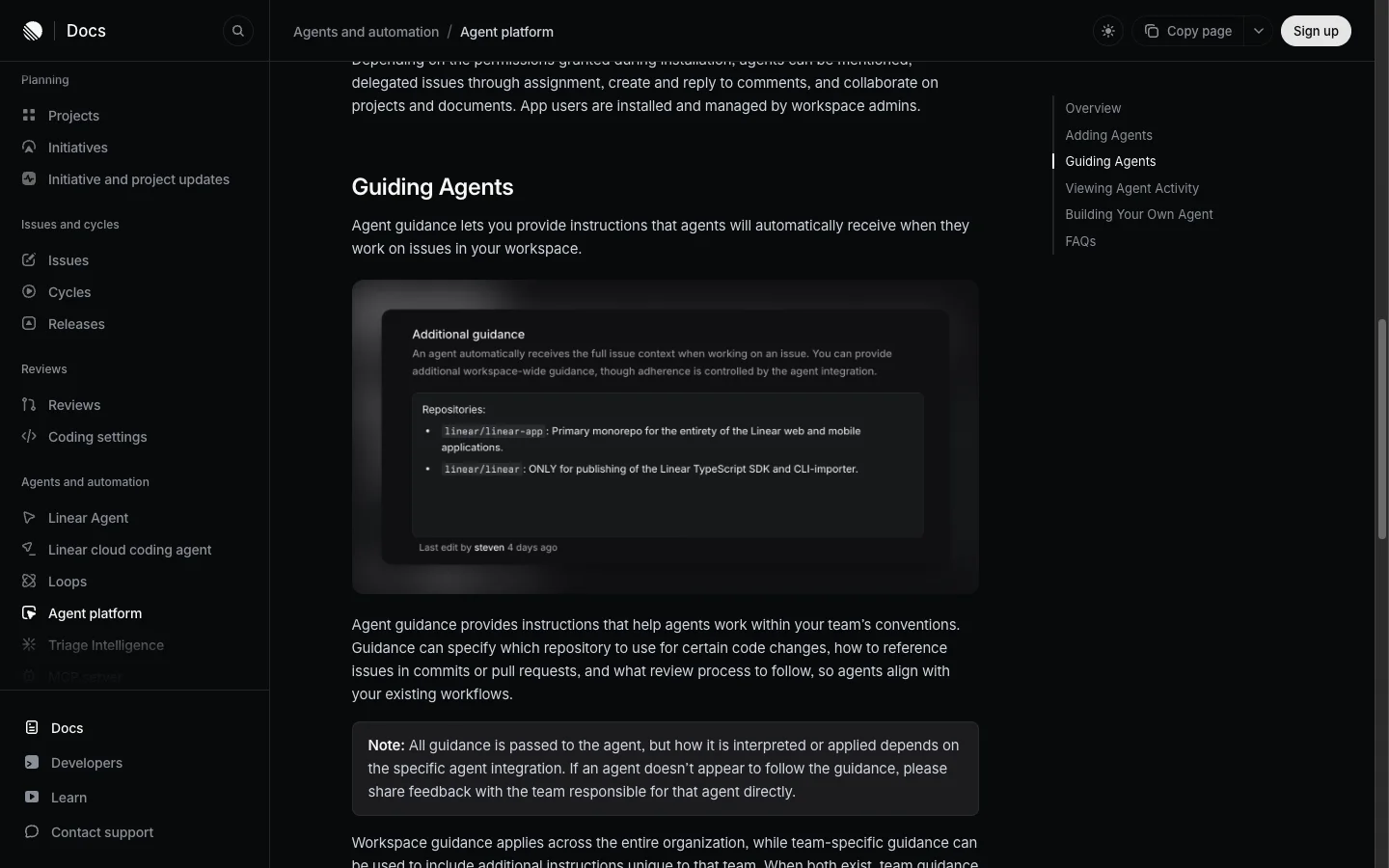 Linear's own example uses guidance to say which repository is for what. Every agent on the team gets it with every issue.
Tip: keep per-issue file names and test commands out of team guidance so they do not confuse the agent on unrelated tasks.
4. Write the issue from the template
When you click delegate, the agent only knows what Linear sends it. Here is what each vendor documents reading from your issue:
| Agent | What it reads from your issue |
|---|---|
| GitHub Copilot | "the entire issue description and comments" (GitHub docs) |
| Cursor | "issue details, comments, and linked references" (Cursor blog) |
| Factory | "the issue title, description, labels, and comments" (Factory docs) |
| Codex | "your issue content" (OpenAI docs) |
| Linear cloud coding agent | "the issue you delegate, the repository access available to your workspace, and the guidance configured for Linear Agent" (Linear docs) |
| Any agent on Linear's platform (including Merlin) | Linear's promptContext: the issue title and description, team, labels, parent issue, project, comment threads and guidance (Linear developer docs) |
None of them reads the Slack thread or meeting notes where your team agreed on the fix. Factory's Linear guide states the rule well: "Keep the issue self-contained rather than relying on context from another conversation."
Every vendor asks for roughly the same ingredients in the description. OpenAI lists Goal, Context, Constraints and Done when. GitHub asks for a clear description, "Complete acceptance criteria on what a good solution looks like", and "Directions about which files need to be changed". Factory says: "Put the repository, desired outcome, acceptance criteria, and verification steps in the issue description before assigning the work." Linear notes: "The more clearly an issue defines the desired outcome, scope, and constraints, the less time Linear spends exploring the codebase or inferring requirements." And a study of rejected agent fixes recommends adding hints about the approach, constraints on approaches to avoid, and how to validate the result.
The six-section template below combines those ingredients and adds a final section none of the vendor guides lists: Hand back, which tells the agent where to open the pull request and who will review it so the diff never joins the 38% that get abandoned.
Paste this template into the issue description:
Outcome
What is true when this is done, in words someone could check by looking at the product.

Context
- Repository: owner/name, and the app or package inside it
- Where to look: files, functions, routes, or an existing pattern to reuse
- Background: the bug report, error message or design, quoted or linked

Scope
- Change:
- Leave alone:

Done when
- The behavior a user or caller can observe
- The test that covers it
- What must still work the way it did before

Verify with
The exact command that passes when the work is right.

Hand back
- Branch from, and pull request into:
- Pull request title: this issue's ID with a closing word, for example "Fixes ENG-123"
- Reviewer: the human assignee of this issue
- Stop and ask before: a schema change, a new dependency, anything outside Scope
Download the template as a Markdown file, with a filled-in example inside.
To stop anyone starting from a blank description, save it in Linear under Team settings, then Templates. Linear issue templates can preset default properties including "team, status, priority, assignee, delegated agent, project, labels, estimate, and sub-issues". To create an issue from a saved template, press Option C on a Mac or Alt C on Windows.
To see the difference in practice, compare a typical bug ticket with the same ticket written from the template.
The issue as it usually gets written:
Title: Export is broken

Customers say the CSV export is wrong. Please fix asap.
The same issue, ready to delegate:
Title: Quote fields that contain commas in the invoices CSV export

Outcome
An invoice whose customer name contains a comma exports as one row, with the whole name in the Customer column.

Context
- Repository: acme/billing, package apps/api
- Where to look: the export is built in src/exports/invoices-csv.ts. The customers export in src/exports/customers-csv.ts already quotes fields correctly. Reuse its writer.
- Background: "Baker, Hughes Ltd" is split across two columns in last month's export.

Scope
- Change: the invoices CSV writer
- Leave alone: column order, the file name, the customers export

Done when
- A name with a comma, a double quote or a line break survives the export in one column
- A unit test covers all three cases
- The existing export tests still pass

Verify with
pnpm test exports

Hand back
- Branch from main, pull request into main
- Pull request title: "Fixes BIL-482: quote fields in invoices CSV export"
- Reviewer: the assignee
- Stop and ask before: adding a dependency
The second version names the exact file to edit and the existing pattern to copy, draws a fence around what to leave alone, and gives a single test command that returns pass or fail. Linear's own cloud coding agent docs contrast a too-ambiguous ticket ("Search is broken.") with a well-scoped one that names the file, points to the flag to reuse, and ends with "Do not modify search ranking, pagination, or project search behavior." Linear's method guide says issue descriptions "should be optional". That works when a teammate can ask you a question in the hallway. For an issue you delegate to an agent, the description is the conversation.
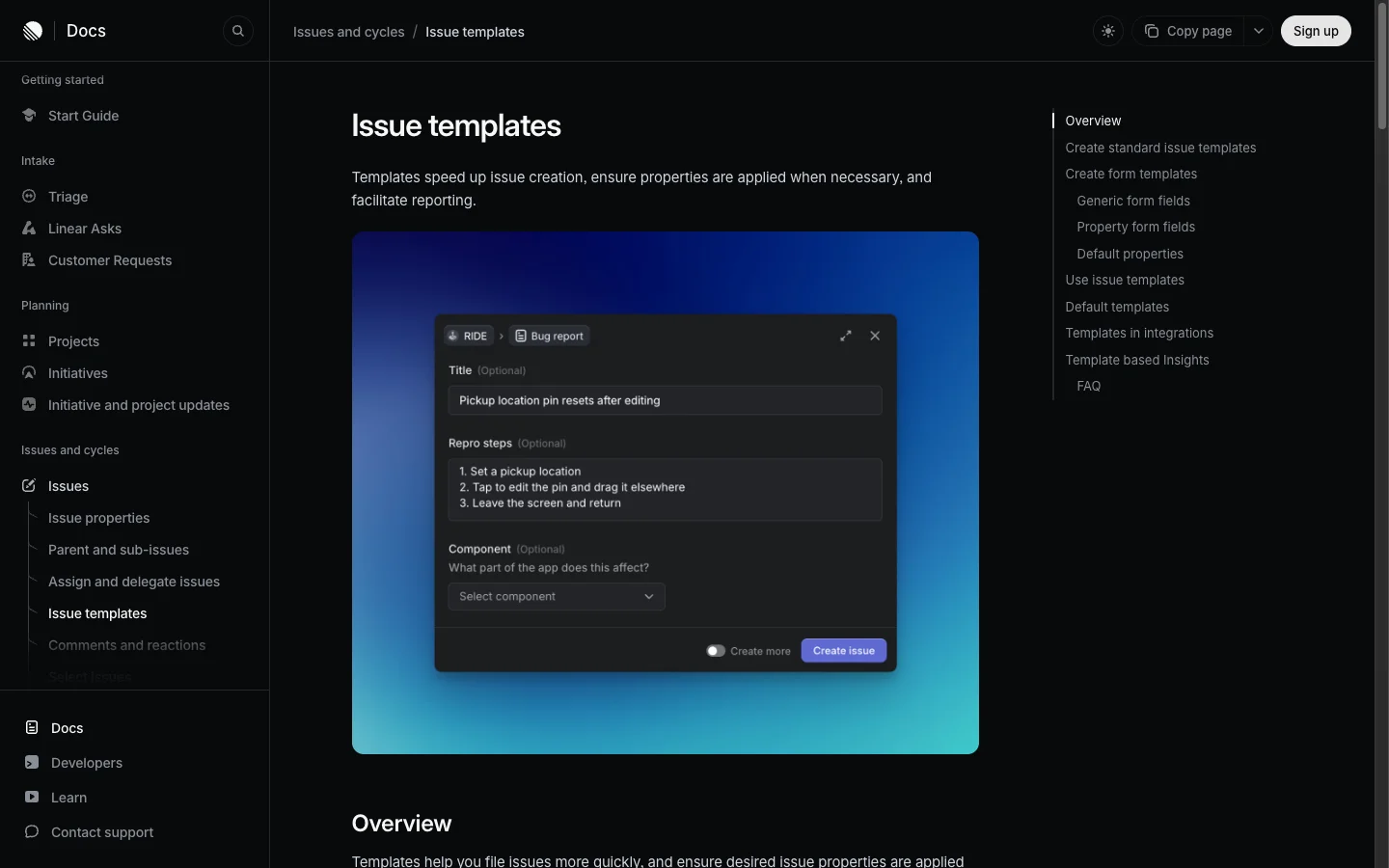 A Linear template can carry the six sections and preset the delegated agent, so the structure is there before anyone types.
5. Delegate it and stay the assignee
As Linear's agents page puts it: "Delegate issues, but not accountability." When you delegate an issue without a human assignee, the agent still starts a session, and then nobody owns reviewing the pull request when it finishes.
Open the issue, make sure the human who will review the pull request is set as the Assignee, then press A (or click the assignee field in the properties sidebar, or open the command menu with Cmd K and pick Assign to...) and select the agent under Delegate to. You can also mention the agent with @ in a comment to start the run. If you ever need to take the issue back, open the same menu and select No agent.
Pitfall: if the agent does not appear in the menu, ask a workspace admin to grant the agent access to the issue's team in Linear settings.
6. Steer from the agent session
Once you delegate the issue, Linear creates an agent session on the issue. As Linear's developer docs explain: "AgentSession tracks the lifecycle of an agent run. Session states let the user know if the agent is currently working, waiting for user input, in an error state, or has finished work."
Watch the session for the first two minutes while the agent reads the repository and forms its plan. If its first actions show it looking in the wrong package or repository, reply in the session right away. Since Linear's September 24, 2026 update, mentioning an agent in a comment "sends a follow-up to its most recent available session on that issue (working or completed)". If the session is waiting for your input, answer its question quickly, because the run does nothing until you do, and if the agent heads down the wrong path entirely, stop the run from the session, after which Linear's stop signal requires that "the agent must not perform any further actions".
In Merlin's Linear integration, the session shows the agent's thoughts, a live status, its plan and one action per step, and you can request a specific model or reasoning effort in plain words in the issue or session, such as "use max effort" (devices and runtimes).
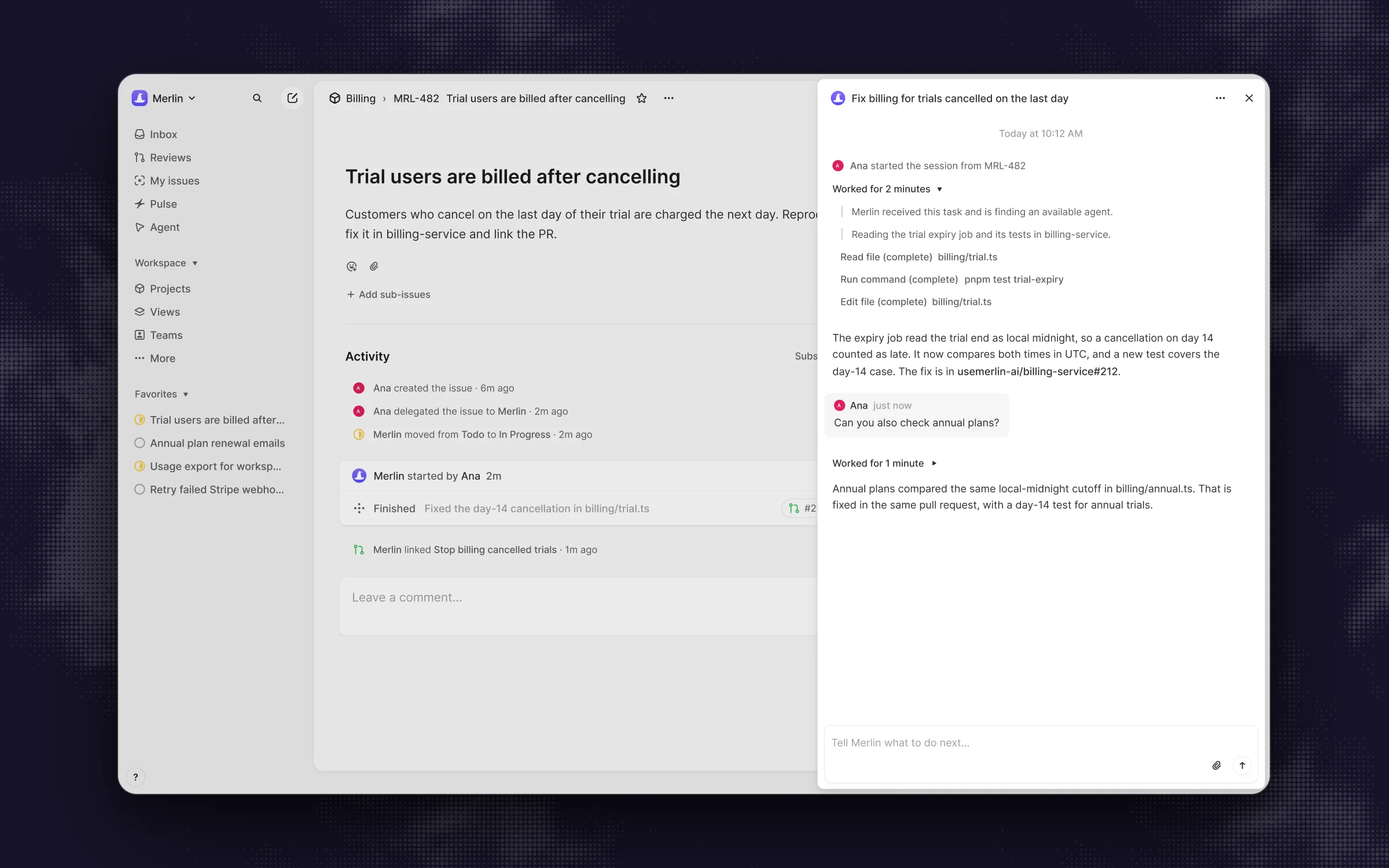 An agent session on a delegated issue: the agent's steps on the right, the pull request linked in the activity, and a follow-up that continues the same task.
Pitfall: keep mid-run nudges small, because as Cognition noted in Devin's performance review, "It usually performs worse when you keep telling it more after it starts the task." If the requirements changed, stop the run and update the issue.
7. Link the pull request back to the issue
With Linear's GitHub integration, a pull request links to a Linear issue in three ways: putting the issue ID in the branch name, putting the issue ID in the pull request title, or writing a magic word plus the issue ID in the pull request title or description (such as "Fixes ENG-123"). Closing words like fixes, closes or resolves move the issue to your merge status when the pull request merges, while non-closing words like refs, part of or contributes to link the pull request without closing the issue (magic words in pull request comments do not create links). As Linear's docs state: "By default, we will move linked issues to 'In Progress' when PRs are open and 'Done' when PRs merge." You can customize statuses for drafted, opened, review requested, ready for merge and merged under Settings, then Team, then Workflows & automations, and Pull request and commit automations.
Check the issue's Links section when the session completes to confirm the pull request is attached. Agents differ on how they hand the branch back: Cursor's cloud agents "create PRs automatically when complete", Copilot opens a linked "[WIP]" pull request while it works, and Codex in Linear stops one step earlier: "When Codex finishes, it posts a summary and a link to the completed chat so you can create a pull request." Agents that run on your own machines, Merlin included, push branches and open pull requests using the machine owner's Git credentials, so that machine needs working push access (prerequisites).
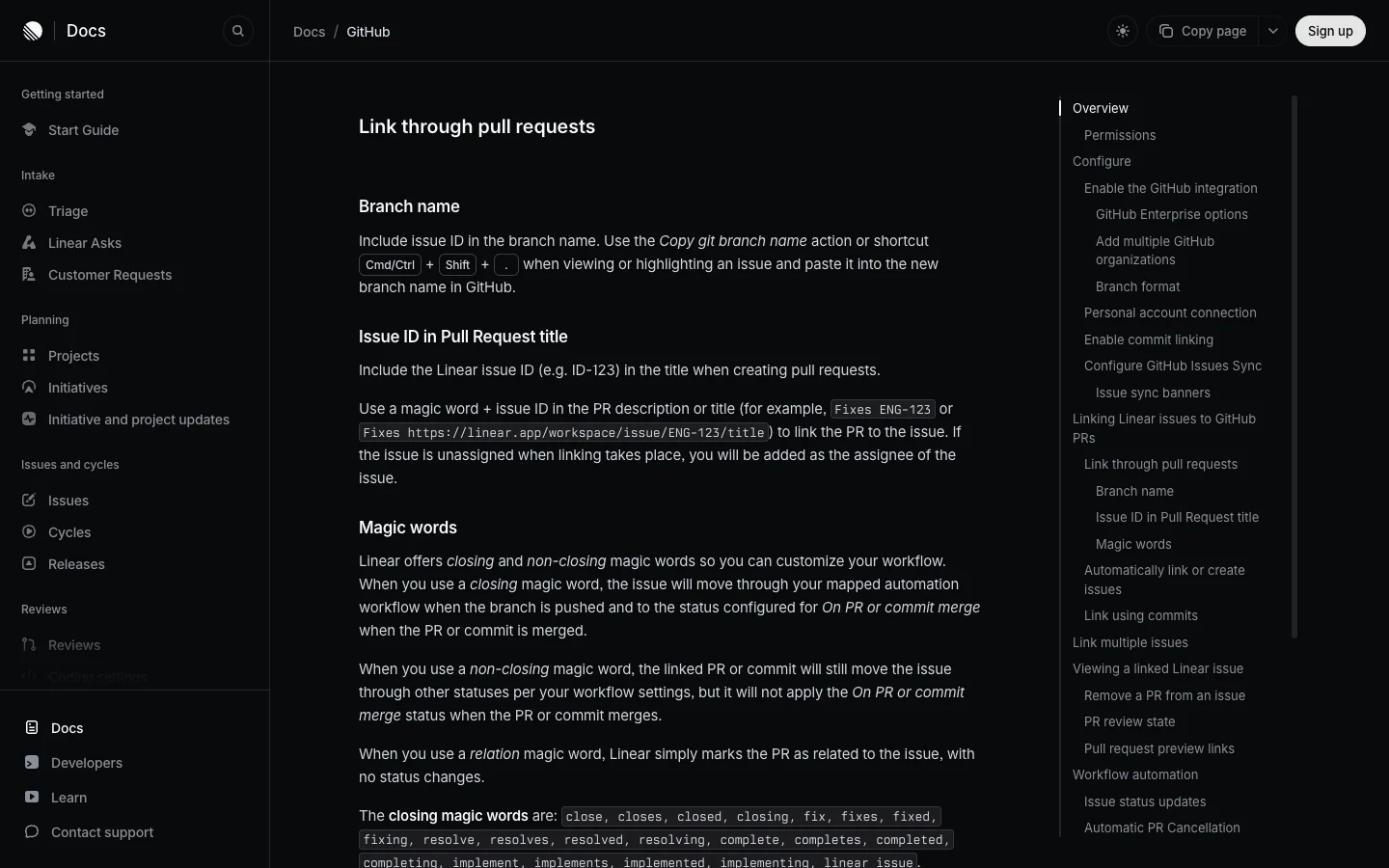 Three ways a pull request finds its issue. An agent told to put the issue ID in the title gets the link, and the status changes, for free.
Pitfall: if two pull requests link to the same Linear issue, Linear waits for both of them to merge before moving the issue to Done.
8. Review it and send feedback in one batch
Reviewer abandonment killed 38% of the rejected pull requests in the MSR 2026 study, where 228 pull requests "were left without any meaningful human reviewer interaction". Treat an agent pull request like a teammate's pull request and review it within one working day. Expect to ask for at least one round of changes: in a study of 567 Claude Code pull requests, 83.8% were merged, and 45.1% of the merged ones needed human-requested changes before merging. Keep the pull requests small, too, following DORA's guidance on working in small batches to "Avoid the temptation to generate massive pull requests".
Read the agent's final response first, check that CI is green and that the output matches your Done when list, and verify the evidence. Anthropic recommends asking for "the command it ran and its output", because "'All tests pass' on its own tells you very little".
You can review on GitHub or directly inside Linear Reviews (included on every Linear plan), which lets you "Read diffs, check CI results, and leave comments directly in Linear. All review activity stays in sync with GitHub." When you have multiple notes, send them together: GitHub's Copilot guide advises that "if you are likely to make multiple comments on a pull request it's best to batch them by clicking Start a review, rather than clicking Add single comment", because the agent starts working as soon as a comment lands.
Route your review to the place your agent listens: Copilot answers @copilot mentions on the pull request from users with write access, Devin "automatically responds to comments on PRs its sessions are working on", Cursor and Codex take follow-ups in the Linear session thread, and Merlin continues either from a follow-up in the Linear session or when you mention @usemerlin-ai on the pull request (GitHub docs).
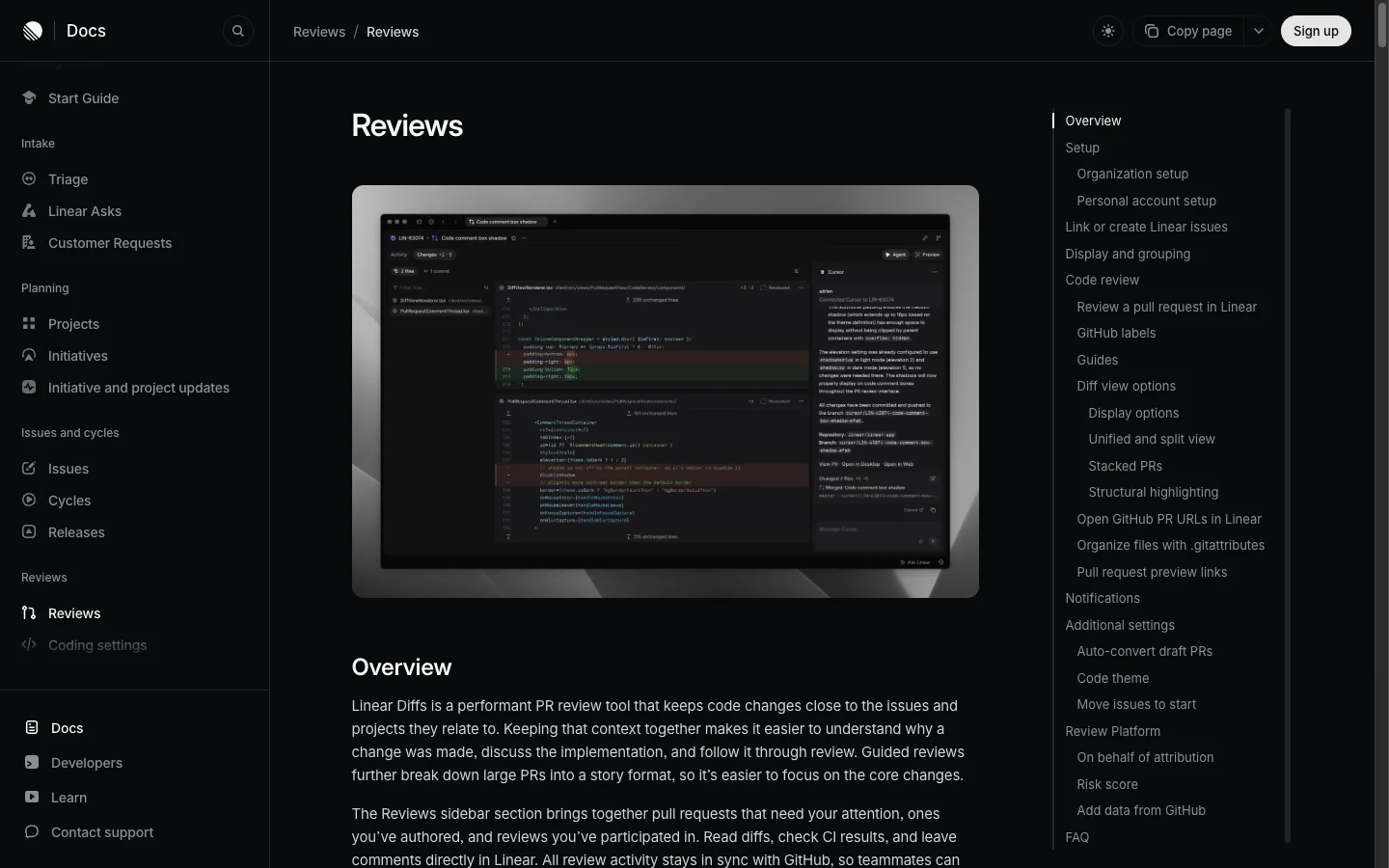 Linear's Reviews puts the diff next to the issue it came from, which is where you check the result against Done when.
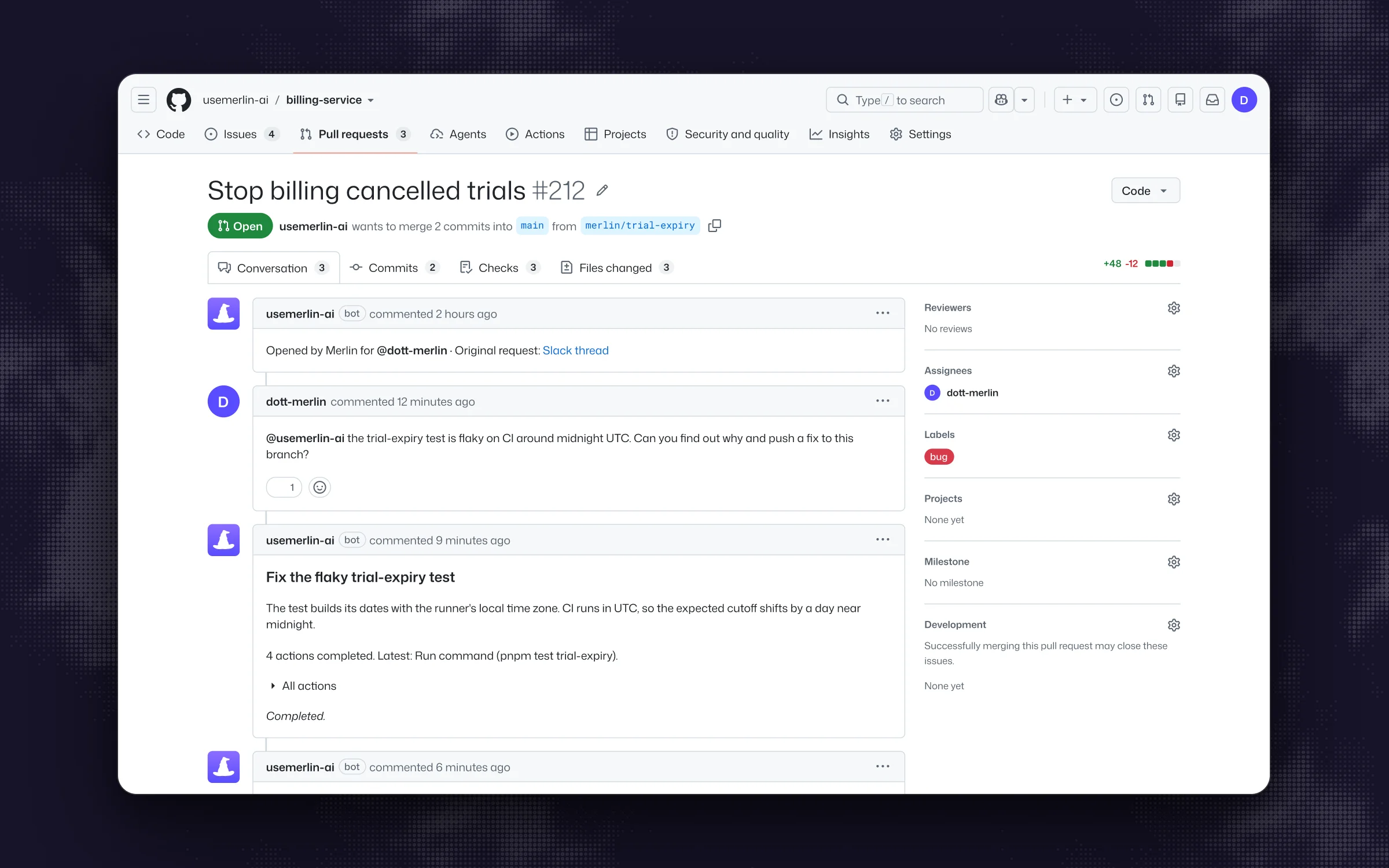 A review round on the pull request itself: one comment asks for the fix, and the agent pushes to the same branch and reports back in the thread.
Pitfall: stop after two failed review rounds on the same issue. As Anthropic's guide warns: "If you've corrected the same thing twice and it's still wrong, a third correction mostly adds to a conversation that already contains two failed attempts." Rewrite the issue with what you learned, start a fresh session, and if the review caught "something Claude should have known about this codebase", add a line to AGENTS.md or CLAUDE.md so the next issue starts with it.
Common problems
When a delegated issue stalls or produces a diff you cannot merge, match the symptom to the cause and fix below.
| Symptom | Usual cause | Fix |
|---|---|---|
| The pull request touches 40 files | Issue: no Scope section, or the issue was two issues | Split it, add Leave alone, delegate each part |
| The agent built the wrong thing | Issue: the outcome lived in a Slack thread or a meeting | Put the outcome and the background in the description, quoted |
| The agent says done and CI is red | Context: it had no command to run, or the test needs a secret the agent's run does not have | Put the test command in AGENTS.md or CLAUDE.md and in Verify with. Use a test that runs without live credentials |
| The agent worked in the wrong repository | Context: nothing named the repository | Name it in the issue and in Linear's agent guidance. Cursor reads a repo setting in the issue text or a repo label, Codex takes the repository in the comment that mentions it |
| The session sits in awaiting input | Review: the agent asked a question and nobody saw it | The assignee answers in the session. Add Stop and ask before to the issue so questions come early |
| The pull request is open for a week | Review: the issue had no human assignee, or the reviewer was never named | Assign a human before delegating and name the reviewer in Hand back |
| The third correction made it worse | Review: corrections piled onto a session that was already off course | Stop, rewrite the issue, start a fresh session |
| The pull request never links to the issue | Context: the title and branch have no issue ID | Ask for "Fixes ENG-123" in the title, in the issue or in guidance |
| Nothing happens after you delegate | Context: the agent has no access to the issue's team, or for an agent on your own machines, no machine is connected | An admin adds the team to the agent in Linear. For Merlin, see the Linear troubleshooting steps |
FAQ
Assigning sets the human teammate who owns the issue, while delegating assigns an AI agent to do the work on that person's behalf. In Linear, the human stays in the Assignee field and remains accountable for reviewing and merging the result, while the agent is set as the issue's delegate.
Include six sections in the issue description: Outcome (what is true when it is done), Context (the repository, files to inspect and background), Scope (what to change and what to leave alone), Done when (observable behavior and tests), Verify with (the exact test command to run), and Hand back (the target branch, pull request title with the issue ID, and the human reviewer). Because agents do not read your Slack channels or meeting notes, everything the agent needs has to live in the issue, the team guidance or the repository's instructions file.
Most coding agents in Linear open the pull request automatically when their run finishes or open a draft pull request as they start. The main exception is Codex in Linear, which posts a summary and a link to the completed chat in the issue so that you can create the pull request from there.
No. As Linear's agents documentation states: "Agents are not counted as billable seats in Linear. The services that provide the agent may have their own pricing structure."
A Linear issue template can preset the delegated agent property alongside the team, assignee and labels (Linear issue templates), and on Linear Business and Enterprise plans, triage rules can automatically delegate incoming issues as they enter triage (Linear assigning issues).
These steps work with any coding agent in Linear, and your choice mostly comes down to whether you want the work to run in a vendor's cloud sandbox or on your own machines, and how you want to pay for model usage. For a side-by-side look at every option, read the best Linear AI agents and Linear Agent vs Merlin.
If your delegated issues have been stalling in progress, start with your instructions file and the test command. If they have been dying in review, start by setting a human assignee and filling in the Hand back section. Save the six-section template in Linear's team settings today, delegate one small bug this week with yourself as the assignee, and read its agent session from start to merge.
Try Merlin for free
Hand work to Claude Code and Codex from Slack, Linear and GitHub. Free for 14 days, no API keys, no card required.
Get started for free