

Linear Agent vs Merlin: The Built-In Agent or Your Own
 Dott
You open Linear, press ⌘J, and Linear Agent is already waiting there. Since June, coding sessions that let it write the actual fix are just a few settings away. Meanwhile, your engineers already have Claude Code or Codex dialed in on their own laptops, complete with local scripts, MCP servers and flat-rate subscriptions.
Deciding between Linear's built-in agent and bringing your own through Merlin comes down to splitting the work in two. For questions about your Linear workspace, filing issues and summarizing threads, Linear Agent is built in, free of token charges and in a league of its own. For writing code, the choice comes down to whose environment does the work: a clean cloud sandbox Linear builds from a single GitHub repository and bills by the 20-minute block, or a machine your engineer already configured, running on a plan your team already pays for.
If you're just here for a quick recommendation, start with these.
The short answer
- You want to file issues, summarize threads and ask what's blocking Q4: Linear Agent. It is built into every plan and uses zero AI credits.
- You want to use your existing Claude Max or ChatGPT Pro subscriptions for code: Merlin. Linear coding sessions bill tokens at API list rates on top of sandbox time, while Merlin runs on the plans signed in on your team's machines.
- You want zero local infrastructure to keep awake: Linear Agent. Coding sessions and Loops run in Linear's cloud.
- Your fix touches two repositories, an internal VPN or local MCP tools: Merlin. Linear's cloud environments hold one GitHub repository each, whereas Merlin runs on your actual development machine.
- You want teammates to steer coding tasks inside GitHub PR comments or Slack threads: Merlin. It works across Linear, Slack and GitHub issues or pull requests.
- Your company runs on Microsoft Teams: Linear Agent. Merlin supports Slack, Linear and GitHub.
- You want the honest setup most teams land on: Use both. Keep Linear Agent on for workspace chores and planning, and delegate the heavy coding issues to Merlin.
Linear Agent and Merlin at a glance
| Dimension | Linear Agent | Merlin |
|---|---|---|
| Best for | Workspace Q&A, issue triage, Loops and single-repo cloud fixes | Running your own Claude Code or Codex across Linear, Slack and GitHub |
| Non-code workspace chores | Native search across issues, projects and docs, plus Code Intelligence on Business | Creates and updates Linear issues from Slack, no native workspace index |
| Where the code runs | Linear cloud sandbox (one GitHub repo per environment) | Teammate's own macOS, Windows or Linux machine |
| Setup required | GitHub org owner grants code access, admin sets up cloud environment | Install Merlin app or CLI daemon on a machine that stays awake with Claude Code or Codex |
| Models | Auto (GPT-6 Sol), Opus 5.5, Fable 5, Sonnet 5, GPT-6 Luna, GLM 5.3 | Whatever your local Claude Code or Codex supports, selectable per task |
| Surfaces | Linear app (⌘J, @Linear), Slack, Microsoft Teams | Linear issues, Slack threads and DMs, GitHub issues and pull requests |
| Automations | Cloud Loops on schedules, workspace events, Slack channels and GitHub events | Schedules, Linear, Slack and GitHub events, plus webhooks on creator's machine |
| Entry price | Included in Linear ($0 to $16+ per seat), plus prepaid AI credits for code and Loops | $19/month Starter (up to 5 users), $59/month Team (up to 50 users), plus your own model plans |
Prices and features were seen on November 2, 2026.
What each one does without writing code
Before an agent touches a line of code, a software team spends hours turning messy Slack threads into tickets, checking project status and hunting down which file owns a feature. Linear Agent was built specifically for that job, while Merlin treats Linear as a place to pick up and report on engineering work.
Linear Agent
- Available by default in every workspace (admins can toggle it under Settings, AI & Agents) and operates within your existing permissions. It launched in public beta for all teams on March 24, 2026.
- Finds information across issues, projects, documents and code. It creates and updates issues, projects, milestones and initiatives, and summarizes long threads or customer requests.
- Supports reusable skills saved from good conversations (shared or personal) and MCP connectors like Granola, Notion and Figma. Since October 22, 2026, it can read and update Figma designs directly.
- Includes Code Intelligence on Business and Enterprise plans to answer codebase questions using the GitHub integration.
- Does not document persistent cross-chat memory. The docs suggest starting a new chat so it does not reuse context from an earlier thread.
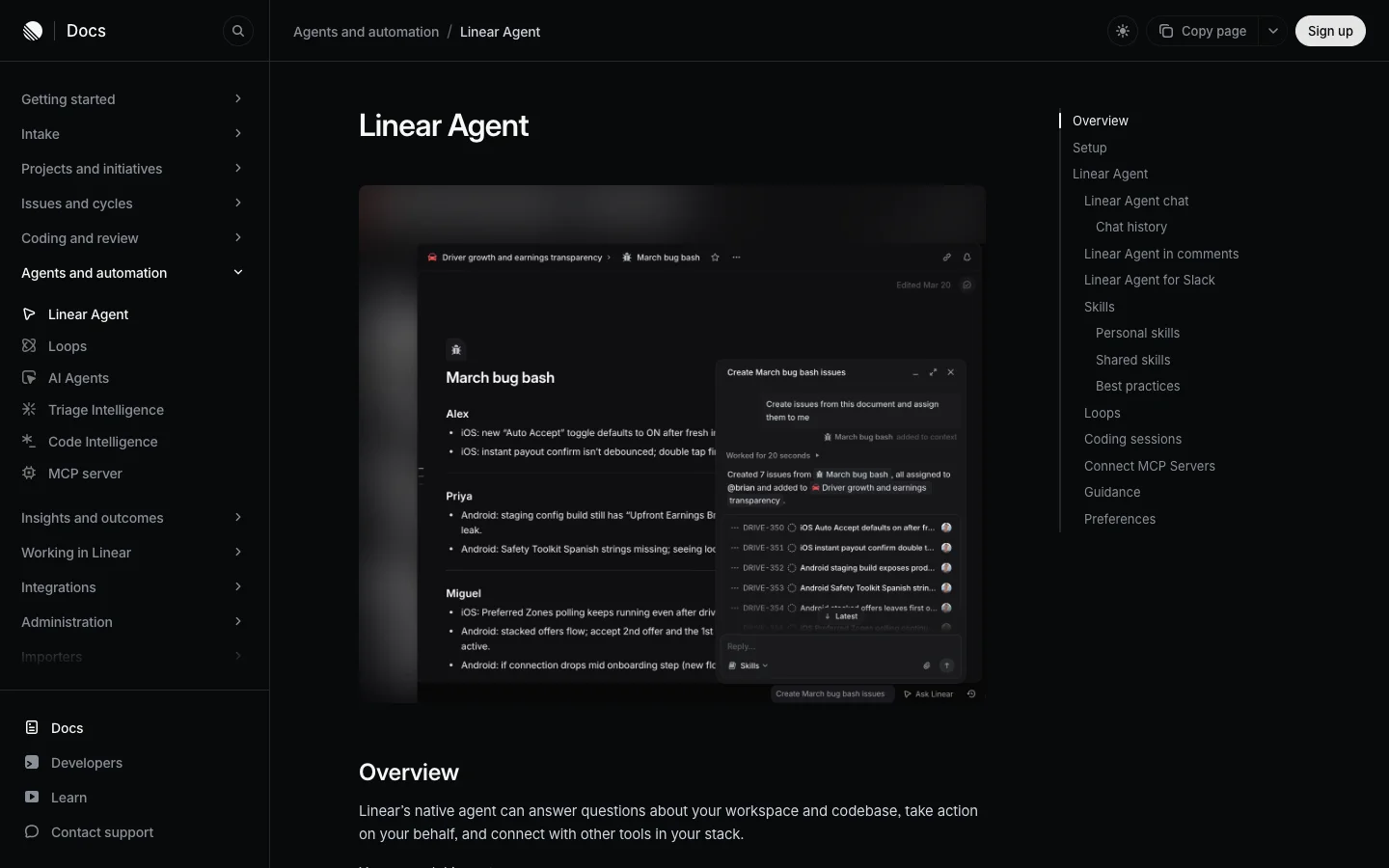 Linear Agent turns a document into assigned issues from a chat. This part is included on every plan and uses no AI credits.
Merlin
- Turns the coding agents engineers already run locally, Claude Code and Codex, into a shared teammate across Linear, Slack and GitHub.
- Can find, create and update Linear issues when asked from Slack, and can answer codebase questions by inspecting the actual repositories checked out on a connected machine.
- Uses workspace memory made of short Markdown facts scoped to the Slack channel where they were learned (off by default, editable in the web app). Runs that start in Linear read public memory but do not write new facts.
What people say
- "I believe that this mode of control is exactly the future" (solarkraft on Hacker News, March 25, 2026, on the Linear Agent launch).
My read: Leave Linear Agent turned on for everything about Linear itself. It knows your cycles, initiatives and documents natively, and none of that chat or issue filing costs AI credits. Merlin enters the picture when you want the agent to use the tools and checkouts sitting on an engineer's machine.
Where the code runs
Once you assign an issue to an agent for a code change, the architecture splits completely. Linear spins up a fresh cloud container for each session. Merlin routes the task to a real machine your team already uses.
Linear Agent
- Coding sessions, launched June 11, 2026, run Claude Code or Codex inside Linear's cloud sandbox and return a draft pull request.
- Each cloud environment supports Node.js, Python, Ruby, Go, PostgreSQL and Redis, alongside custom environment variables, a prepare script and config files like
.npmrc. - The agent can install dependencies from lockfiles, boot local apps and run browser automation to capture screenshots or recordings.
- Review happens in Linear's Reviews tab, where diffs update live during a session since October 8, 2026.
- Hard boundary from the docs: "An environment contains one repository, and a repository can belong to only one active environment." And "Repositories must be available through your workspace's GitHub integration."
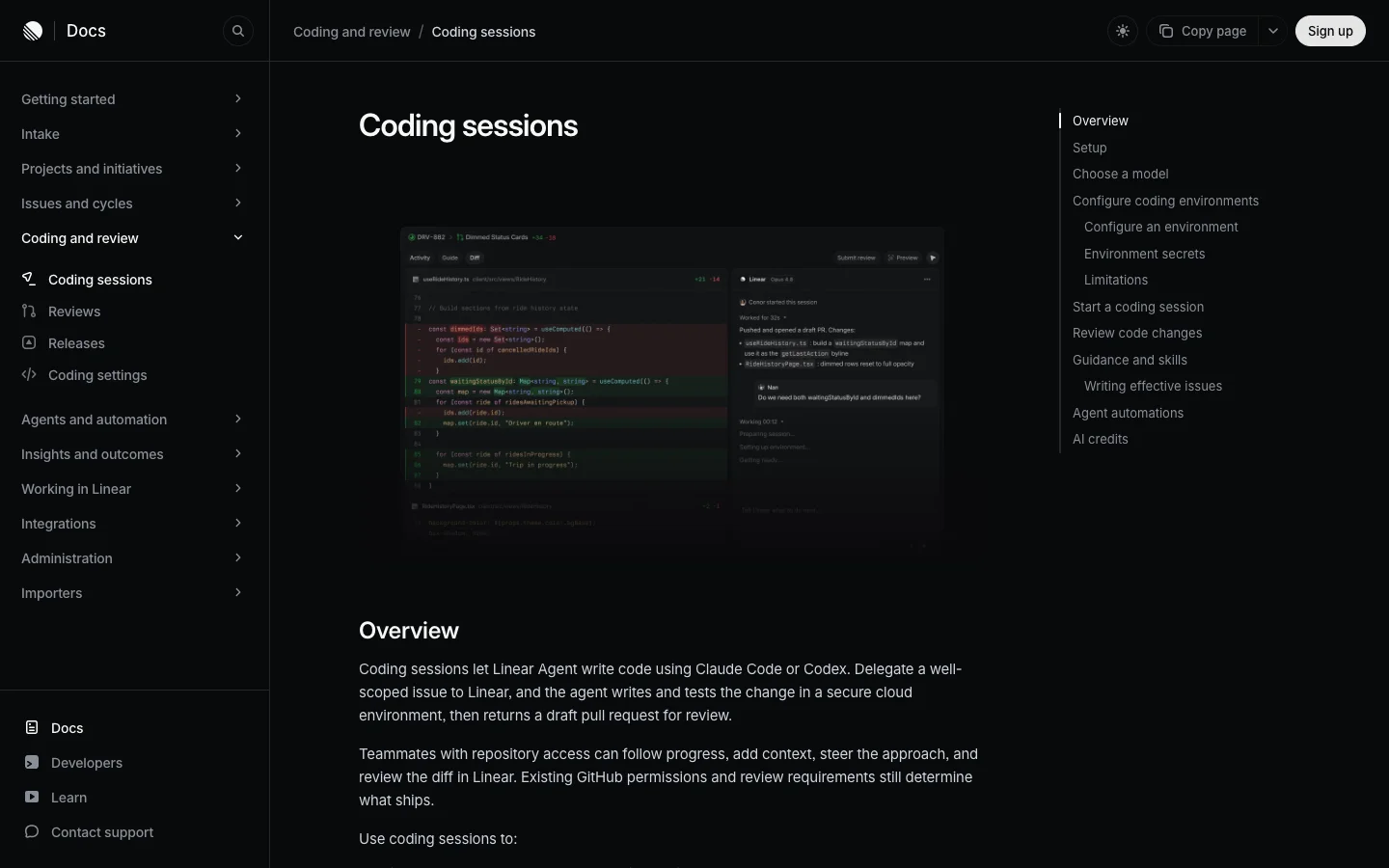 A coding session runs Claude Code or Codex in Linear's cloud sandbox and returns a draft pull request to the Reviews tab.
Merlin
- Runs Claude Code or Codex directly on a macOS, Windows or Linux machine connected by a workspace member (security docs). Merlin does not host models or upload your working directory to a cloud sandbox.
- Uses the repositories, credentials, internal CLIs, skills and MCP servers already set up on that machine. It can work inside any local repository named in the prompt and move between multiple repositories on the same machine (devices and runtimes).
- In Linear, delegating or mentioning Merlin starts an agent session that posts its thoughts, live status, plan and step-by-step actions, with a stop control and thread follow-ups to steer the run.
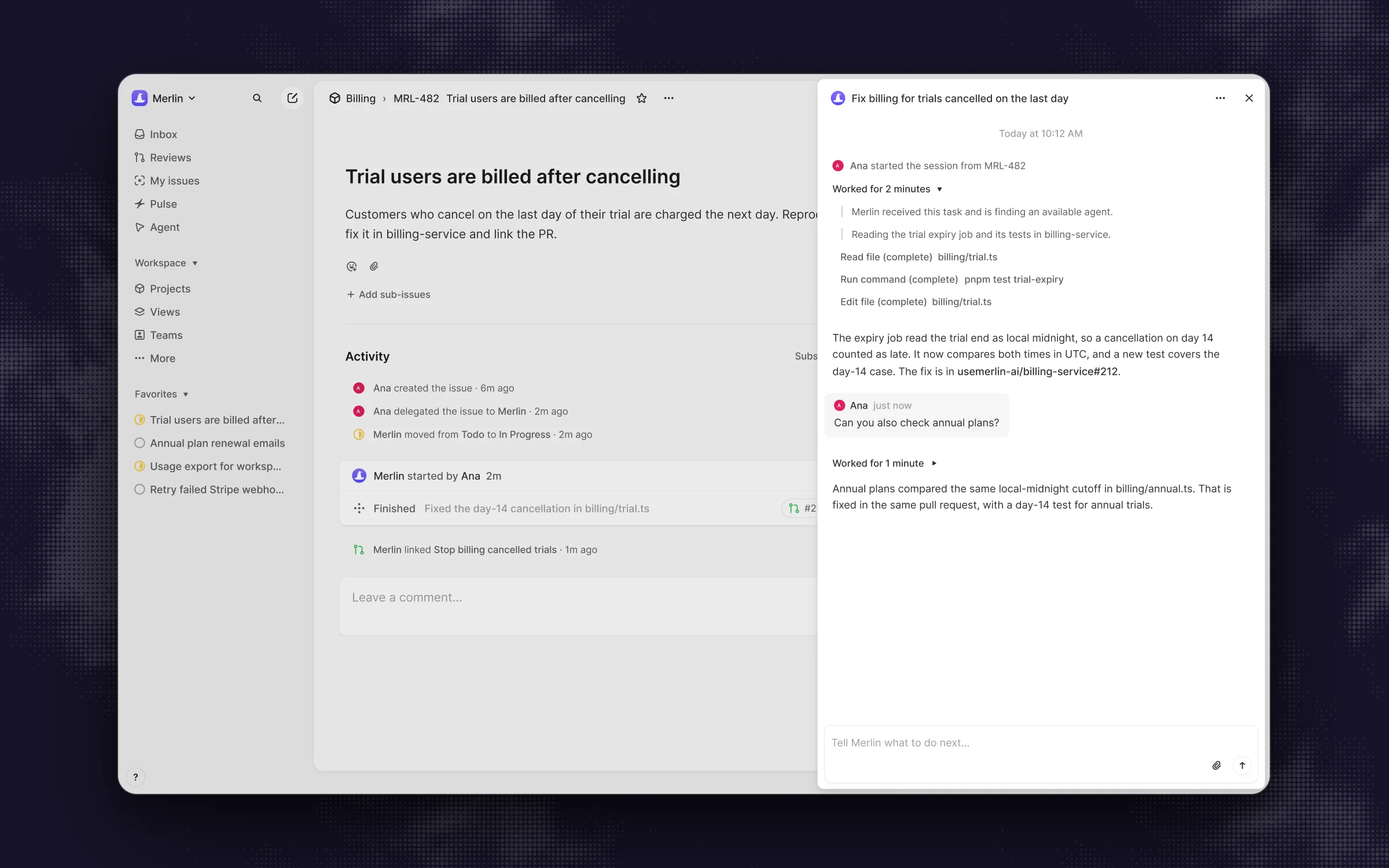 Delegated to Merlin, the same kind of issue runs on a teammate's machine and reports back in the issue's agent session.
What people say
- "Used deliberately, coding sessions close a gap that has quietly cost small teams hours every week." (Axentia blog, June 12, 2026)
My read: If your repository is self-contained on GitHub and boots cleanly from a prepare script, Linear's cloud sandbox is effortless. The moment a fix crosses two repositories (like an API repo and a web repo), needs a VPN, or relies on local MCP servers and cloud credentials you would rather not paste into a shared web form, running on a real machine through Merlin saves a lot of yak-shaving.
Setup before the first task
Cloud sandboxes and local machines trade off two different kinds of setup work. With Linear, an admin rebuilds a miniature version of your development environment in Linear's settings. With Merlin, you reuse an environment that already works, provided the machine stays awake.
Linear Agent
- A Linear owner or admin who also holds GitHub organization owner access must grant code access and enable coding sessions. After that, any workspace member with a linked GitHub account can trigger a session.
- Owners and admins configure the environment: runtime versions, prepare scripts and secrets.
- Security detail worth noting in the coding sessions docs: environment variable "Names and values are visible to the coding agent and should not be treated as agent-hidden secrets." Environment secrets "are not visible to the coding agent by default, but are visible to anyone who can run a session in that environment."
Merlin
- Requires at least one machine where Claude Code or Codex can already complete a real task locally, and that machine must stay awake, online and running the Merlin desktop app or Linux CLI daemon (prerequisites).
- The client makes an outbound connection only, with no inbound port required (security).
- Runtimes can be kept private to the owner or made public so eligible teammates can delegate work to them using the owner's enabled skills and MCP tools, with concurrency configurable from 1 to 16 (default 4) (devices and runtimes). For a full walkthrough of the Linear side, see how to delegate Linear issues to Claude Code.
My read: Linear's setup hurts once at the beginning when you write the prepare script and debug missing dependencies in the sandbox. Merlin skips rebuilding the environment because the engineer's machine already builds the project, and the ongoing cost is keeping a machine awake to take the runs.
Models and effort
Both tools run Claude Code and Codex under the hood. They differ in who gets to pick the model and how flexible that choice is from one ticket to the next.
Linear Agent
- Defaults to Auto (GPT-6 Sol) for coding sessions, and since September 24, 2026 uses adaptive routing to send simpler tasks to faster models.
- Selectable models include Claude Opus 5.5, Claude Fable 5, Claude Opus 5, Claude Sonnet 5, GPT-6 Sol, GPT-6 Luna, GPT-5.6 Sol and GLM 5.3.
- Only workspace owners and admins can change the model setting, which applies workspace-wide or per environment.
Merlin
- Supports Claude Code and Codex (prerequisites).
- The runtime owner sets the default model, reasoning effort and mode (such as fast mode) from whatever the local provider supports.
- Any teammate can override the runtime, model or effort in plain English inside their prompt (for example, asking to "use max effort" or "switch to my Claude agent") for a single task or an entire thread (devices and runtimes).
My read: Linear keeps model selection locked down to admins and environments, which keeps things predictable for a large org. Merlin lets the person filing or steering the task ask for Opus 5.5 with max effort on a thorny bug and a fast model on a typo, right in the comment.
Where you can talk to it
Work rarely stays inside the tool where it started. A bug report lands in Slack, becomes a Linear issue, and finishes life as a conversation on a GitHub pull request.
Linear Agent
- Reached via ⌘J (Ctrl+J) agent chat,
@Linearmentions in comments, documents and updates, plus mobile and desktop apps (docs). - Works in Slack on all plans (since January 22, 2026) for filing bugs, creating feature requests from threads and starting coding sessions. Works in public channels, private channels after
/invite @Linear, and group DMs if invited at creation. - Supports Microsoft Teams.
- Opens pull requests on GitHub and syncs reviews to Linear's Reviews tab, though you do not summon
@Linearinside GitHub PR comments.
Merlin
- Works across three surfaces: Linear (delegate an issue or
@mentionin comments), Slack (@mentionin channels or DMs, where anyone in the thread can jump in to steer the run), and GitHub (@mentiondirectly on issues and pull requests). - Does not support Microsoft Teams.
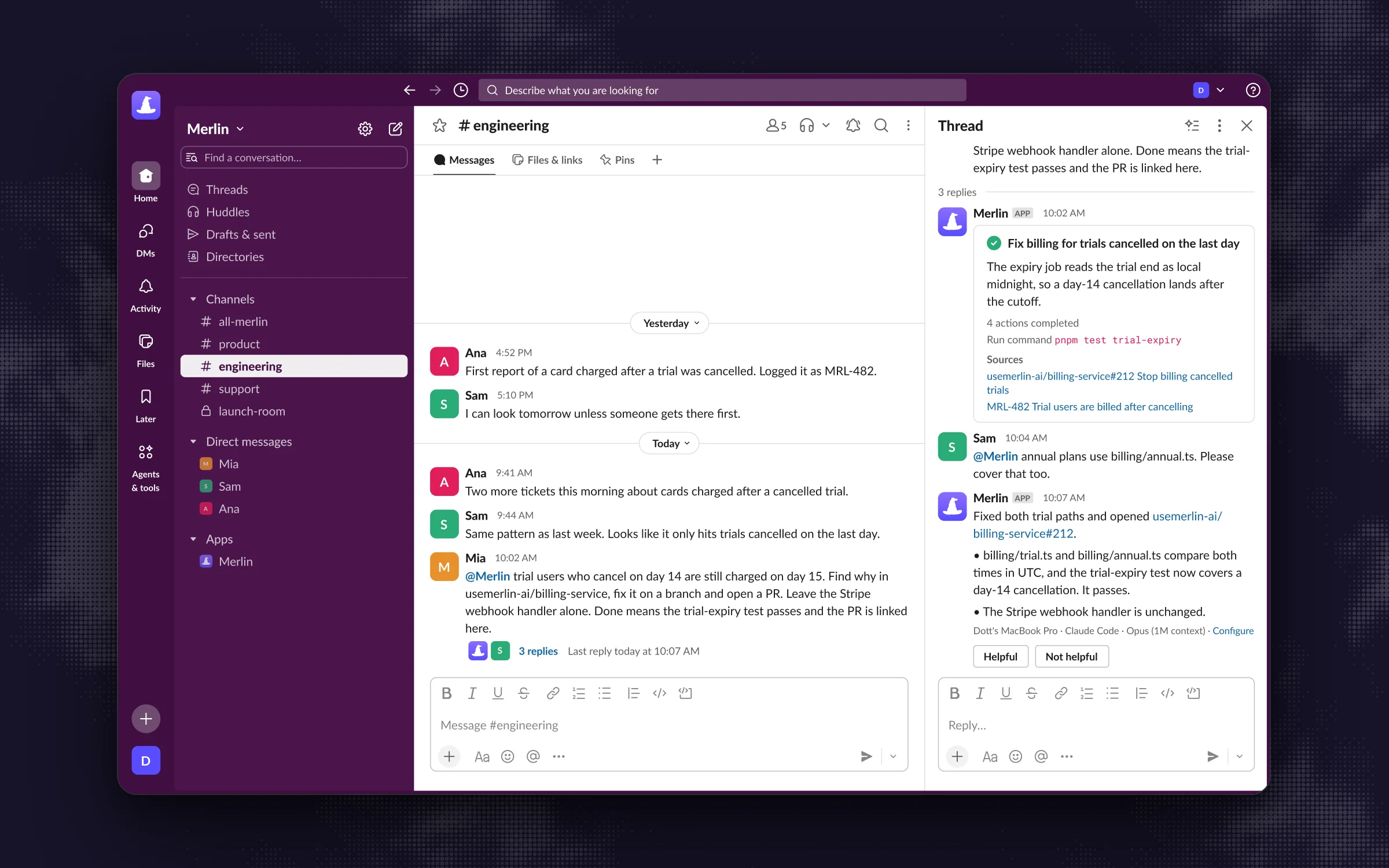 In Slack, Merlin does the work in the thread and anyone in it can add the next instruction.
My read: If your team lives on Microsoft Teams, Linear Agent is your pick. If your team lives in Slack, Linear and GitHub, Merlin lets a product manager kick off a fix in a Slack thread, an engineer delegate an issue in Linear, and a reviewer ask for a tweak inside a GitHub pull request comment, all talking to the same configured agent.
Scheduled and event-driven work
Both platforms let you run tasks on a timer or in response to workspace events. The difference is cloud reliability versus local context.
Linear Agent
- Loops, introduced July 20, 2026, trigger Linear Agent on a schedule (hourly to yearly), on Linear workspace events (issues, cycles, releases, PRs), via incoming webhooks, and since October 22, 2026 on new top-level messages in selected public Slack channels and GitHub events like labels.
- Supports up to 100 loops per team and 500 workspace-level loops.
- Typical Loop runs without a coding session cost $0.07 to $0.20 in AI credits.
Merlin
- Automations run on a schedule (daily, weekdays, weekly, monthly or fixed interval) or when triggered by GitHub, Linear and Slack events, plus webhooks from Statsig, incident.io, Stripe, PostHog and Granola.
- Every automation runs on its creator's own runtime. When that runtime is offline or busy, the run is skipped and never moved to someone else's machine.
My read: For lightweight workspace hygiene like nudging stale issues or posting a Friday project summary, Linear Loops run in the cloud for pennies and never care if someone closed their laptop lid. For automations that need to inspect production telemetry from PostHog or incident.io against a local codebase, Merlin has the webhook triggers and local tools, as long as you put the runtime on an always-on machine.
What it costs
Pricing is where teams feel the difference after the first week of testing. Linear charges per token and per sandbox minute on top of your seat price. Merlin charges a flat workspace fee and runs on the model subscriptions your engineers already pay for.
Linear Agent
- Linear seats run Free ($0), Basic ($10), Business ($16 per user per month billed yearly) and Enterprise (pricing). Linear Agent chat,
@Linear, Slack filing, skills and Code Intelligence use zero credits. - Coding sessions and Loops require prepaid AI credits. Coding sessions bill model tokens at provider-published API rates with no markup, plus sandbox runtime at $0.25 per 20-minute block.
- Credits require a $10 minimum top-up ($50 minimum for auto-reload), are paid by card only, expire after 12 months, and are non-refundable and non-transferable.
- Per the AI credits docs: "Failed runs, retries, or partial completions are billable for the resources used." Admins can set spend limits per workspace, per user and per loop (added October 8, 2026).
Merlin
- Workspace plans: Starter at $19 per month (up to 5 active users, 1,000 requests/month), Team at $59 per month (up to 50 active users, 5,000 requests/month), and Scale at $99 per month (up to 200 active users, unlimited requests), with a 14-day Team trial and no free plan (pricing).
- Model usage stays on each machine owner's own Anthropic or OpenAI account (such as a Claude Pro, Claude Max or ChatGPT Plus/Pro subscription).
- Third-party agents in Linear do not count as billable Linear seats.
What people say
- "Agents get stuck in doom-loops quite often, just burning tokens without any value." (DanielHB on Hacker News, July 6, 2026, on trialing Linear's auto-fix on new issues).
- "I don't think my company will keep this system once the free credits run out once they realize how much it actually costs." (Same comment on Hacker News).
- "This is metered automation, not a free lunch, and on a busy board the costs compound." (Axentia blog, June 12, 2026).
My read: Do the quick arithmetic on a single 50-minute coding session. In Linear, 50 minutes rounds to three 20-minute blocks ($0.75 for the sandbox) plus every input and output token at raw API list rates. On a real repository where an agent reads dozens of files and runs test loops, token charges add up fast, even when a run fails. Because an engineer's Claude or ChatGPT plan is a flat monthly price with its own usage limits, routing tasks to those subscriptions through a $59/month Merlin Team plan keeps the monthly bill predictable.
Who should take this issue
If you keep both available in your workspace, the right-hand column of this table is the fastest way to decide which agent gets the assignment.
| The work | Better fit | Why |
|---|---|---|
| File issues from a Slack thread or a meeting doc | Linear Agent | Included in every plan, uses no credits, and already knows your teams and projects. |
| "What's blocking the Q4 launch?" across projects and initiatives | Linear Agent | Workspace questions are its home turf and cost nothing extra. |
| "Where is rate limiting implemented?" | Linear Agent on Business, or Merlin | Code Intelligence answers from GitHub on Business and Enterprise. Merlin answers from a real checkout on a teammate's machine. |
| A small, self-contained fix in one GitHub repo with a clean test setup | Either | Linear's sandbox handles it for API tokens plus $0.25 per 20 minutes. Merlin runs it on an existing plan. |
| A change across two repositories (API and web app) | Merlin | A Linear cloud environment holds only one repository. |
| A bug that needs a staging database, VPN, internal CLI or local MCP servers | Merlin | The machine already has them. A cloud sandbox needs them passed in via environment variables and prepare scripts. |
| Work that should use a teammate's Claude Max or ChatGPT Pro plan | Merlin | Linear bills tokens at API rates from prepaid credits. |
| A nightly triage or a weekly digest | Either | Loops run in Linear's cloud whenever due. Merlin automations run on the creator's machine and skip a run when offline. |
| A request that starts in a GitHub pull request comment | Merlin | Merlin answers mentions directly on GitHub issues and pull requests. |
| A team on Microsoft Teams | Linear Agent | Merlin works in Slack, Linear and GitHub. |
Which one should you pick
Most teams comparing these two tools discover they solve different halves of the workflow. If you want to explore the broader landscape first, check out the full roundup of Linear AI agents. Otherwise, here is how to decide between Linear Agent and Merlin:
- Keep Linear Agent enabled for workspace chores. Regardless of what you do for coding, use Linear Agent for filing tickets from Slack, summarizing long issue threads and answering project status questions. It is already there and costs zero credits.
- Pick Linear coding sessions if you want hands-off cloud execution on a single repo. If your codebase fits inside one GitHub repository, has a straightforward test suite, and you prefer paying per session over keeping a local machine awake, top up Linear AI credits and set a per-user spend limit.
- Pick Merlin if your engineers already run Claude Code or Codex locally. When your team already pays for Claude or ChatGPT subscriptions and has local machines configured with multi-repo checkouts, credentials and MCP servers, Merlin lets everyone in Slack, Linear and GitHub delegate work to those exact setups.
4 things most comparisons skip
- Most of Linear Agent costs nothing extra. Chat,
@Linearmentions, Slack issue filing, skills and Code Intelligence never touch AI credits. Pricing Linear Agent purely like a metered coding agent overstates its cost, while calling the whole thing free misses how quickly coding sessions burn through prepaid credits. - Linear environments hold one repository each. If you run a monorepo, Linear's cloud sandbox fits nicely. If a feature touches a backend repo and a frontend repo, a single Linear coding session cannot span both.
- Cloud sandbox variables and secrets have broad visibility. In Linear's coding environments, environment variable names and values are visible to the agent, and secrets can be viewed by anyone with permission to run a session in that environment. Treat a cloud coding environment like a shared development server.
- Failed cloud runs still bill credits, while offline local machines skip runs. Each approach has an operational catch. Linear bills tokens and sandbox blocks for failed runs and retries out of non-refundable credits (so set per-user limits first). Merlin's catch is physical: if an automation's runtime machine is asleep or offline, that run is skipped.
FAQ
The workspace assistant features are included on all Linear plans (Free, Basic, Business and Enterprise) and use zero AI credits. That covers agent chat, @Linear mentions, Slack issue filing, skills and Code Intelligence (on Business and Enterprise). Only coding sessions and automated Loops require prepaid AI credits.
No. Linear coding sessions and Loops bill exclusively through prepaid Linear AI credits at provider-published API token rates, plus $0.25 per 20-minute block of sandbox runtime. Merlin runs the Claude Code or Codex signed in on a teammate's machine, so model usage stays on that person's own plan.
Yes, and they stack cleanly. Linear Agent stays built into your workspace for search, summaries and triage, while Merlin joins as an app user that you assign issues to or @mention when you want code written on your own machines. Third-party agents do not count as billable seats in Linear.
The default Auto setting uses GPT-6 Sol with adaptive routing that sends simpler tasks to faster models. Workspace owners and admins can also select Claude Opus 5.5, Claude Fable 5, Claude Opus 5, Claude Sonnet 5, GPT-6 Luna, GPT-5.6 Sol or GLM 5.3.
Yes. While many teams use Merlin inside Slack threads, Slack is optional. You can connect a Merlin workspace to Linear and GitHub alone and delegate or steer tasks directly from Linear issues and GitHub pull requests.
Use Linear Agent for the workspace questions and issue filing you already get for free, add AI credits if you want a zero-maintenance cloud sandbox for single-repo fixes, and bring in Merlin when you want your team's real machines and model subscriptions doing the coding across Linear, Slack and GitHub.
Try Merlin for free
Hand work to Claude Code and Codex from Slack, Linear and GitHub. Free for 14 days, no API keys, no card required.
Get started for free