

AI Prompts for Bug Triage and Issue Writing
 Dott
Someone drops a bug report in Slack: a blurry screenshot, a stack trace, or "checkout is broken for UK cards." You forward it to your AI coding agent with a one-line prompt like "look into this bug." Five minutes later, you get back a confident guess, a null check pasted right at the crash site, or a 40-file pull request you now have to review and close.
A one-line ask forces the agent to guess four things: what it already knows, what job you actually want done, what a finished answer looks like, and what it must leave alone. When you spell those four parts out, bug triage stops being a slot machine and becomes one of the engineering tasks an AI coworker can own before a human ever opens an editor.
Below are nine copy-ready prompts that take a vague bug report from first reproduction to a scoped, filed issue, plus an illustrative sample output for each so you can see the shape of a good answer. Each prompt takes about a minute to fill in.
Key takeaways
- Write every bug triage prompt in four parts: Background, Ask, What good looks like, and Boundaries.
- Spell out "What good looks like": naming the exact output shape and completion check stops the agent when the work is actually done, rather than when it merely looks done.
- Separate triage from fixing: keep the agent in read-only mode (or test-only mode) until you have a reproduction and a root cause, so it doesn't patch the crash site and hide the real bug.
- Force facts apart from guesses: ask the agent to list what it verified, what it suspects, and what it could not check.
- Save your boundaries once: put recurring rules (read-only during triage, never close issues, always cite commits) in your repo instructions or workspace guidance so teammates don't have to retype them.
What you need
- An AI agent that can read your repository and run its tests: Claude Code, OpenAI Codex, GitHub Copilot, Cursor, or an AI coworker in Slack and Linear such as Merlin.
- An
AGENTS.mdorCLAUDE.mdfile in the repo: with your test command and build instructions (How to Delegate a Linear Issue to an AI Agent walks through setting this up). - Read access to logs or error tracking (optional): Sentry, Datadog, Logtail, or database read replicas if you want the agent to estimate customer impact in step 6.
- An issue tracker: a Linear team or GitHub repository where the final triaged issue will live.
The four-part prompt
Anthropic's prompting guide puts the mindset well: "Think of Claude as a brilliant but new employee who lacks context on your norms and workflows." Their quick test is to show your prompt to a colleague who has minimal context on the task and ask them to follow it. If your colleague would be confused, the agent will be too.
OpenAI's Codex best practices recommend four ingredients in a default prompt (Goal, Context, Constraints, Done when), and Merlin's custom instructions guide teaches the same four under the names Outcome, Context, Boundaries, and Evidence. Whatever labels you prefer, every prompt below uses this four-part template:
- Background: the symptom, where it surfaced (Slack thread, Sentry link, customer email), and the files, service, or commit window to start in.
- Ask: the single triage job for this step (reproduce, locate, find root cause, size impact, or draft the issue). Explaining why the step matters helps the agent aim its answer.
- What good looks like: the exact sections, length, and proof required in the reply. As the Claude Code best practices warn, "Claude stops when the work looks done. If it has nothing to run that tells it whether the work actually is done, 'looks done' is all it has to go on." Showing the output shape is the most reliable way to steer format and rigor.
- Boundaries: what the agent must leave alone (do not edit application code, do not open a pull request, do not message the customer, stop after three failed attempts).
Compare a typical one-liner from the Claude Code docs with its scoped version:
Bad:  "fix the login bug"
Good: "Users report login fails after the session times out. Look at token
      refresh in src/auth/, write a failing test that reproduces it, then
      fix it."
Here is the blank four-part skeleton you can keep on a clipboard snippet:
Background:
[Symptom, links, error message, and starting directory or service]

Ask:
[One specific triage job and why you need it]

What good looks like:
[Exact sections, commands to run, and how to separate facts from guesses]

Boundaries:
[What not to touch, edit, close, or deploy]
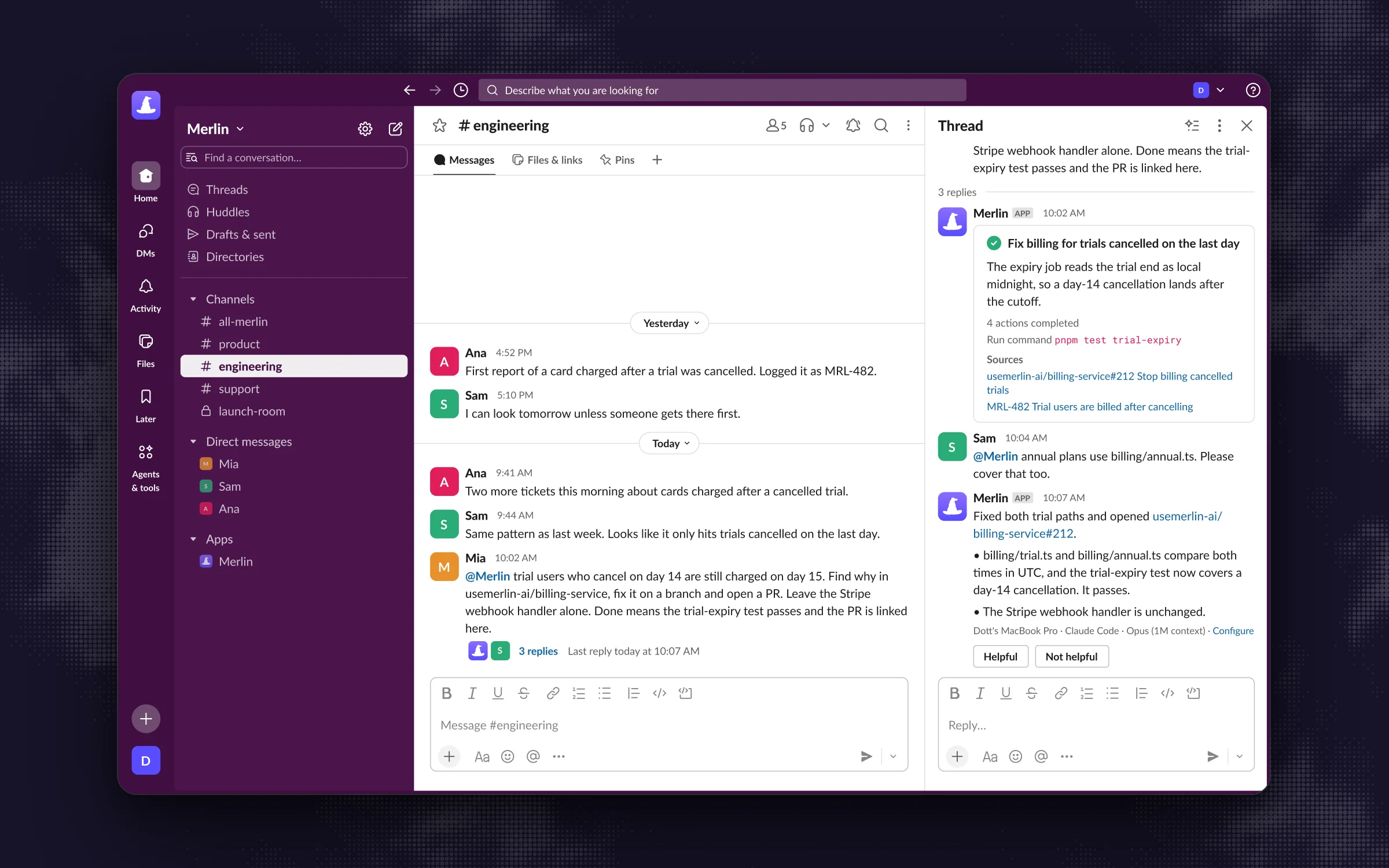 A bug request in a Slack thread that names the outcome, the context, the boundaries and what done means. The follow-up steers the same task instead of starting over.
In the screenshot above, Mia @mentions Merlin in Slack with the symptom, the files in scope, and the boundaries up front, and Sam replies in the same thread to extend the check to annual plans without starting a new prompt from scratch.
How to triage a bug with AI prompts
You rarely need all nine prompts for a single bug. A tiny UI glitch might jump straight from step 1 (reproduce) to step 8 (write the issue), while a gnarly production regression will walk through the whole chain. Each sample output below uses a fictional checkout service called shop-web to show the shape of a good answer.
1. Turn a vague report into a reproduction
Mozilla's bug writing guidelines start with a line worth taping to your monitor: "Steps to reproduce are the most important part of any bug report. If a developer is able to reproduce the bug, the bug is very likely to be fixed." Before anyone touches code, ask the agent to turn a messy Slack thread or support ticket into numbered steps and verify whether the bug actually happens.
Background:
A user reported: "[paste raw bug report, Slack messages, or support ticket]."
The relevant app lives in [repo/directory, e.g., apps/shop-web].

Ask:
Turn this report into a clean reproduction and verify whether you can trigger the bug locally or via existing tests.

What good looks like:
Reply with four short sections:
1. Steps to reproduce (numbered, exact inputs and URLs/commands).
2. Expected result vs. Actual result.
3. Reproduction status: Reproduced (with the command and output) or Not reproduced (with what you tried and what environment detail is missing).
4. Facts vs. Speculations: separate what you observed directly from what you are guessing.

Boundaries:
Do not edit any code or test files. Stop after 3 reproduction attempts if it does not trigger and list what you need from the reporter.
Example output
1. Steps to reproduce
   1. Start the dev server (`pnpm --filter shop-web dev`).
   2. Add SKU `TEE-BLK-M` (price: 25.00 GBP) to cart.
   3. Apply coupon code `SPRING10` (10% off) and select UK Standard Shipping (4.99 GBP).
   4. Submit `POST /api/checkout/intent` with currency `GBP`.

2. Expected vs. Actual
   - Expected: Stripe PaymentIntent created for 2749 pence (22.50 + 4.99 GBP).
   - Actual: HTTP 500 `InvalidIntegerError: amount 2749.0000000000005 is not an integer`.

3. Reproduction status
   - Reproduced (3/3 runs) via `curl -X POST localhost:3000/api/checkout/intent -d @repro.json`.

4. Facts vs. Speculations
   - Fact: `25.00 * 0.9 * 100` evaluates to `2250`, but adding `4.99 * 100` (`499.00000000000006`) produces `2749.0000000000005`.
   - Speculation: Any shipping rate ending in `.99` with a percentage discount will trigger this.
Tip: Requiring a "Facts vs. Speculations" line (borrowed straight from Mozilla's guide) stops the agent from presenting a hunch as a confirmed reproduction.
2. Write a failing test that locks in the bug
Once the agent can trigger the bug, have it capture the reproduction as an automated test before anyone writes a fix. A failing test gives you proof the bug exists today and a completion check for whatever fix comes later.
Background:
We reproduced the bug where [one-line symptom from step 1].
Tests for this module live in [path, e.g., apps/shop-web/src/checkout/__tests__/].
Our test command is `[test command, e.g., pnpm --filter shop-web test]`.

Ask:
Write a minimal automated test that reproduces this exact failure.

What good looks like:
- One new test case in the existing test file for this module.
- Run the test suite and paste the failing test output showing the exact assertion or error from the bug report.
- Confirm all preexisting tests in that file still pass.

Boundaries:
Only edit or create test files. Do not modify application code and do not fix the bug yet.
Example output
Added test case in `apps/shop-web/src/checkout/__tests__/totals.test.ts`:
- `calculates integer minor units when percentage discount combines with .99 shipping`

Test run (`pnpm --filter shop-web test totals.test.ts`):
  FAIL  src/checkout/__tests__/totals.test.ts
  ✕ calculates integer minor units when percentage discount combines with .99 shipping (6 ms)
    Expected: 2749
    Received: 2749.0000000000005

  Tests: 1 failed, 14 passed, 15 total
Application code untouched (`git diff src/checkout/totals.ts` is empty).
Pitfall: Watch for tests that mock out the very function that fails. If the test passes on the first try, the agent tested its own mock.
3. Locate the code path
When you have a stack trace or symptom in an unfamiliar service, ask the agent to map the execution path from the entry point down to the failing function, and list every other caller that touches it.
Background:
Symptom or stack trace: [paste error or failing test name].
Entry point is [route, job, or handler, e.g., POST /api/checkout/intent].

Ask:
Trace the code path from the entry point to the line where the bad state or error happens, and list every call site of the failing function.

What good looks like:
1. Call chain: numbered list from entry point to failure, each step formatted as `path/to/file.ts:line` (`functionName`) with one sentence on what transforms the data.
2. Other callers: every other place in the repo that calls the failing function, so we know blast radius.

Boundaries:
Read-only. Do not edit files or propose a code patch yet.
Example output
1. Call chain
   1. `src/api/checkout/intent.ts:28` (`createIntentHandler`) parses cart items, coupon, and shipping option.
   2. `src/checkout/totals.ts:44` (`calculateOrderTotalMinorUnits`) multiplies dollar/pound floats by 100 after applying discount.
   3. `src/payments/stripe.ts:19` (`createPaymentIntent`) passes `amount` directly to `stripe.paymentIntents.create`, which throws on non-integer floats.

2. Other callers of `calculateOrderTotalMinorUnits`
   - `src/api/checkout/preview.ts:31` (cart summary endpoint)
   - `src/jobs/subscription-renewal.ts:62` (nightly recurring billing worker)
   - `src/admin/refund-calculator.ts:18` (partial refund estimator)
Tip: Asking for "Other callers" during triage saves you from shipping a fix for web checkout that breaks the nightly subscription worker.
4. Find the root cause, not the crash site
Pasting a stack trace and asking an AI to fix it usually patches wherever the error surfaces rather than where the bug originates. If stripe.ts throws because amount is a float, a naive prompt puts Math.round() inside stripe.ts, leaving corrupted totals in your database and invoice emails. This prompt forces the agent to walk backward through the data flow and git log.
Background:
The failure surfaces at `[file:line]` with `[error message]`, traced in `[call chain from step 3]`.

Ask:
Find the root cause where the invalid state is created (not where it crashes), and check git history to see when and why this behavior was introduced.

What good looks like:
1. Crash site vs. Root cause: one sentence on each (`file:line`).
2. Why the bad value exists: trace the variable from creation to crash.
3. Git history: run `git log -S` or `git blame` on the root cause lines and cite the commit hash, date, PR/commit title, and what that commit was trying to do.
4. Confidence: High / Medium / Low, plus what you did NOT check.

Boundaries:
Read-only. Do not edit files. If git history does not explain it, say so instead of guessing.
Example output
1. Crash site vs. Root cause
   - Crash site: `src/payments/stripe.ts:19` (Stripe SDK rejects float amount).
   - Root cause: `src/checkout/totals.ts:51` converts major units to minor units (`* 100`) without `Math.round()` after removing `dinero.js`.

2. Why the bad value exists
   `shipping.price` is stored as a decimal float (`4.99`) in `shipping_rates`. Line 51 computes `(subtotal * (1 - discountRate)) * 100 + shipping.price * 100` in IEEE 754 floating point.

3. Git history
   - Commit `a81f3c9` (2026-11-04, "perf(checkout): drop dinero.js wrapper in hot cart path") replaced the Dinero money wrapper with raw number math but omitted `Math.round` on the shipping conversion.

4. Confidence: High
   - Not checked: Whether `shipping_rates` in production Postgres holds more than 2 decimal places for non-GBP currencies.
Tip: Making the agent run git blame and state what the original commit was trying to do stops you from reverting a performance or security fix by accident.
5. Check for duplicates and past fixes
Before you spend an hour writing up a ticket, check whether a teammate already filed it last Tuesday or fixed the exact same bug six months ago in another module.
Background:
Bug summary: [one-line symptom and root cause file/function, e.g., float precision error in calculateOrderTotalMinorUnits].
Issue tracker: [Linear team key or GitHub repo, e.g., Linear team SHOP or github.com/org/shop-web].

Ask:
Search open and closed issues and pull requests for duplicates, related regressions, or prior fixes in this area.

What good looks like:
A markdown table with columns: ID/Link, State (Open/Closed/Merged), Title, and Relevance (Duplicate / Related / Prior fix), followed by a one-line recommendation on whether to file a new issue or reopen an existing one. If nothing matches, reply "No matching issues or PRs found" and list the search queries you ran.

Boundaries:
Do not close, merge, comment on, or mark any issue as a duplicate. Report back only.
Example output
| ID / Link | State | Title | Relevance |
| --- | --- | --- | --- |
| SHOP-812 | Closed (Merged PR #410) | perf(checkout): drop dinero.js wrapper in hot cart path | Introducing PR |
| SHOP-604 | Closed | Rounding mismatch on EUR VAT invoices | Related (same float*100 pattern in `src/billing/vat.ts`) |
| SHOP-839 | Open | User reports "Something went wrong" on UK checkout | Likely duplicate (filed 2 hours ago by Support, no root cause yet) |

Recommendation: Enrich open issue SHOP-839 with the reproduction and root cause from commit `a81f3c9` instead of filing a second ticket.
Pitfall: Always include the boundary "Do not close or mark any issue as a duplicate." Agents with tracker write access love to tidy up your backlog uninvited.
6. Estimate customer impact
A bug that hits one internal test account gets scheduled very differently from a bug failing 14% of production checkouts. If your agent has read access to logs, Sentry, or an analytics replica, ask it to count affected users and show its query.
Background:
Bug: `[error signature or condition, e.g., InvalidIntegerError in POST /api/checkout/intent introduced in commit a81f3c9 on 2026-11-04]`.
Telemetry source: `[Sentry project / Datadog service / read-only SQL view]`.

Ask:
Estimate how many users, workspaces, or requests are affected, since when, and which segments are hit.

What good looks like:
1. Time window: first seen and last seen timestamps (UTC).
2. Volume: total failed events, unique affected users/orgs, and failure rate as a percentage of total attempts.
3. Query used: the exact Sentry query, log filter, or SQL statement you ran so a human can re-run it.
4. Unknowns: what could not be measured from this data source.
Mark any extrapolated number clearly as `(estimate)`.

Boundaries:
Read-only queries only. Do not expose raw customer PII (emails, full names, card numbers) in your reply. Use counts and anonymized IDs.
Example output
1. Time window
   - First seen: 2026-11-04 16:42 UTC (18 minutes after deploy of `a81f3c9`).
   - Last seen: 2026-11-18 09:11 UTC (ongoing).

2. Volume
   - 142 failed `POST /api/checkout/intent` requests across 98 unique `cart_id`s.
   - Represents 3.8% of UK checkout attempts in that 14-day window (142 / 3,710).

3. Query used
   `service:shop-web status:500 "InvalidIntegerError" @http.url:"/api/checkout/intent"`

4. Unknowns
   - Cannot tell from error logs how many of the 98 carts later succeeded after removing their coupon code (requires joining `checkout_events` in Snowflake, which is not connected).
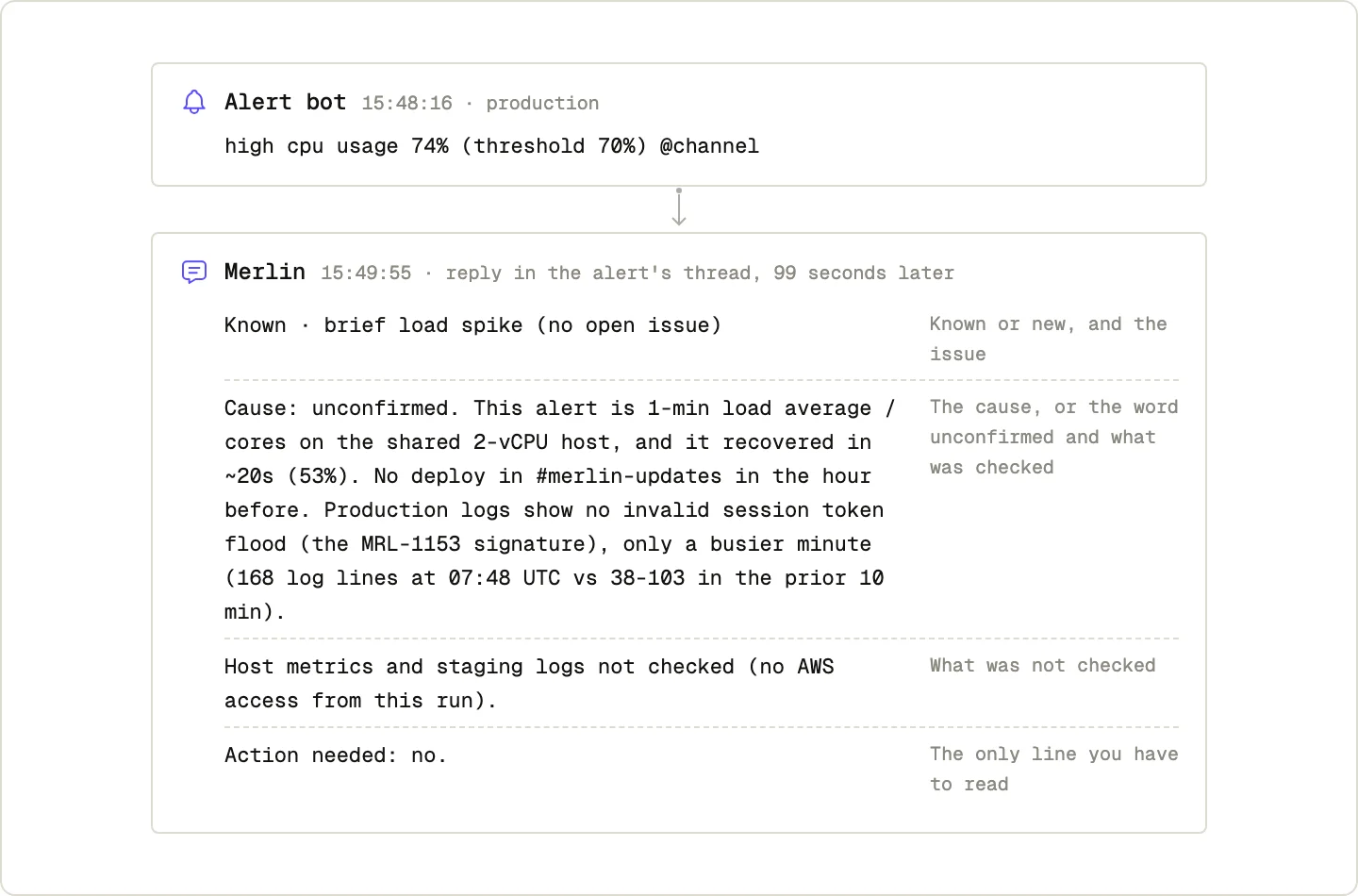 A real triage reply shaped by its prompt: the cause is marked unconfirmed and the reply lists what it could not check.
The screenshot above shows this exact "what was checked / what was not checked" pattern in a Slack alert channel (how to set up AI alert triage in Slack): Merlin replies to a production CPU alert in 99 seconds, marks the suspected cause as unconfirmed, and explicitly states what it could not verify so the on-call engineer knows where to look next.
7. Propose severity and priority against your rubric
Never ask an AI "how severe is this bug?" in a vacuum. Without your team's definitions, every bug with a stack trace comes back as "Critical / P0." Paste your rubric into the Background section and ask for a proposal that a human can approve or override in one second.
Background:
Bug & impact summary: [paste output from steps 4 and 6].
Our team's severity rubric:
- Sev 1 (Critical): Production down, data loss/corruption, or over 20% of core flows failing with no workaround.
- Sev 2 (High): Core flow broken for a subset of users (under 20%) with no obvious workaround, or over 20% with an easy workaround.
- Sev 3 (Medium): Non-core flow broken, or core flow glitch with a clear workaround.
- Sev 4 (Low): Cosmetic, copy, or internal-only annoyance.

Ask:
Propose a severity level and a scheduling priority (Fix in hotfix / Next sprint / Backlog) based strictly on our rubric.

What good looks like:
- Proposed Severity: Sev [1-4]
- Proposed Priority: [Hotfix / Next sprint / Backlog]
- Why (2 sentences max): quote the exact rubric threshold this bug hits.
- What would bump it up one level: the single condition that would make this higher severity.

Boundaries:
Do not change issue priority or page on-call in Linear/PagerDuty. A human lead makes the final call.
Example output
- Proposed Severity: Sev 2 (High)
- Proposed Priority: Hotfix today
- Why: Checkout is a core revenue flow failing for 3.8% of UK attempts (under 20% threshold), and customers receive a generic 500 error with no indication that removing their coupon code works around it.
- What would bump it to Sev 1: If the nightly subscription worker (`src/jobs/subscription-renewal.ts`) is also failing or writing corrupted invoice amounts to Postgres.
Tip: Including "What would bump it up one level" tells the triaging lead the one follow-up question worth checking before they sign off.
8. Write and file the issue
Now you have everything a developer or coding agent needs to ship a clean fix. Mozilla's bug writing guide has two golden rules for this step: keep the title around ten words, and "explain the problem, not your suggested solution." A title like "Use Math.round in totals.ts" hides what is broken for customers and locks the assignee into one implementation.
Background:
We have triaged a bug with the following verified details:
[Paste reproduction, failing test path, root cause commit/file:line, impact numbers, and proposed severity].
Target tracker: Linear team `[TEAM]`, project `[PROJECT]`.

Ask:
Create a single well-structured bug issue (or update existing duplicate `[ISSUE-ID]`) so an engineer or agent can fix it without asking follow-up questions.

What good looks like:
- Title: 10 words or fewer describing the problem and symptom, not the proposed code fix.
- Body sections:
  - **Summary:** 2 sentences on what breaks and who it affects.
  - **Steps to reproduce:** numbered list + the failing test path from step 2.
  - **Expected vs. Actual:** 1 bullet each.
  - **Impact:** numbers and time window from step 6.
  - **Suspected root cause:** `file:line`, introducing commit hash, and other callers from steps 3-4.
  - **Done when:** concrete verification checks (failing test passes, all callers checked).
- Return the created/updated issue URL.

Boundaries:
Assign the issue to `[human lead name]` in state `Triage` or `Todo`. Do NOT delegate the issue to an agent or start coding a fix yet.
Example output
Updated Linear issue SHOP-839:
Title: UK checkout returns 500 when percentage coupon combines with .99 shipping

Summary:
`POST /api/checkout/intent` throws `InvalidIntegerError` from Stripe when a percentage discount is applied to a cart with `.99` shipping. Affects 3.8% of UK checkout attempts (142 failures since Nov 4).

Steps to reproduce:
1. Run `pnpm --filter shop-web test totals.test.ts` (failing test committed on branch `repro/shop-839`).
2. Or POST SKU `TEE-BLK-M` (25.00 GBP) + coupon `SPRING10` + UK Standard Shipping (4.99 GBP) to `/api/checkout/intent`.

Expected vs. Actual:
- Expected: Stripe PaymentIntent created for `2749` pence.
- Actual: HTTP 500 `InvalidIntegerError: amount 2749.0000000000005 is not an integer`.

Impact:
142 failed checkouts across 98 carts since 2026-11-04 16:42 UTC.

Suspected root cause:
`src/checkout/totals.ts:51` (`calculateOrderTotalMinorUnits`), introduced in `a81f3c9`. Also called by `preview.ts`, `subscription-renewal.ts`, and `refund-calculator.ts`.

Done when:
- `totals.test.ts` passes including the `.99` + percentage discount case.
- All four callers of `calculateOrderTotalMinorUnits` return integer minor units.
- `pnpm --filter shop-web typecheck && pnpm --filter shop-web test` pass.
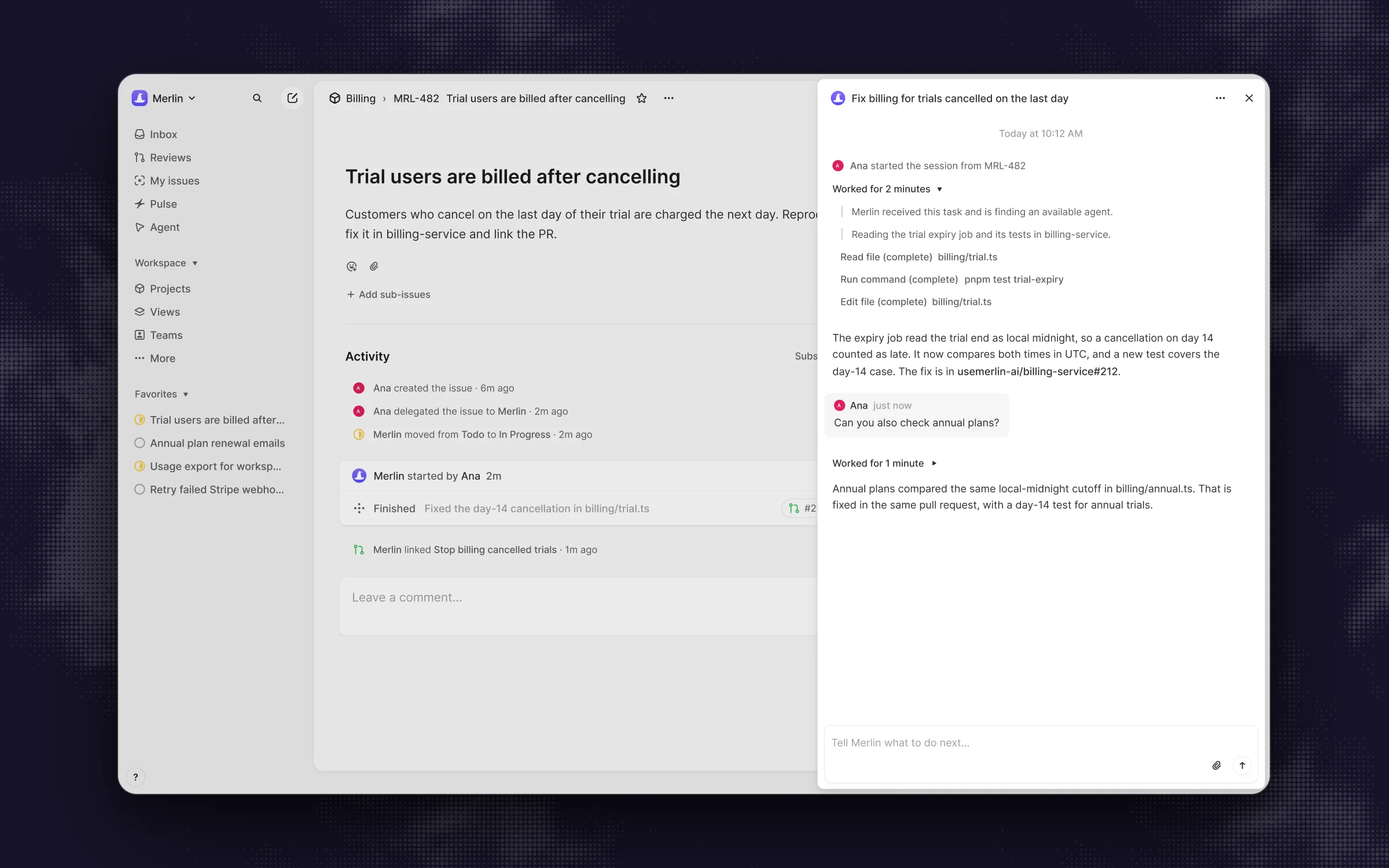 Once the issue is filed, delegating it starts an agent session where a follow-up steers the same task.
Once an issue looks like that, handing it off for the actual fix takes seconds. In Linear, you can delegate the issue to Merlin (or use the full template in How to Delegate a Linear Issue to an AI Agent and Get a PR Back), and the agent starts with the failing test, the exact file, and the completion check already written down.
9. Split a tangled fix into sub-issues
Sometimes triage uncovers a bug that touches three services or requires a database migration plus a backfill. OpenAI's Codex guide advises asking the agent to plan before it starts coding whenever a task is complex. Use this prompt to split a multi-part fix into small, independently mergeable sub-issues while keeping the parent ticket with a human owner.
Background:
Parent issue `[ISSUE-ID]` requires changes across multiple areas: `[list callers, migrations, or services uncovered in steps 3-4]`.

Ask:
Propose a breakdown of 2 to 4 small sub-issues that can each be reviewed and merged independently.

What good looks like:
For each proposed sub-issue, provide:
1. Title (under 10 words).
2. Scope: exact files in scope and out of scope.
3. Order / Dependency: which sub-issue must merge first.
4. Done when: the test command or check that proves this slice works on its own.
Wait for my confirmation before creating the sub-issues in Linear/GitHub.

Boundaries:
Keep the parent issue assigned to `[human owner]`. Do not create more than 4 sub-issues and do not start coding.
Example output
Proposed sub-issues for SHOP-839 (waiting for your confirmation to create):

1. Round minor-unit conversion in `calculateOrderTotalMinorUnits`
   - Scope: `src/checkout/totals.ts` and `src/checkout/__tests__/totals.test.ts` only.
   - Order: Merge first (unblocks live UK checkouts).
   - Done when: `pnpm --filter shop-web test totals.test.ts` passes with property tests across `.01` to `.99` rates.

2. Audit and add integer-minor-unit assertions in VAT and refund calculators
   - Scope: `src/billing/vat.ts` and `src/admin/refund-calculator.ts` (out of scope: checkout hot path).
   - Order: Independent of #1.
   - Done when: New unit tests in `vat.test.ts` and `refund-calculator.test.ts` pass.

3. Dry-run audit script for `subscription_invoices` created since Nov 4
   - Scope: Read-only script in `scripts/audit-nov-invoices.ts` to check if any recurring renewal stored a fractional amount.
   - Order: Run after #1 merges.
   - Done when: Script outputs count of affected rows in staging and prod read replica.
Tip: Making the agent wait for your thumbs-up before creating sub-issues prevents tracker spam when you decide sub-issue #2 can wait until next quarter.
Common problems
- The agent fixes the crash site instead of the root cause: This happens when you combine "find the bug" and "fix the bug" in a single one-line prompt. Run step 4 (root cause, read-only) first, verify where the bad value is born, and only then ask for a code change.
- The agent claims it reproduced the bug, but it only read the code: Agents are eager to please and will sometimes write "Reproduced" after tracing the logic in their head. Require the exact command and terminal output in "What good looks like" (step 1 and step 2).
- The reply is a 900-word wall of text nobody in Slack will read: When you leave output format open, models default to long essays. Cap each section in "What good looks like" (for example, "four bullets, one sentence each" or "a 4-column table").
- The agent edits application code or closes tickets during triage: An agent with tool access will act unless told otherwise. Put
Read-only. Do not edit files or modify issues.in your Boundaries section. - Every teammate writes boundaries differently (or forgets them): Instead of relying on everyone to paste the Boundaries block in Slack, save your team's triage defaults once. In Merlin, an owner or admin can set workspace guidance that every run receives automatically before the requester's personal guidance, personal guidance wins when they disagree, and each guidance field holds up to 4,000 characters. Keep in mind that saved guidance is passed to the model as context, not as an authorization boundary, so enforce true access control through your repository and tracker permissions.
- A long Slack triage thread starts drifting or mixing two bugs: When a thread shifts from "triage this checkout 500" to "refactor how we store currency across the monorepo," the old messages muddy the context. Reply in the same thread to steer an active task, and start a fresh thread when the desired outcome changes (Slack guide).
FAQ
The most reliable bug triage prompt uses four parts: Background (symptom, links, and starting directory), Ask (one specific triage step such as reproducing or finding the introducing commit), What good looks like (exact sections, commands to run, and separating facts from guesses), and Boundaries (read-only, no code edits or closing tickets). If you only copy one prompt from above, copy step 1 (reproduce) and step 4 (root cause).
Yes, and it is one of the highest-leverage ways to use an agent in Slack. Give the agent the raw thread and ask for a title under ten words that describes the problem (never a proposed fix), numbered steps to reproduce, expected versus actual behavior, and a clear "Done when" checklist. Always have it check whether it can actually reproduce the issue before filing.
State Read-only. Do not edit files or open a pull request. inside the Boundaries section of your prompt, or run your CLI agent in plan/read-only mode. If your team triggers triage from Slack or Linear through Merlin, you can also put default triage boundaries into shared workspace guidance so every run inherits them.
Use both for different halves of the prompt. Put rules that apply to every run (how to format commit citations, read-only defaults during triage, your severity rubric) into AGENTS.md, CLAUDE.md, or workspace guidance. Put multi-step workflows (like running the reproduction, root-cause check, and Linear filing in order) into a shared skill that anyone on the team can invoke.
Prompt structure and repository access matter far more than the model logo. Any frontier coding agent that can read your codebase, run your test suite, and inspect git log (such as Claude Code or OpenAI Codex) will handle these nine prompts well. With Merlin, those agents run on your teammates' own machines using their existing Claude or ChatGPT plans, with workspace plans starting at $9 per workspace per month (seen on November 18, 2026, pricing), provided the host machine stays online and connected.
If vague bug reports keep dying in your Slack channels, start by pasting prompt 1 (reproduce) and prompt 4 (root cause) on the next bug that lands today, or jump straight to prompt 8 (write the issue) if you already know why it breaks. The next set in this series covers prompts for pull request review, then incident response, standups, PRDs, support escalations, and release notes.
Try Merlin for free
Hand work to Claude Code and Codex from Slack, Linear and GitHub. Free for 14 days, no API keys, no card required.
Get started for free