

Claude Tag vs Slackbot in a Shared Workspace
 Dott
Dott
Slackbot is already in everyone's sidebar because your company is on Slack Business+ or Enterprise+, and now someone in engineering has paired Claude Tag with the workspace. You're looking at two bots in the same Slack, both running on Claude underneath, and a room full of people asking which one they're supposed to use.
Since the model family is the same, the split comes down to one line: whose view of Slack answers the question. Slackbot answers as you, using your permissions, your private channels and your DMs, in a panel only you can see. Claude Tag in a channel answers as the channel, using the service accounts an admin gave that room, in a thread the whole room reads and steers together.
If you're just here for a quick recommendation, here's the summary.
The short answer
- You're catching up on your own unread threads, DMs and private channels: Slackbot. It sees everything your Slack account can see and keeps the answer in your own panel.
- You want the whole channel to see the answer, steer it and get the same result no matter who asked: Claude Tag. It runs on the channel's connections and posts in the thread.
- Your question needs a private channel the rest of the room isn't in: Slackbot. Claude Tag can't see a private channel it wasn't invited to, and anything it writes is visible to everyone in the room where you asked.
- You want the bot to write code, run a script or open a draft pull request: Claude Tag. It runs an ephemeral cloud sandbox and opens PRs as the Claude GitHub App, while Slack Code hands coding off to partner agents you pay for separately.
- You don't want to buy a Claude seat for every person in Slack: Claude Tag in channels doesn't need per-user seats. Anyone in the paired workspace can tag
@Claude, and channel work draws from one org usage balance. - You work in channels with guests or Slack Connect partners: neither works out of the box. Slackbot blocks guests completely, and Claude Tag stays quiet in guest and external channels until an admin turns it on.
- You're keeping both in the same workspace: route by question. Ask yourself, "Would I want everyone in this channel to read this answer and get the exact same one?" Yes means
@Claudein the channel. No means Slackbot.
Claude Tag and Slackbot at a glance
The two rows I'd read first are Whose access and Who sees the answer, because almost every surprise in a shared workspace comes from those two.
| Dimension | Claude Tag | Slackbot |
|---|---|---|
| Best for | Shared work the whole channel should see and steer (bugs, status, docs, tickets) | Personal help built on what you can see (catch up, find, draft, prep) |
| Whose access | Service accounts an admin sets per channel, the same for everyone in it | Yours, matching your Slack permissions plus your connected apps |
| Who sees the answer | Everyone in the channel (and guests, if allowed) | You (Slackbot in channels is an early pilot) |
| Private channels | Reads the private channels it's invited to, never searches private channels | Answers from private channels and DMs you're in |
| Guests and Slack Connect | Off by default, an admin can allow Channel only or Full access | Guests have no access to Slackbot |
| Memory | Per channel, plus workspace notes saved from public channels | Personal, about you |
| Ships code | Yes, draft pull requests as the Claude GitHub App | No, Slack Code hands coding off to partner agents |
| You pay | Needs a Claude Team or Enterprise org, channel work billed by usage to the org balance, no per-seat fee for Slack users | Included with Slack Business+ ($15 per user per month, annual) or Enterprise+, 15 messages per member per week on Business+ |
| Status | Public beta since June 23, 2026 | Generally available since the January 2026 relaunch |
Prices, limits and permissions were seen on October 30, 2026.
Who sees what when both live in one workspace
Here is what actually happens in each kind of room when both bots are installed.
| Situation | Slackbot | Claude Tag |
|---|---|---|
| You ask in a public channel | Slackbot answers you privately in its own panel, drawing from everything you can see (channel tagging is an early pilot) | Claude Tag answers in the thread with the channel's access, everyone in the channel reads it and anyone can steer it |
| You ask in a private channel you're in | Same as above, using your view | Answers in the thread, reads this channel, can't search other private channels, and its notes stay in this channel |
| You DM the bot | Your private conversation, your permissions, your seat's weekly limit | Runs on your own claude.ai account and connectors, and bills to your seat (an Owner can turn DMs off) |
| A guest is in the channel | The guest can't use Slackbot at all | Off by default. With Channel only or Full access it answers, guests read everything it posts, and it won't search the workspace or read other channels |
| A Slack Connect channel with another company | The other company's people can't use your Slackbot | Off by default. When turned on, access is capped at channel-only and the other company can read and prompt it |
| Your question needs a private channel the rest of the channel isn't in | Slackbot can use it, and the answer stays with you | Claude Tag can't see it unless it was invited there, and anything it posts goes to the whole channel |
The practical takeaway is that these two bots don't compete for the same prompt. Slackbot is a private lens over everything your account can reach, while Claude Tag is a shared coworker bound to the room you're standing in. The one place they blur is a one-to-one DM with Claude Tag, where it stops acting like a channel agent and runs on your own claude.ai account.
Whose access it uses
When someone asks a bot in Slack why a deploy failed or what a customer agreed to, the answer depends on which systems the bot is allowed to open. Claude Tag and Slackbot make opposite choices here.
Claude Tag
- In a channel, Claude Tag runs on service-account credentials an admin sets per channel, and actions are attributed to the agent's own accounts. As Anthropic's docs put it, "What Claude can do never changes based on who asked."
- If a task in a channel needs your personal access, Claude can ask to use your own claude.ai connector for your part of the job. That step runs under your name and permissions, while everyone else's replies in the same thread still use the channel's access.
- In a group DM, it uses workspace and org connections under the agent's accounts. In a one-to-one DM, it switches to your own claude.ai connectors and attributes the work to you.
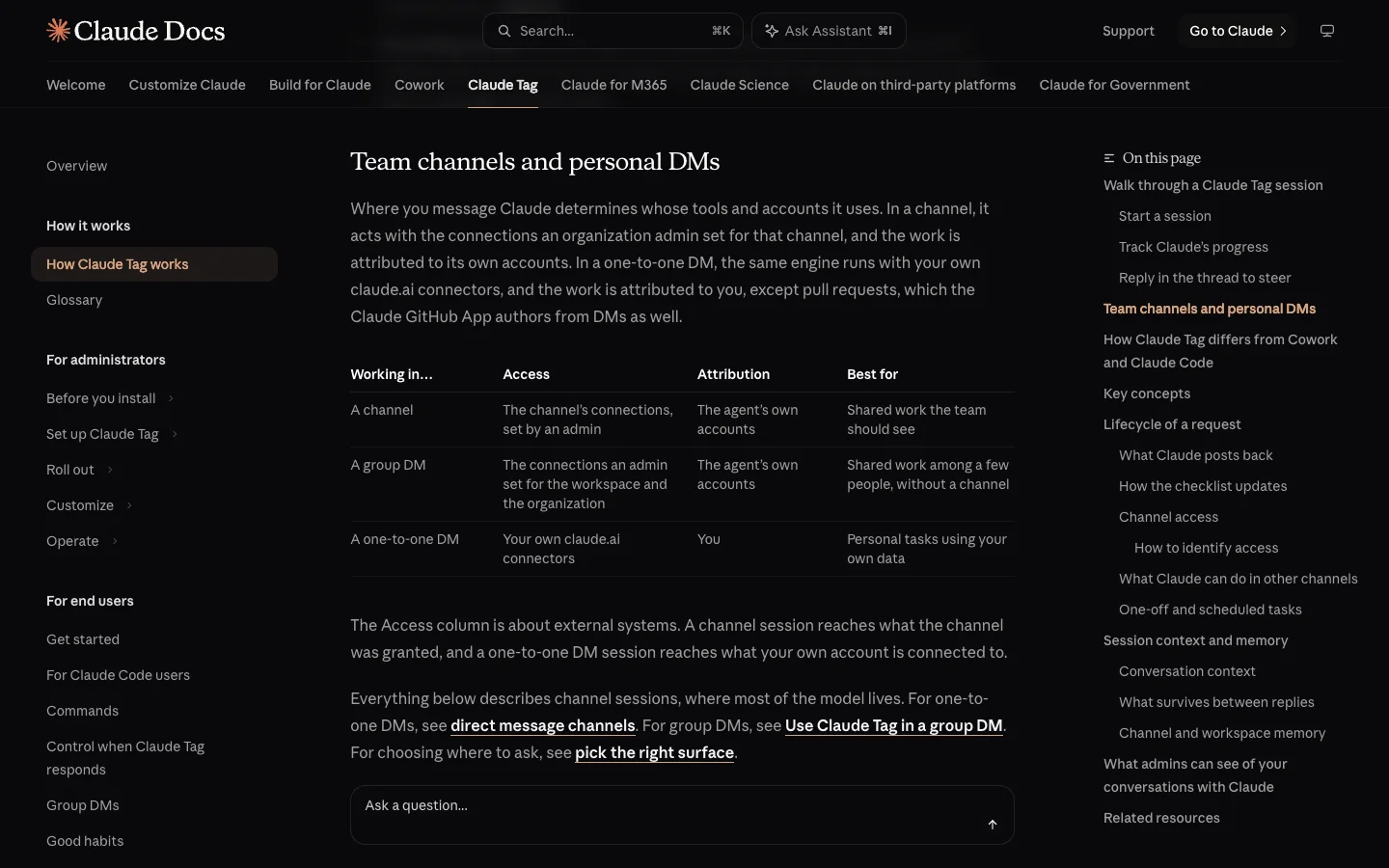 Where you tag Claude decides whose accounts it uses: the channel's in a channel, yours in a DM.
Slackbot
- Slack calls Slackbot "your personal agent for work" and states that it "has the same context and access to information you do, so answers are always relevant and personalized."
- Its security model is tied to your Slack user: "Responses from Slackbot are based only on information you can view in Slack," and "no one using Slackbot can see anything they don't have permission to view."
- When you ask it to look outside Slack, it pulls from Salesforce, workspace apps, enterprise search sources and connected MCP servers that your account is allowed to see.
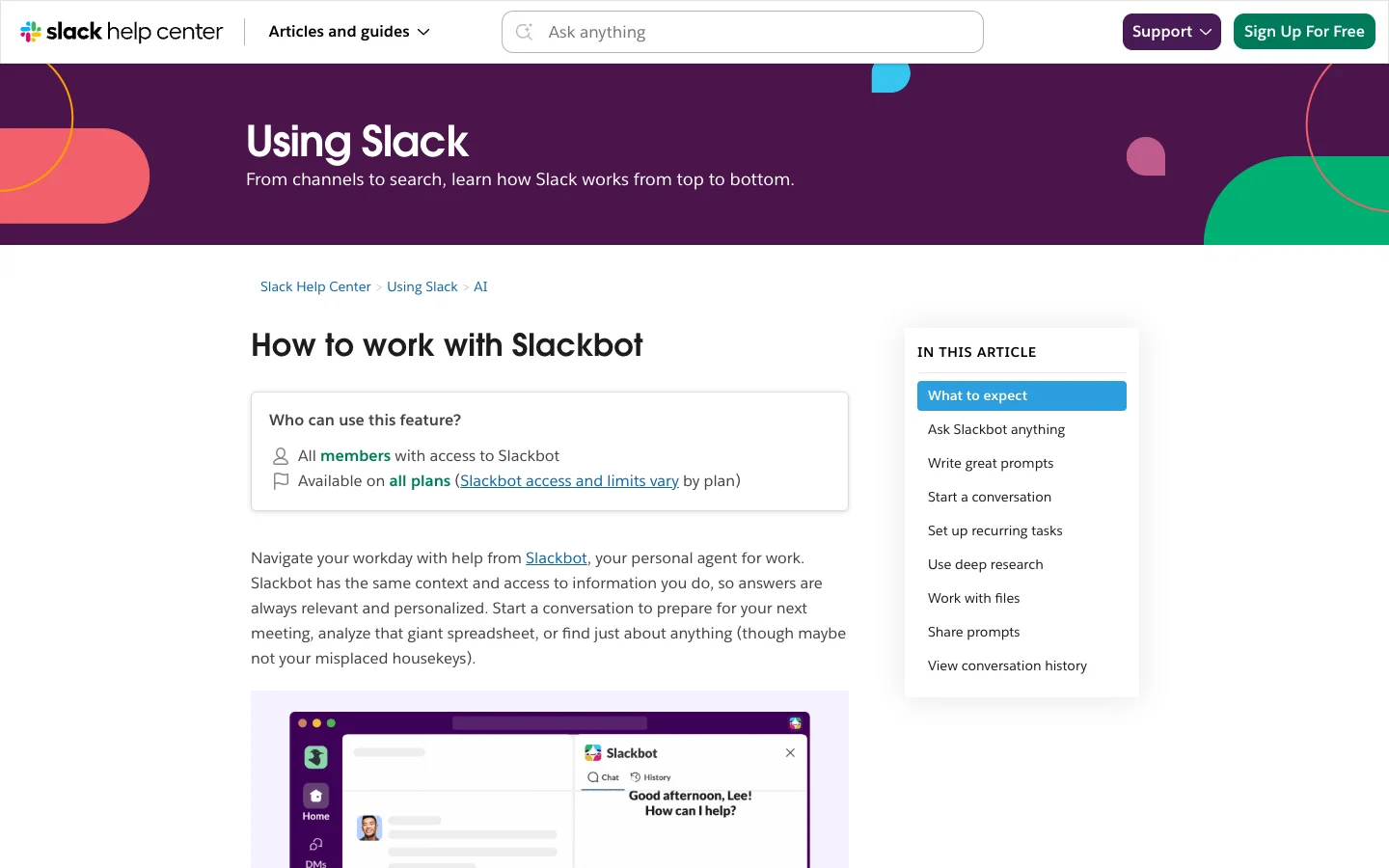 Slack describes Slackbot as a personal agent that sees exactly what you see.
My read: this is the cleanest way to explain the two to a team. Slackbot is you with a faster search bar. Claude Tag in #team-eng is a shared service account that happens to speak English, which means a junior engineer in that channel can ask it to query a data warehouse or a ticket queue the admin wired up for the room, even if that engineer doesn't have a login of their own.
Who sees the answer
The second half of the split is where the reply lands. One bot works in public by default, and the other works in a private side panel.
Claude Tag
- When you mention
@Claudein a channel, results land in the thread so the whole channel can read them, and anyone in the room can reply in that thread to steer the running session. - From a public channel, Claude Tag can also read and post in other public channels it belongs to. When it posts outside the thread where you asked, the message carries a footer such as
Sent by Claude in #team-eng on behalf of @jordan. - From a private channel, it can read other public channels it's in, though it won't post to them.
Slackbot
- Slackbot lives in its own panel next to your sidebar, so the conversation is between you and the bot even when you start from a message in a busy channel.
- You can share a prompt with teammates, and anyone who can see a shared prompt can click Send to Slackbot to run it against their own view of Slack.
- Bringing Slackbot directly into channel threads is new: Slack noted on September 15, 2026 that "Slackbot in Channels is in early pilot", alongside third-party agents from Anthropic, Cognition, GitHub, Vercel and OpenAI.
My read: if five people need to hash out a bug triage or an incident timeline, doing it in five separate Slackbot panels wastes four people's prompts. Put that in a channel thread with Claude Tag so the second person can say "check the staging logs too" without starting over. Save Slackbot for the questions you'd feel silly asking in front of 80 people, like "what did we actually decide in #proj-atlas last week?"
Private channels and search
A Slack admin's first worry is usually a bot reading a private exec or HR channel and repeating it in #general. Both vendors thought about this, and they solved it differently.
Claude Tag
- With nothing extra connected, Claude Tag reads its own thread and the current channel's history (including pins) and searches the workspace's public content.
- Workspace search can find messages by keyword from public channels Claude Tag isn't a member of, or an admin can limit search to channels Claude is in.
- Neither search setting ever includes private channels. Claude Tag only sees a private channel if someone invites it into that specific room, and even then it can't search across other private channels from outside.
Slackbot
- Because Slackbot runs as you, it can read every private channel and DM you're part of, and zero private channels you aren't in.
- Because the answer comes back to your private panel, a summary that pulls from
#exec-compstays on your screen unless you copy and paste it somewhere else.
My read: Claude Tag is safe in public rooms because it is blind to private rooms by design. The trade-off is that when you're sitting in a public channel and your question depends on context buried in a private deal room or a DM, Claude Tag simply doesn't have the material. That's a Slackbot job.
Guests and Slack Connect
Most companies on Business+ or Enterprise+ have single-channel guests, multi-channel guests or Slack Connect channels with customers and agencies. This is where a channel bot can accidentally leak context if an admin doesn't check the defaults.
Claude Tag
- By default, Claude Tag is disabled in any channel that includes a Slack guest. An admin can set "How should Claude work in channels with guests" to Restrict (the default), Channel only or Full access.
- Under every setting, guests can read whatever Claude posts in that room. And in any guest channel, even when an admin picks Full access, Claude Tag won't search the workspace, look up people or channels, or read other channels.
- Slack Connect channels with another organization are also set to Restrict by default and post no notice when someone tags
@Claude. If an admin enables Channel only or Full access for Slack Connect, access is still capped at channel-only, no workspace search or routines run there, and the other company's members can mention@Claudeand read its replies. Anthropic's docs warn admins to treat the channel's instructions and bundled connectors as available to the other company.
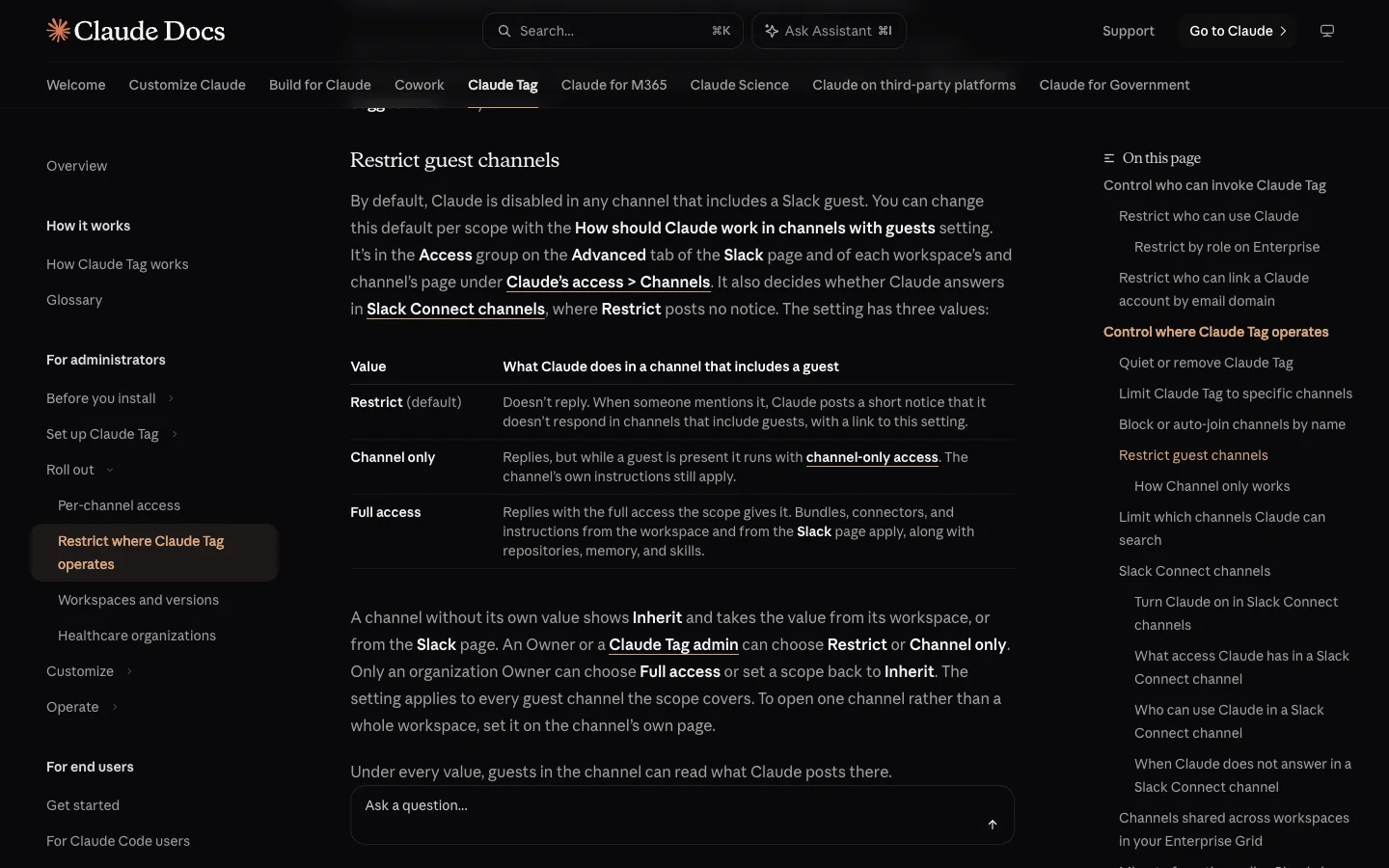 Claude Tag stays quiet in guest channels until an admin picks Channel only or Full access.
Slackbot
- Slack's rule is short: guests and Frontline Members don't have access to Slackbot.
- Your own employees can still open their personal Slackbot while looking at a guest channel or a Slack Connect channel, and people from the other company can't use your workspace's Slackbot.
My read: keep Claude Tag on its default Restrict setting for Slack Connect unless you have built a dedicated, locked-down connector bundle just for that partner room. In a shared customer channel, using your own Slackbot on the side to draft a reply and pasting the finished paragraph yourself is much harder to get wrong.
Memory
Both bots remember things across sessions, and a separate comparison of memory layers for Slack agents covers how each tool stores and scopes those notes. The short version is that memory follows the same personal-versus-channel split as everything else.
Claude Tag
- Every channel, public or private, keeps its own notes. Anyone in that channel can see, correct or remove entries.
- When Claude Tag is working in a public channel, it can also save workspace notes that are read in every channel.
- A private channel reads those shared workspace notes, and never writes back to them, so private context doesn't bleed out through memory.
Slackbot
- Slackbot builds personal Preferences and Topics from your own channels and messages.
- It refreshes them weekly, and you can inspect or edit what it saved under Manage memories.
My read: Claude Tag's memory is useful for rules a whole room shares, like "our staging branch is next" or "link every bug to the Linear project CORE." Slackbot's memory is for your own role, your manager's name and the projects you follow.
Getting real work done
Answering questions from Slack history is table stakes. Where the two diverge is what happens when you ask the bot to run code, update a ticket or show up on a schedule.
Claude Tag
- Every channel session gets an ephemeral cloud sandbox where Claude Tag can write and run code, inspect files and generate artifacts. The sandbox doesn't touch your laptop and is discarded when the conversation goes idle.
- When it ships code to GitHub, it opens draft pull requests with the Claude GitHub App as the author, even if you asked from a DM.
- It supports scheduled jobs, channel watching and triggers such as repository events (which Anthropic calls routines), so a channel can have Claude triage new alerts or post a morning rollup without a human typing
@Claude.
Slackbot
- Slackbot searches Slack history, connected apps and the web to write reports with citations, and takes action in tools like Jira, Figma, Salesforce and Docusign, plus custom tools over MCP.
- You can set recurring tasks that run up to three times per day.
- It doesn't execute code or open pull requests itself. For engineering work, Slack Code hands coding tasks off to partner agents (Claude, Devin, GitHub Copilot or ChatGPT) that you license separately.
My read: if the job ends in a paragraph, a Salesforce update or a Jira ticket, either bot can finish it. If the job needs a shell, a script, a data chart built from a CSV in the thread or a draft PR, Claude Tag does it natively and Slackbot hands the baton to somebody else.
What it costs
Most teams reading this already pay for Slack Business+ or Enterprise+, which means Slackbot is already on the invoice. The real question is what Claude Tag adds on top, and who in the workspace needs a paid seat.
Claude Tag
- Requires a Claude Team or Enterprise organization on Anthropic's first-party service (it isn't on Free, Pro or Max). Team Standard seats are $20 per user per month billed annually, or $25 monthly, for 2 to 150 seats. Enterprise is $20 per seat per month annually with a 20-seat minimum, plus API-rate usage.
- "Adding Claude to Slack doesn't add a per-seat charge." Your Slack users don't each need a Claude seat to tag
@Claudein channels. By default, anyone in the paired Slack workspace can use it in a channel, or an Owner can restrict it to members of the Claude org. - Channel, thread and group DM work draws from an org usage balance funded by an Owner under a token spend limit (Anthropic included an introductory launch credit when the beta opened). One-to-one DMs from a user with a linked Claude account bill to that user's seat instead. Admins can track spend by channel, though they have no page or export of individual messages people send.
Slackbot
- Included in Slack Business+ at $15 per user per month billed annually ($18 monthly) and Enterprise+ at $45 per user per month annually. Free and Pro workspaces only get a limited sample unless they upgrade or enable Salesforce Flex Credits.
- On Business+, each member can send 15 messages to Slackbot per week, resetting Monday at 12 a.m. local time. Enterprise+ has no weekly message cap, and extra Business+ usage runs through Salesforce Flex Credits.
My read: run the math for a 25-person company on Business+ annual billing. You're already paying $375 a month for Slack, which gives every employee 15 Slackbot prompts a week whether they touch it or not. To add Claude Tag for all 25 people in channels, you only need a minimum two-seat Claude Team org ($40 a month on annual billing) plus whatever usage balance your channels burn through under the spend cap you set. The 15-message weekly cap on Business+ is tight enough that heavy users will blow past it by Wednesday afternoon, so moving shared team questions onto Claude Tag actually saves people's personal Slackbot quota for their own private catch-up.
Which one should you pick
If you're an admin deciding how to roll these out, here is how the choice shakes out by team setup.
- You're on Slack Business+ and nobody wants to manage another vendor: stick with Slackbot for personal search, catch-up and meeting prep, and tell people to pace their 15 weekly prompts. If you outgrow that, look at the wider field of Slackbot alternatives.
- You have a Claude Team or Enterprise org (or even two seats for engineering leads) and want a bot the whole room can work with: pair Claude Tag, wire service accounts into your busy project channels, and teach the team the routing rule: personal view goes to Slackbot, shared work goes to
@Claude. - You want a channel agent in Slack, and your engineers already pay for Claude Code or Codex on their own machines: Merlin drives the Claude Code or Codex already installed on a teammate's machine from Slack channels, Linear and GitHub, using their local repos, credentials and MCP servers. Model usage stays on each machine owner's plan, memory is scoped per channel, and workspace plans run $19 to $99 a month (seen on October 30, 2026). At least one teammate's machine has to stay online, and there is no free plan or Microsoft Teams support. For more options in this category, see the roundup of the best AI agents for Slack.
6 things most comparisons skip
- Both bots run on Claude, so a better answer is almost always an access difference. When Slackbot nails a question that Claude Tag missed, it's usually because the answer lived in a DM or a private channel Claude Tag wasn't invited to. When Claude Tag nails one Slackbot missed, it's usually because an admin connected a repo, database or ticket queue to that channel.
- Claude Tag can know less than you and more than you at the same time. It knows less because it never searches private channels. It knows more because a channel's service account might have read access to a production data warehouse or a customer support queue that your personal login can't open.
- Claude Tag DMs are practically a different product from Claude Tag in channels. The moment you move from
#team-engto a one-to-one DM with Claude, it drops the channel's service accounts, picks up your personal claude.ai connectors and bills your seat. And even in a DM, Claude Tag opens GitHub PRs as the Claude GitHub App, whereas Anthropic's separate Claude Code in Slack product opens PRs under your own GitHub account. - Deleting a Slack message doesn't erase it from Claude Tag's transcript. If someone pastes a secret or a regrettable take into a thread with
@Claudeand deletes the Slack message five seconds later, it still stays in the session transcript Anthropic keeps. - Claude Tag can chime in without being tagged. Its "Respond automatically" setting is on by default, which lets it reply to a channel message that didn't mention
@Claudewhen it judges a response is warranted. Slackbot stays quiet in its panel until you talk to it. If uninvited bot replies annoy your team, flip that setting off on day one. - Slackbot's bill is flat, and Claude Tag's moves with every noisy channel. An idle Business+ workspace still pays $15 per user a month, and a busy one hits the 15-message wall. An unchecked
#generalchannel with Claude Tag can chew through your org's usage balance quickly, so set a spend cap before you announce it to the company and check the per-channel usage page at the end of week one.
FAQ
Yes. Slack confirmed in its September 2026 update that Slackbot is powered by Claude. Because both Slackbot and Claude Tag use Anthropic's models underneath, the day-to-day difference between them comes from whose permissions they use, where the answer appears and what tools they can reach.
Yes, and they complement each other well when people know which one to reach for. Slackbot handles private, personal questions from your own sidebar panel using your permissions, while Claude Tag handles shared work inside channel threads using the channel's connections. The one place they overlap in practice is a one-to-one DM with Claude Tag, which also runs on the person's own account like Slackbot does.
No. Pairing Claude Tag requires a Claude Team or Enterprise organization, and channel usage does not add a per-seat charge for your Slack members. By default, anyone in the paired Slack workspace can mention @Claude in a channel and draw from the org's shared usage balance, while one-to-one DMs require and bill to a user's linked Claude seat.
Only the private channels you explicitly invite it into. Claude Tag's workspace search never searches private channels under any admin setting, and notes it saves inside a private channel stay in that room. Slackbot, by contrast, can draw from any private channel or DM your own Slack account belongs to.
Guests cannot use Slackbot at all. In Claude Tag, both guest channels and Slack Connect channels are restricted by default. If an admin turns Claude Tag on for those rooms, guests and external partners can read everything it posts, and its access is automatically capped so it cannot search the rest of your workspace or read other channels.
No. Claude Code in Slack routes a coding mention to a Claude Code session on the web under your own account and opens pull requests as you, while Claude Tag in a channel acts as the agent's own service accounts and opens pull requests as the Claude GitHub App. Claude Tag also replaced the older Claude in Slack app when it entered beta in June 2026.
If both bots are already sitting in your workspace, you don't need to rip either one out. Use Slackbot when the question is about your own unread Slack, and tag @Claude when the whole channel should see and steer the work.
Try Merlin for free
Hand work to Claude Code and Codex from Slack, Linear and GitHub. Free for 14 days, no API keys, no card required.
Get started for free