

Slack and Linear Integration: Why Context Still Gets Lost
 Dott
An engineer (or an AI coding agent) opens a Linear issue that someone created from Slack three weeks ago. The title says "Fix export timeout" and the description is a single sentence copied from a chat message. The reason the bug matters, the enterprise customer who reported it, the approach the team agreed on and the shortcut they explicitly ruled out are all sitting in Slack somewhere.
Linear's Slack integration creates issues from Slack messages, syncs one thread's comments with the issue, posts notifications and expands Linear links into previews. It moves a link, one thread's comments and a few status changes, while the discussion, the decision and the background stay where they were typed.
Once you see where each piece of context gets stuck between the two apps, you can pick the right way to close the gap and know what each fix costs.
What teams expect the integration to do
When a team connects Slack and Linear, the natural assumption is that the two tools now share a brain. Whatever the team said in Slack should live on the issue, and whatever changes on the issue should show up in Slack.
In practice, people expect three things to happen automatically:
- The issue carries the whole conversation. Anyone picking up the ticket later expects to read the reasoning, the edge cases and the final decision right at the top of the issue.
- The issue stays current as the conversation continues. When two engineers jump into a huddle or start a side thread to check a database constraint, the ticket should reflect what they figured out.
- Slack hears about anything that changes in Linear. If a product manager cuts the scope in half during triage or reassigns the work, the people watching the original Slack thread expect to see that update where they were talking.
The integration is great at moving messages, yet those three expectations ask it to do a job it was never built to do.
What the native integration actually does
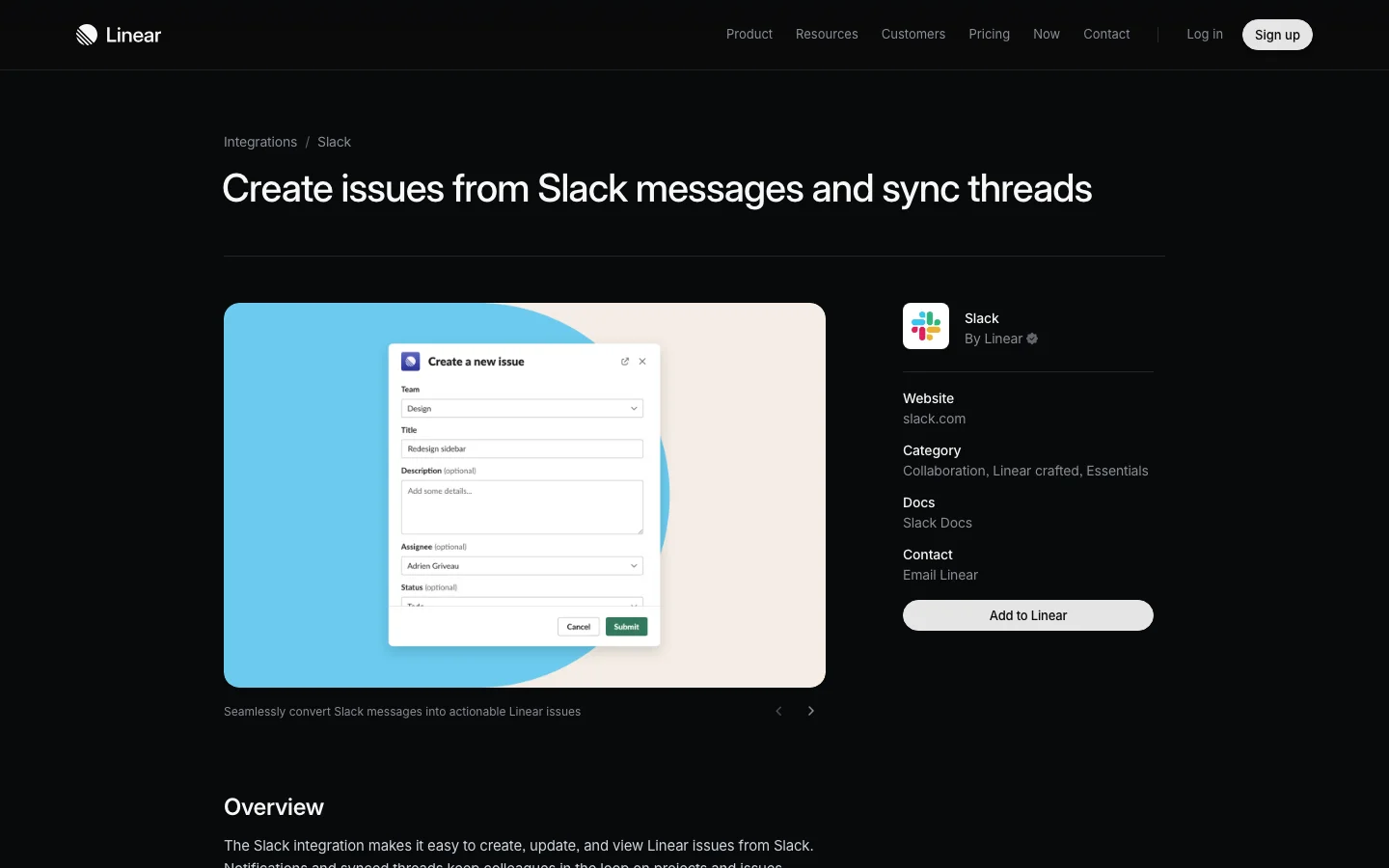 Linear's own page names the two things the integration does: it creates issues from Slack messages and it syncs threads.
Linear's Slack integration page and documentation (seen on 2026-11-17) lay out the exact boundaries of what moves between the two tools. The integration is included on every Linear plan, from Free ($0) to Basic ($10 per user per month billed yearly), Business ($16 per user per month billed yearly) and Enterprise.
Here is what each feature carries across:
- Create an issue from a message. Click More actions, Connect to apps, Create new issue… on any Slack message to open a dialog where you pick the team and fill in the title and description (a team's default template text appears in the description field). This is also where the synced thread is created.
- Linear Agent for Slack (
@Linear). You can mention@Linearin a Slack discussion to take actions in Linear based on your conversation's context, such as asking@Linear make feature requests from this thread. Workspace admins can also add custom guidance in the Slack integration settings to shape how the agent creates issues. - Synced threads. When you create an issue from a Slack message, you can create a synced comment thread at the same time. If Linear is available in that channel, replies in the Slack thread flow into a single comment thread on the Linear issue, and comments made inside that synced Linear thread post back to Slack. The Slack thread also gets an update when the issue is completed, canceled or marked as a duplicate. Private channels require running
/invite @Linearfirst, and synced threads are not available in DMs.
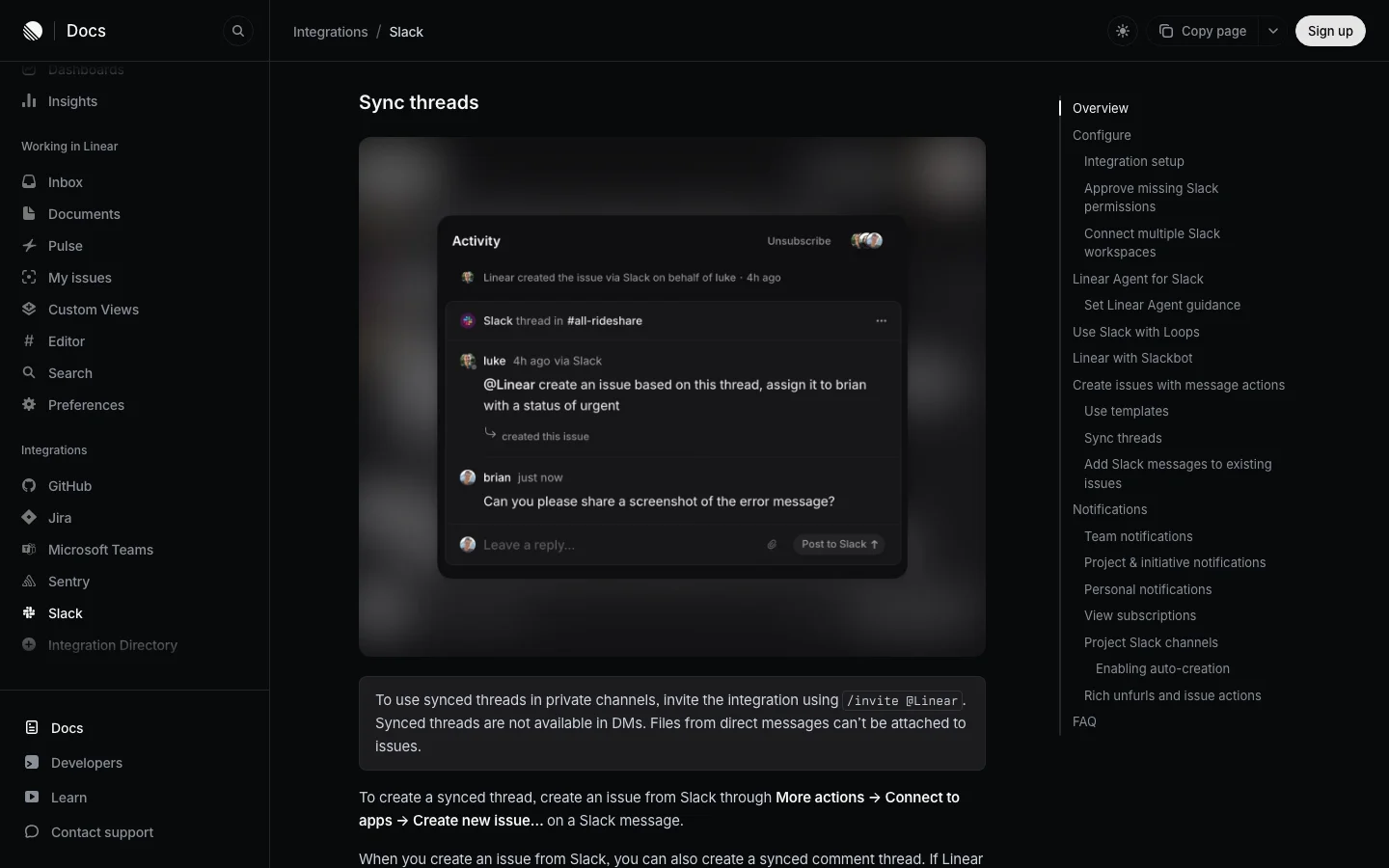 A synced thread shows up on the issue as one comment thread. The note under it sets the edges: private channels need an invite, and DMs don't sync.
- Link existing issue and
/linear. From a message's action menu you can link it to an existing Linear ticket, or you can attach a Slack message URL inside Linear. Both options drop a reference link without creating a synced thread or sending terminal updates. Typing/linearcreates a lightweight issue from the message box and does not work inside Slack threads, support Slack sync or upload files. - Notifications. Team notifications broadcast issue activity (creation, comments, status changes and project updates) to a dedicated Slack channel. You can also turn on project and initiative updates, custom view notifications and personal DM notifications.
- Link previews. Pasting a Linear URL or mentioning an issue ID in Slack expands a preview showing the title, description, status, assignee and creation date, and mentioning an ID adds a reply with the issue link in the thread. URLs from private Linear teams never unfurl.
- Linear Asks. Only Linear members can create issues through the standard integration. Linear Asks, included on Business and Enterprise plans, lets anyone in the Slack workspace send requests to Linear and keeps a synced comment thread.
- Slackbot via MCP. Slackbot can be connected to Linear's MCP server to read and update Linear data from Slack.
What crosses and what stays
| Information | Slack to Linear | Linear to Slack |
|---|---|---|
| The message an issue was created from | Yes, as the new issue | The synced thread, when Linear is in the channel |
| Replies in the synced thread | Yes, as comments in one comment thread | Yes, comments in that synced thread appear in Slack |
| Replies when the issue was only linked or pasted | No | No |
| DMs, other threads, other channels, huddles | No | No |
| Issue completed, canceled or marked duplicate | Not applicable | Yes, the synced thread is updated |
| Description edits, priority, scope, assignee changes | Not applicable | Not in the thread. Team notifications can post activity to a channel |
| The decision the thread reached | Only as one comment among the others | Not applicable |
Every "Yes" in that table is raw text moving exactly as it was typed. Nothing in the plumbing reads the thread and writes down what it concluded.
Where the context gets lost
Because the integration moves individual messages and specific status events, the actual reasoning behind a piece of work falls into the gaps between the two tools.
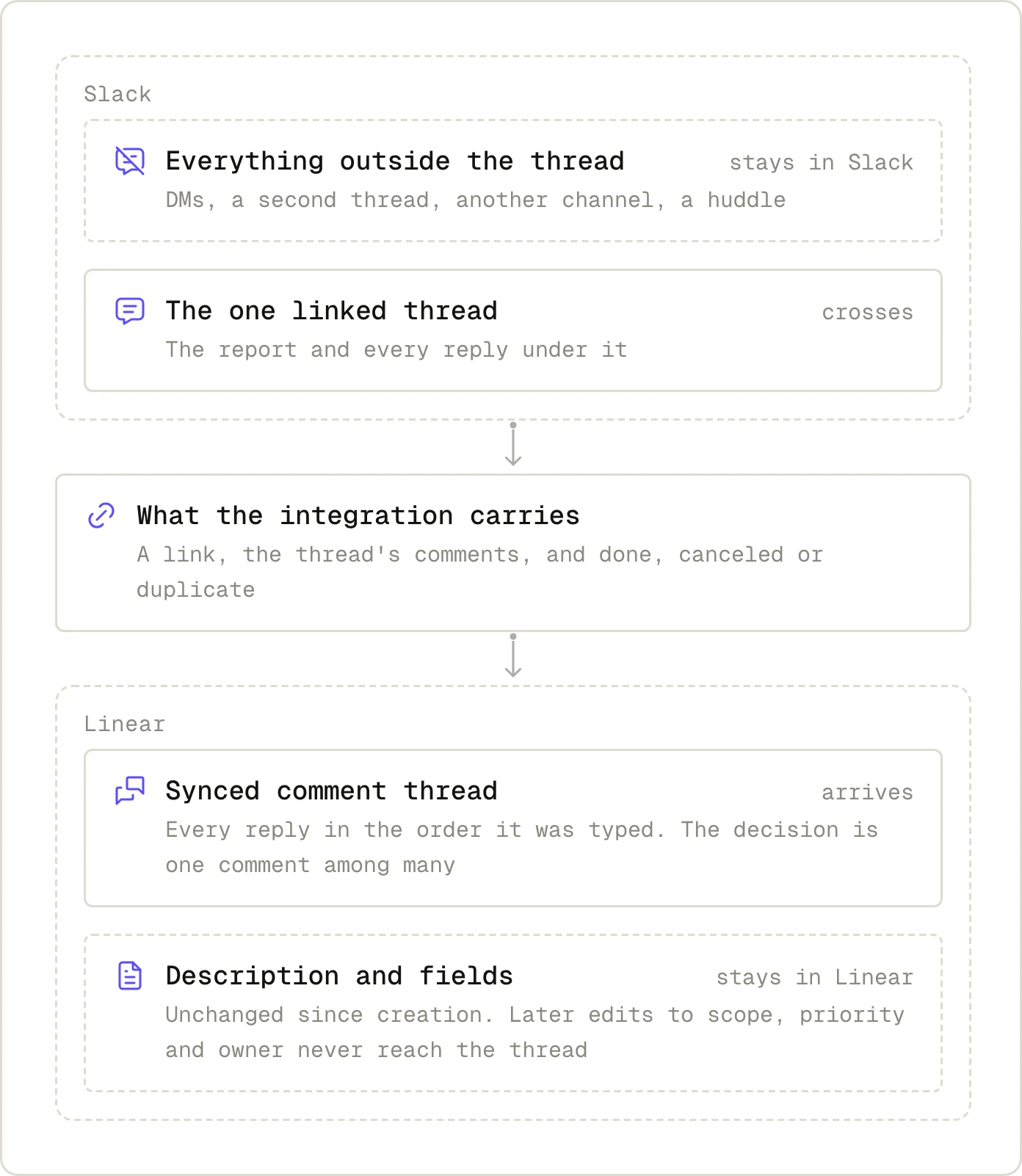 The two dashed boxes are where context is lost: one on each side. The integration only connects the two solid ones.
1. The decision is in reply 14
A customer support lead posts in #bugs-prod that CSV exports are timing out for large accounts, and creates a Linear issue from that first message. Over the next hour, three backend engineers debate twenty replies in the thread: they suspect a slow Postgres query, realize the query is fine, blame the Node stream buffer, and finally agree on reply 14 to switch the export job to a background worker and skip pagination for now.
With thread sync on, all twenty replies land in Linear inside one comment thread, in chronological order. The issue description at the top still says "CSV exports timing out for large accounts." The actual decision sits buried as comment 14 of 20, unmarked, and if Linear had not been invited to the channel when the issue was created, none of the twenty replies are in Linear at all.
2. The conversation moved somewhere else
Halfway through the #bugs-prod thread, the tech lead messages the database owner in a DM to ask if the background worker queue can handle 50-megabyte payloads. They jump into a five-minute Slack huddle, realize the current Redis instance will run out of memory during billing runs, and decide the export job must write directly to S3 instead.
Linear's docs state plainly that synced threads are not available in DMs and files from direct messages cannot be attached to issues. Even if they move the debate to #infra-redis, the sync only watches the one original thread in #bugs-prod. The single most important constraint on how to build the fix never reaches the ticket.
3. The issue changed in Linear and Slack never heard
On Tuesday morning, the engineering manager runs triage in Linear. Looking at the quarter's roadmap, they rewrite the issue description to cover only accounts on the Enterprise tier, drop the priority from Urgent to Medium, and reassign it to next sprint.
A synced Slack thread only receives comments posted directly inside that synced comment thread, plus terminal status updates when the issue is completed, canceled or marked as a duplicate. Description edits, scope reductions, priority changes and reassignments do not post into the synced thread. The support lead watching #bugs-prod still thinks a full fix for every customer is shipping today. Team notifications can post issue activity to a dedicated feed channel like #linear-feed, which sits in a completely different place from where the conversation happened.
4. The issue was linked, never synced
Sometimes an engineer creates the ticket in Linear first, then pastes the Linear URL into the Slack thread so everyone has the link. Other times someone uses Link existing issue from the Slack message menu, attaches the Slack URL inside Linear, or types /linear to spin up a quick ticket.
In Slack, the pasted link expands into a clean preview card showing the title, status and assignee, so the thread looks wired up. Under the hood, Linear's docs note that with Link existing issue "no terminal updates will be sent to the Slack thread, and no synced thread will be created," attaching a Slack URL sends "no updates or messages," and /linear "is not supported in Slack threads, for Slack sync." Even the unfurled card is a snapshot: per the docs, "Previews in Slack may not match the issue in Linear exactly." Every reply typed after that link stays in Slack forever.
This missing context used to cost twenty minutes of an engineer's morning while they hunted down the right person in Slack. Today, teams also hand tickets directly to AI coding agents, and an agent reads the Linear issue without going fishing through unlinked Slack channels or DMs. If you want to see what happens when an agent picks up a ticket, read How to Delegate a Linear Issue to an AI Agent and Get a PR Back.
Three ways teams patch it, and what each costs
No toggle in Linear's integration settings closes a structural gap. Teams that keep their issues readable use one of three approaches, and each comes with a trade-off.
1. A manual habit
The simplest fix is a team rule: one person owns the summary. Before a Slack thread goes quiet, the issue creator or the assigned engineer edits the Linear issue description to record three things: the decision the thread reached, the reason behind it, and what the team decided to leave out.
It works on every Linear plan and costs zero dollars. The catch is that it runs entirely on human discipline. It fails during incident weeks when the team is busiest, and nobody notices that a summary is missing until three weeks later when someone opens the ticket cold.
2. Zapier or another automation tool
 Zapier pairs a trigger in one app with an action in the other. It moves an event across, as it happened.
When a team gets tired of missing status updates or copy-pasting messages, they usually bring in Zapier's Linear and Slack integration. Zapier pairs Linear triggers (New Issue, Updated Issue, New Issue Comment) and actions (Create Issue, Create Comment, Update Issue) with Slack triggers (New Message Posted to Channel, New Reaction Added in a Channel, New Mention) and actions (Send Channel Message, Retrieve Thread Messages).
Zapier is great at moving fields when an event fires. You can build a Zap that posts a Slack message whenever an issue's priority or description changes in Linear (patching scenario 3), or one that creates an issue whenever someone reacts with a ticket emoji. What it cannot do on its own is read twenty replies and tell which one was the decision, unless you add an AI step and prompt it yourself. Each action counts toward your task limit, and every custom Zap becomes another piece of internal plumbing to maintain. On Zapier's pricing page (seen on 2026-11-17), the Free plan includes 100 tasks a month and restricts you to two-step Zaps (one trigger and one action), Professional starts at $19.99 a month billed annually ($29.99 billed monthly) for 750 tasks, and Team starts at $69 a month billed annually for 2,000 tasks.
3. An agent that reads the conversation
To turn a messy thread into an updated issue description without relying on someone's memory, you need software that can read the conversation and write the conclusion into the ticket. Two options handle this inside Slack and Linear.
Linear Agent (@Linear) is built right into Linear's Slack integration. When a thread settles on a plan, anyone with a Linear account can mention @Linear in the thread and ask it to create or update issues from the conversation's context, guided by whatever rules the admin set in Linear's Slack settings. The trade-off to watch is timing: @Linear acts at the moment you mention it, so its summary captures the thread up to that reply, and anything people debate afterwards goes back to being ordinary synced comments. It is also unavailable in externally shared Slack Connect channels, requires /invite @Linear in private channels, and in group DMs it must be invited when the group DM is first created.
Merlin is an AI coworker that lives across Slack, Linear and GitHub, running the Claude Code and Codex setups that engineers already have on their own machines. In a Slack thread, anyone can mention @Merlin and ask it to find, create or update a Linear issue with the conclusion the thread just reached. Inside Linear, delegating an issue to Merlin or mentioning it starts an agent session directly on the ticket, where it reads the issue context and posts its thoughts, live status, plan and actions as it works, and teammates can steer it with follow-ups.
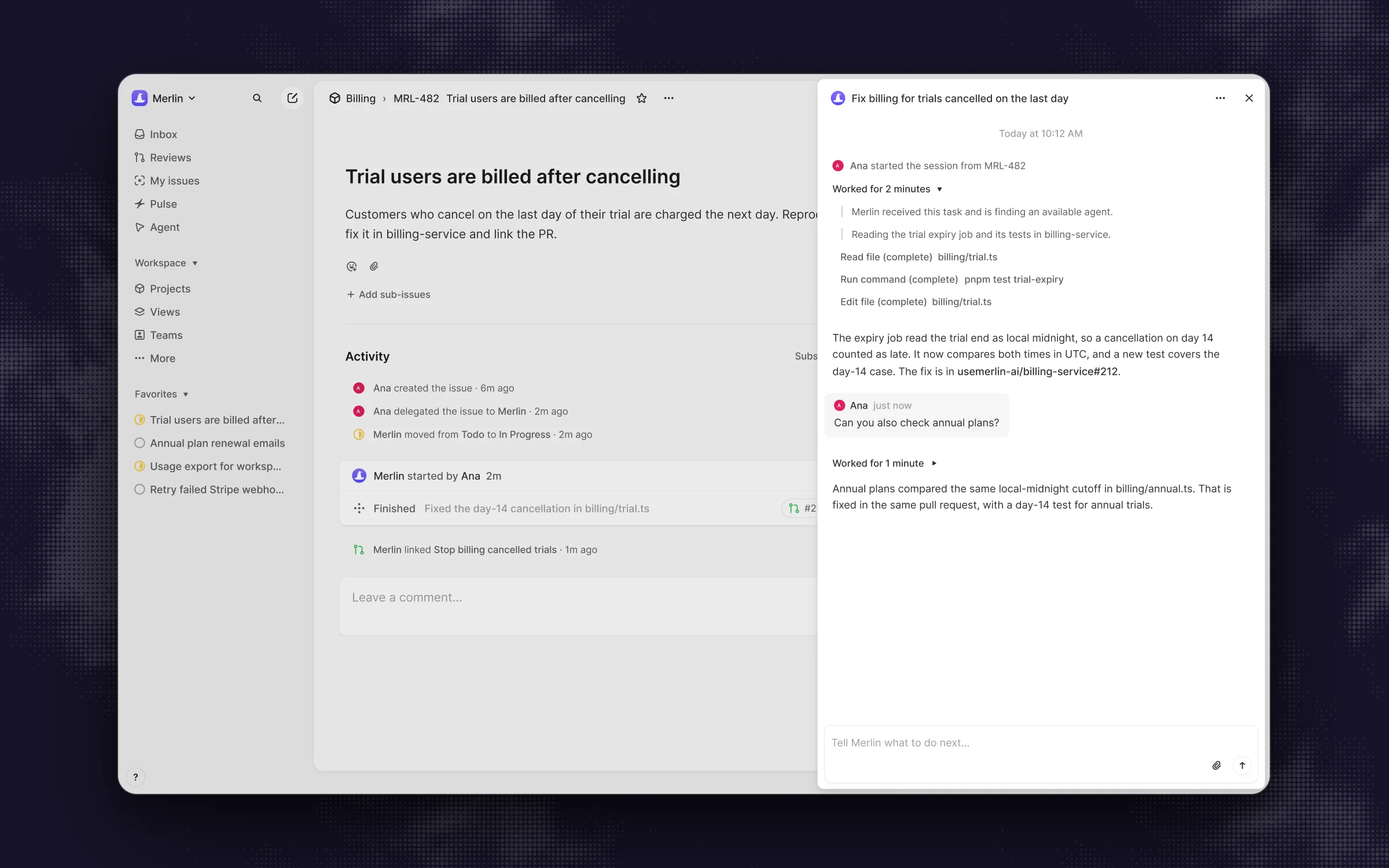 An issue delegated to Merlin starts an agent session on the issue itself, so the work and the follow-ups stay with it.
Merlin's limits are worth knowing up front. Like @Linear, it acts when triggered (by a mention, a DM, a delegated issue or a scheduled automation), and it requires one of the team's machines to be online running Claude Code or Codex. Its memory starts off by default in a new workspace, is scoped to the Slack channel where a fact was learned, and a run started from Linear only reads public channel memory without saving new entries. Its summaries can also be inaccurate or incomplete, so a human still needs to glance at the ticket, and Slack's agent interface requires a paid Slack plan. Merlin has no free tier after its 14-day Team trial: workspace plans on its pricing page (seen on 2026-11-17) are Starter at $9 a month (up to 3 active users, 1,000 requests), Team at $59 a month (up to 50 active users, 5,000 requests) and Scale at $99 a month (up to 200 active users, unlimited requests), while model usage stays on each machine owner's own Claude Code or Codex plan.
For a wider look at agents that operate inside Linear, see Best Linear AI Agents in 2026.
One rule applies to every agent on the market: an agent only sees the channels it has been invited into. A decision made in a private DM between two engineers stays invisible until someone brings it back to the channel.
A checklist for keeping context with the issue
Whether you stick with the native integration or add an agent on top, these eight habits keep the reasoning attached to the work:
- Start from the message action menu. Create tickets using More actions, Connect to apps, Create new issue… with thread sync turned on, or mention
@Linearat the end of the discussion. - Invite Linear to private channels early. Run
/invite @Linearwhenever you spin up a private project or incident channel so the first issue created there gets a synced thread. - Spot the un-synced links. Treat pasted Linear URLs, Link existing issue and
/lineartickets as static bookmarks that carry zero replies across. - Put the decision in the description. When a long thread lands on an answer, edit the top of the Linear issue to state the decision, the reason and the non-goals, and name one person on the thread to own that edit.
- Bring side-channel outcomes back. If a huddle or a 1-on-1 DM changes the technical approach, post a two-sentence summary in the original synced Slack thread so it lands on the issue.
- Announce scope changes in the synced thread. When triage changes the priority, assignee or scope in Linear, drop a quick comment in the synced thread on the issue so the people in Slack hear about it.
- Read the issue cold before handing it off. Before assigning a ticket to an engineer who was out of the channel or delegating it to an AI agent, read the title and description alone and ask if they could build the right thing from what is written there.
- Automate the part that hurts, and review the output. Use Zapier if you need field changes broadcast to Slack, use
@Linearor Merlin if you want the thread summarized into the ticket, and always have a human verify the final description.
FAQ
Yes, Linear builds and maintains an official Slack integration that is included on all Linear plans, including the Free tier (Linear Slack integration). It lets you create issues from Slack messages, sync a Slack thread with an issue's comment thread, expand Linear links into previews, mention @Linear to take actions, and send issue notifications to Slack.
Four things usually cause this: the issue was only linked (by pasting a URL, using Link existing issue, or typing /linear) instead of being created with a synced thread, @Linear was never invited to a private channel with /invite @Linear, the conversation is in a DM where synced threads are unsupported, or the Slack app wasn't in the channel when the ticket was created. Also, if your workspace recently updated Slack app permissions, an admin must reauthorize or reconnect the integration inside Linear settings, because approving permissions in Slack alone does not update an existing connection (Linear Slack docs).
Hover over the Slack message, click the three-dot More actions menu, select Connect to apps, and click Create new issue… to open the creation form and start a synced thread. You can also mention @Linear in a thread and ask it to create an issue from the discussion, or type /linear in the message box for a quick issue without thread sync.
A synced thread copies only the replies posted inside that single Slack thread, placing them into one comment thread on the Linear issue. Messages in the main channel outside the thread, related threads in other channels, DMs and huddles stay in Slack.
With the standard Slack integration, only people who have a Linear user account can create issues. If you want anyone in your Slack workspace (such as sales, support or external partners) to submit requests into Linear with a synced comment thread, you need Linear Asks, which is available on Linear's Business and Enterprise plans.
They do different jobs and most teams that use Zapier run it alongside the native integration. Linear's native integration gives you two-way comment sync on a thread and link previews, while Zapier moves specific fields when events happen, like posting a Slack message when an issue's priority changes. Neither tool reads a long argument and rewrites the issue description on its own.
A small team creating a handful of tickets a week can keep its context intact with the manual habit of editing the description before leaving a thread. A team that keeps getting surprised by quiet scope changes in triage can wire up a Zapier notification. A team that regularly hands tickets to engineers or coding agents who weren't in the room will want an agent like @Linear or Merlin to read the thread and write the conclusion onto the issue.
Try Merlin for free
Hand work to Claude Code and Codex from Slack, Linear and GitHub. Free for 14 days, no API keys, no card required.
Get started for free