

Dust vs Merlin: Knowledge Assistant vs AI Coworker
 Dott
Dott
Your company already lives in Slack, you have a Dust trial open (or an invoice on your desk), and one of your engineers just mentioned you could put your existing Claude Code and Codex setups directly into the channels instead. Both tools show up as a bot you can mention in a thread. Once someone hits enter, they do two very different jobs.
Dust asks a builder to prepare context up front: an admin syncs data sources into permissioned Spaces, a builder sets up named agents in a web app, and teammates call those agents in Slack to answer questions from your docs, wikis and tickets. Merlin reuses the context that already sits on your engineers' machines (cloned repositories, local credentials, MCP servers, skills) and picks up the rest in the Slack channel itself, so anyone can ask it to trace a bug, run a test suite or open a pull request.
If you're just here for a quick recommendation, start with these.
The short answer
- Your team's answers live in Google Drive, Notion, Confluence or Zendesk: Dust. Its managed connectors, permissioned Spaces and Deep Dive research agent are built for searching across synced company documents.
- Your team's answers live in code, logs, Linear issues and pull requests: Merlin. It drives the Claude Code and Codex already installed on your engineers' machines and finishes work by opening branches and PRs.
- You want to design named, specialized agents in a web builder: Dust. Builders create agents like
@OnboardGuideor@SecurityReviewer, lock down which Spaces they can read, and publish them to the workspace. - You want zero connector setup and no new model seats to buy: Merlin. A 10-person team pays $59 a month for the workspace, and model usage stays on the Claude or ChatGPT plans your engineers already pay for.
- You need Microsoft Teams, a browser extension, or EU data residency: Dust. Merlin runs in Slack, Linear and GitHub only.
- You want scheduled runs and channel memory to live inside Slack: Merlin. Its schedules post straight back to the channel, and what you tell it to remember stays scoped to that channel.
Dust and Merlin at a glance
Most comparison tables list checkboxes for Slack and GitHub. The rows below cover the parts you actually feel on Tuesday afternoon: who has to set the tool up, what the bot can see when you tag it, and where the work ends.
| Dimension | Dust | Merlin |
|---|---|---|
| Best for | Answering questions and running workflows across synced company docs and tools | Letting the whole team delegate real engineering and ops tasks to Claude Code and Codex from Slack, Linear and GitHub |
| Who prepares the context | Workspace admins connect data sources into Spaces, and builders configure named agents in the web app | Engineers use the repos, credentials, skills and MCP servers already on their machines, plus notes saved in the Slack channel |
| Where the knowledge comes from | Managed connectors (Drive, Notion, Confluence, Slack, Zendesk, Snowflake, GitHub read-only) and remote MCP servers | Local files, git repositories, CLI tools and MCP servers on the runtime machine, plus channel memory |
| What the bot sees in a Slack thread | The thread it is mentioned in (channel history requires the separate Slack data sync or Slack tools) | The thread, channel memory, and per-channel modes from Mention only to Thread follow-ups and Proactive |
| What it can finish | Answers, research reports, files via the Computer sandbox, and tool actions (filing issues, reviewing PRs) | Code changes, test runs, git commits, pull requests, Linear and GitHub updates, plus anything the machine's tools can do |
| Where a scheduled run lands | A new conversation in the trigger creator's Dust history, or inside a shared Dust Pod | Back in the Slack channel where the schedule belongs |
| Whose memory it is | Private to each individual user, per agent | Shared per Slack channel (public channels workspace-wide, private channels stay private) |
| Models and where they run | 20+ hosted models (OpenAI, Anthropic, Google, Mistral) billed in Dust credits | Your engineers' own Claude Code and Codex installations, running on their machines on their existing plans |
| Cost for 10 people | €240/mo billed yearly (€300/mo monthly) on Business Pro, with 8,000 credits per seat and up to 3 connectors | $59/mo flat for the workspace on Team (up to 50 active users), plus your engineers' existing Claude or ChatGPT plans |
These are the list prices I saw on November 1, 2026.
Who prepares the context
Both tools want to give an agent enough context to be useful without leaking things across the company. They split on who does that setup work and when.
Dust
- Dust is built around Spaces and an Agent Builder. Workspace admins connect data sources and organize them into open or restricted Spaces, where "Only workspace admins can create and manage spaces." The Space an agent draws from decides who in the company is allowed to use that agent.
- Builders design agents in the web Agent Builder (with an assistant called Sidekick), from an existing conversation, or via YAML. Once published, teammates call the agent by name, such as
@Dust +OnboardGuide. - Each agent has an Editors list, so a team can assign owners to maintain its prompt, model tier and tools over time.
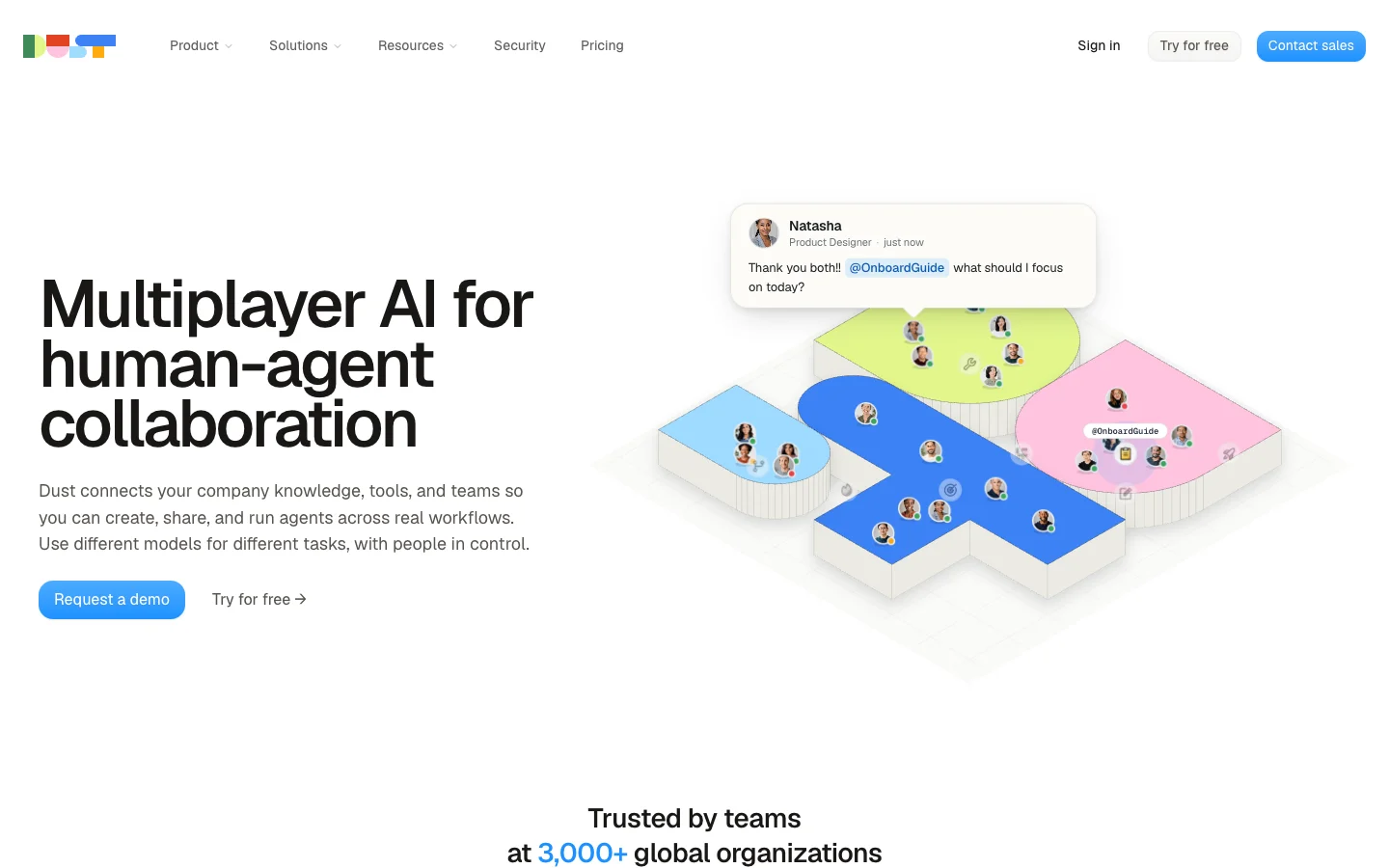 Dust is built around named agents that someone designs ahead of time and teammates call by name.
Merlin
- Merlin is for teams whose engineers already run Claude Code or Codex. Instead of rebuilding your context in a web portal, an engineer installs the Merlin desktop app (macOS or Windows) or Linux CLI daemon and links their machine as a runtime.
- That runtime already has the engineer's cloned git repositories, local environment variables, CLI tools, skills and MCP servers. New runtimes start private by default, and the owner can flip a runtime to public when they want teammates in Slack, Linear or GitHub to be able to route work to it (prerequisites, security).
- Reusable instructions travel as shared skills that anyone can publish from a machine or write in the workspace catalog.
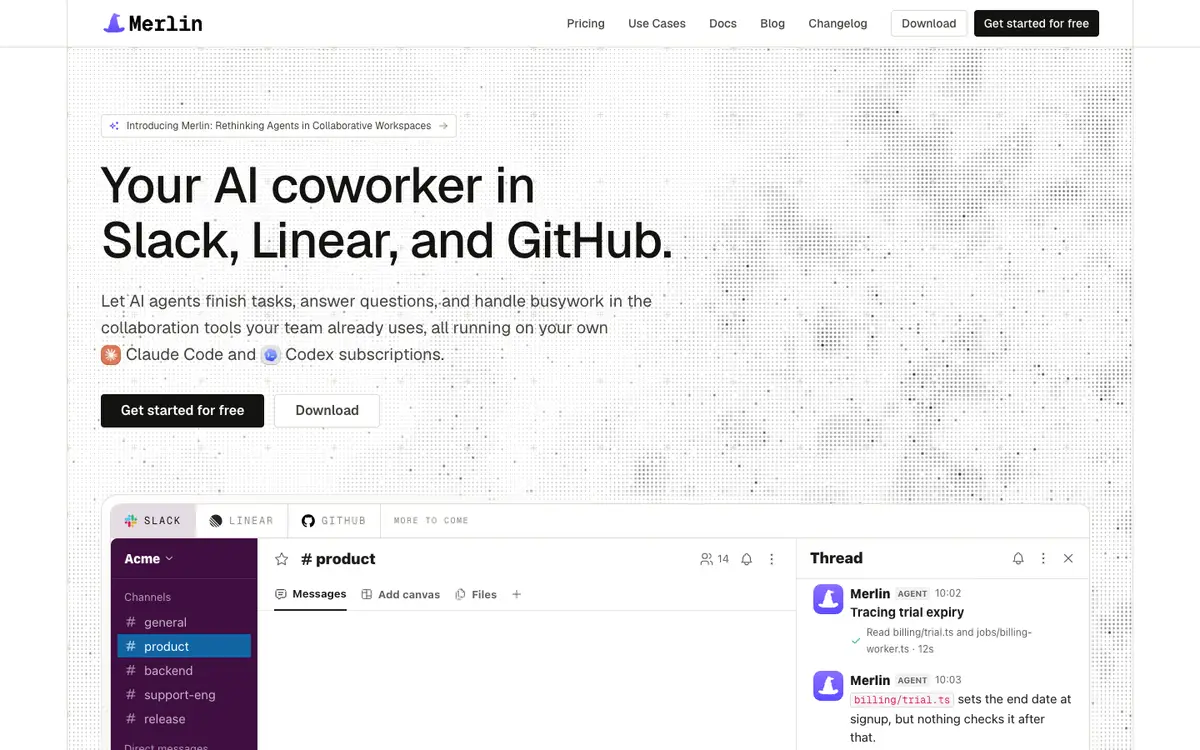 Merlin runs the Claude Code and Codex your engineers already use, and posts the work back in the thread.
What people say
- As Viktor, a competing Slack agent builder, puts it on its own comparison page: "The quiet cost of an agent platform is the person who has to own it." (Viktor blog)
My read: Dust shines when you have someone excited to act as an agent builder for the company, curating knowledge spaces and tuning prompts for sales, support and ops. Merlin fits when your engineers have already done that setup locally for Claude Code or Codex and you want the rest of the team to benefit from it without maintaining a second platform.
Where the knowledge comes from
When someone asks a question in Slack, the agent can only answer from what it can reach. Dust pulls knowledge into a central index. Merlin reaches out from an engineer's machine.
Dust
- Dust offers managed connections that sync and index Google Drive, Notion, Confluence, Slack, Intercom, Zendesk, Snowflake, Salesforce, SharePoint and GitHub.
- On the self-serve Business plan (for teams up to 100), workspaces are capped at 3 managed connectors, 5 remote MCP servers and 5 Spaces. Lifting those caps requires moving to an Enterprise contract.
- Dust also includes a built-in Deep Dive agent that spawns up to six parallel sub-agents across your connected company data and the web, running for 10 to 30 minutes to compile a thorough research answer.
Merlin
- Merlin does not sync Google Drive, Notion or Confluence into its own search index. It reads whatever files, repositories, CLIs and MCP servers exist on the runtime machine that picks up the task (how it works).
- If an engineer has Linear, Sentry, Postgres or Notion MCP servers configured in their local Claude Code or Codex setup, Merlin can use them right away. If a task requires a file, credential or tool that isn't on that runtime machine, the task stops at that boundary (prerequisites).
- Day-to-day tribal knowledge is captured inside Slack through channel memory, where telling Merlin "Remember that we ship on Thursdays" saves a note for future threads.
My read: If the question is "What did we promise Acme Corp in the Q3 security questionnaire and where is the latest slide deck?", Dust's synced connectors and Deep Dive agent are built for that. Watch the 3-connector limit on Dust's Business plan, though, because Drive, Notion, Slack and GitHub already put you at four. If the question is "Why is the checkout webhook returning a 500 for Acme Corp?", Merlin has the codebase and the logs right under its feet.
What it sees in a Slack thread
Both tools live in Slack, and both have quirks in how they read a channel that are worth knowing before you roll them out.
Dust
- You call an agent in a channel with
@Dust +AgentName(one agent per message), or message the bot directly in DMs without the mention (Dust in Slack). - Per Dust's Slack troubleshooting docs, the interactive bot "only receives the thread it's mentioned in, not the entire channel history." If you want an agent to know what happened earlier in the channel, an admin has to enable the separate Slack data sync or give the agent Slack search tools. You also cannot set a default agent for private channels, and each Dust workspace gets a single interactive Slack bot.
- For channels where you don't want people typing mentions, admins can turn on Slack auto-reply, which binds one published agent to reply to every message (or every top-level post) in that channel.
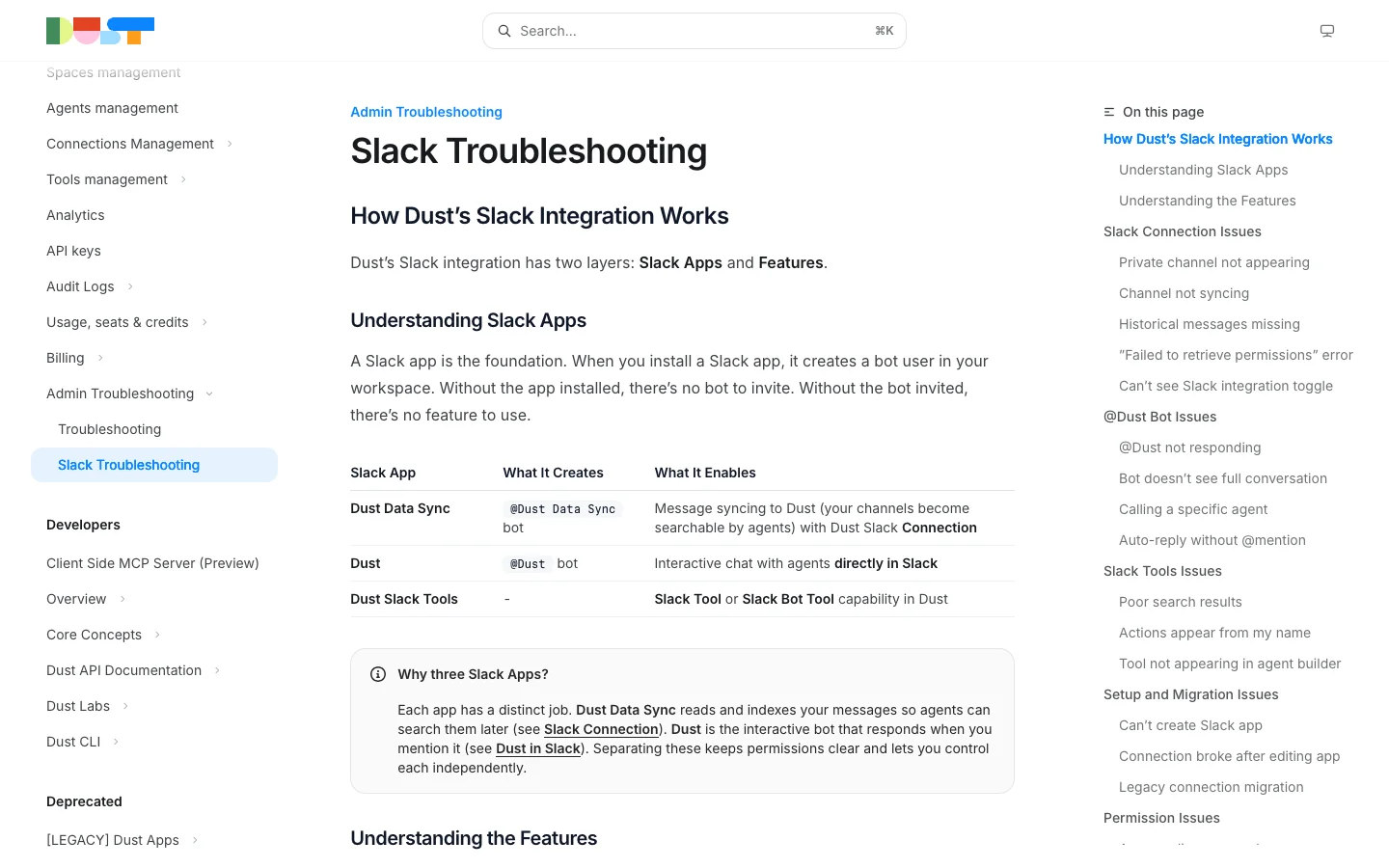 Dust splits Slack into three apps: one indexes channels, one answers mentions, one lets agents search and post.
Merlin
- You
@Merlinin a channel thread, send it a DM, or let a channel setting decide when it speaks up (Slack integration). - Every Slack channel has its own response mode: Mention only, Thread follow-ups (once Merlin is in a thread, it keeps replying without needing another
@Merlin), or Proactive (Merlin may also consider unmentioned top-level messages in that channel). - While a task is running, anyone in the Slack thread can reply to steer it or hand it extra context. Merlin does not support Microsoft Teams or a browser extension.
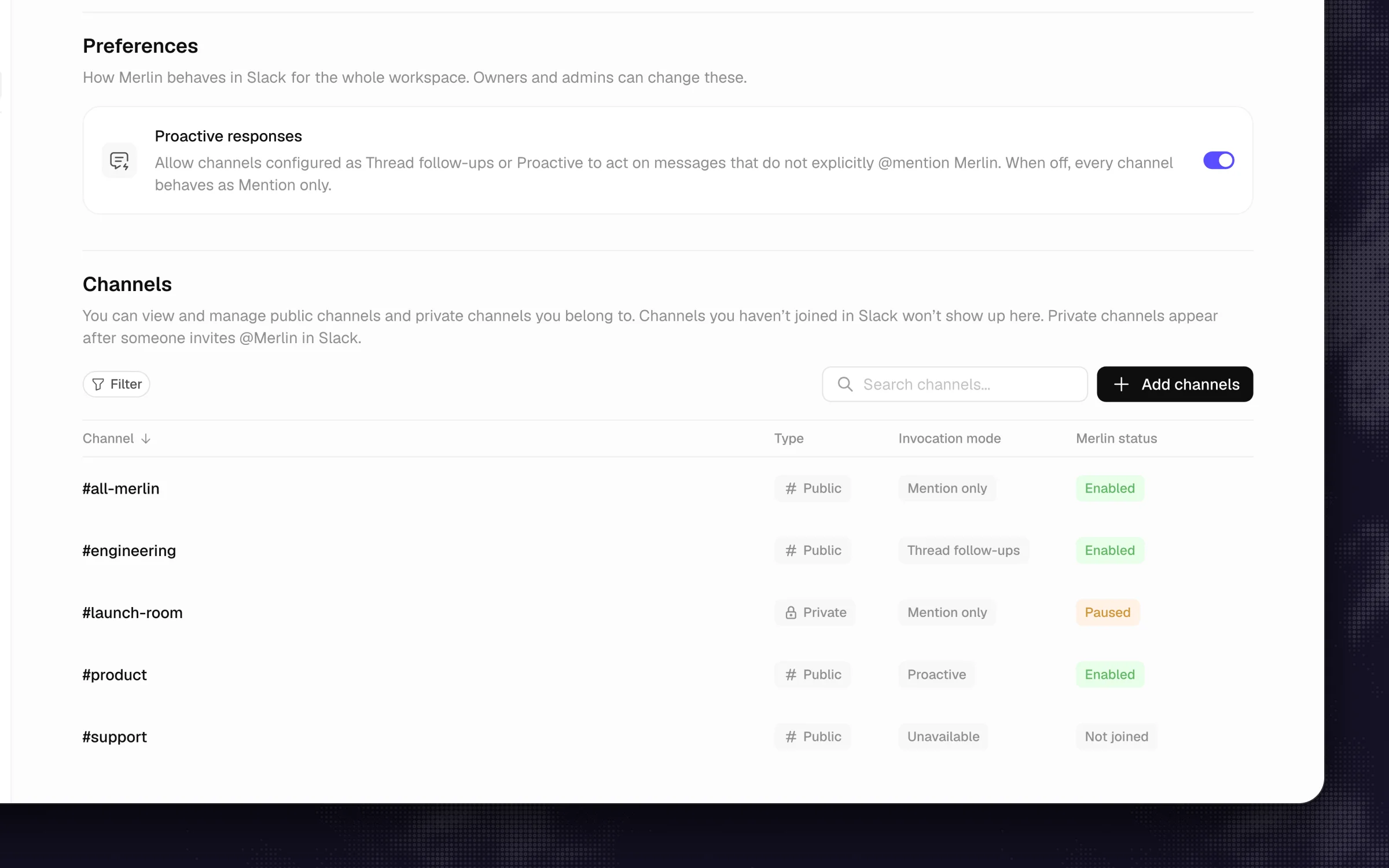 Each channel gets its own response mode, from Mention only to Proactive.
My read: Dust's Slack setup is designed around routing a question to a specific named agent, which is why you type +AgentName and why reading the rest of the channel takes a separate sync app. Merlin treats the Slack thread like a terminal session that the whole channel can watch and steer together.
What it can finish
Answering a question in Slack is half the job. The other half is what happens when the answer requires changing a system.
Dust
- Dust agents can take actions through connected MCP tools, and they have Computer, a temporary sandboxed workspace that runs code and makes files (with no open internet access unless an admin allowlists specific domains). Computer replaced Dust's File Generation tool on October 14, 2026.
- For engineering workflows, Dust's GitHub data sync is read-only for indexing issues, discussions, PRs and code. Its interactive GitHub tool can create and update issues, post comments and review pull requests. It reviews and files, it does not push code or open pull requests.
Merlin
- Because Merlin drives Claude Code and Codex on an engineer's machine, it can do whatever that coding agent can do: read a repository, reproduce a bug, run the test suite, commit to a branch and open a pull request (how it works).
- You can also assign or mention Merlin directly on a Linear issue or mention
@merlinon a GitHub issue or pull request. The result comes back to the place where you asked for it. - The trade-off is physical: the machine that owns the runtime has to be online and awake when the task runs.
My read: Dust's Computer sandbox is great when a PM or analyst wants an agent to crunch a CSV, run a Python script and hand back a chart or a document. When the output needs to be a tested pull request against your actual repository, Dust stops at reviewing and filing issues, while Merlin writes the code and opens the PR.
Scheduled work and where it lands
Both platforms let you run agents on a schedule or from an incoming webhook, such as a new Jira ticket or a failed GitHub check. Look closely at where the output goes.
Dust
- Agents support schedules or webhook triggers (from GitHub, Jira, Linear, Zendesk, Fathom or custom sources) configured with plain-language schedules. Triggers belong to the member who created them.
- When a trigger fires, each run lands as a new conversation inside the Dust web app in that member's history, or inside a shared Pod (Dust's collaborative workspace for tasks, files and conversations) if the trigger is attached to one.
- Webhook triggers are rate-limited to 42 runs per 24 hours by default.
Merlin
- Automations run on a schedule or fire from incoming webhooks, and you can set them up either in the web app or by asking Merlin in Slack in plain English.
- Every run posts its output back into the Slack channel where the team works, so a morning triage or a deploy check shows up in the channel feed for everyone to read and reply to.
My read: Dust pulls scheduled work into the Dust web app (or a Dust Pod), which makes sense if you want a dedicated inbox for agent outputs. If your team already ignores every tab except Slack, Merlin dropping the morning bug triage straight into #eng-triage means people will actually read it.
Memory
When you correct an agent on Monday, who gets the benefit of that correction on Tuesday?
Dust
- Builders can enable the Agent Memory tool on any custom agent.
- That memory is private to each individual user, per agent, and persists until the user deletes it. If you tell an agent how your team formats release notes, it remembers that for you, not for the colleague sitting next to you, unless a builder edits the agent's master instructions.
Merlin
- Merlin's memory is scoped to the Slack channel where a fact was learned. Notes saved in a public channel can be read across the workspace, while notes saved in a private channel stay locked to that private channel.
- Anyone in the channel can say "Remember that staging deploys need the feature flag turned on first," and the whole channel gets that context on the next run. Memory starts turned off in a new workspace until an owner or admin enables it.
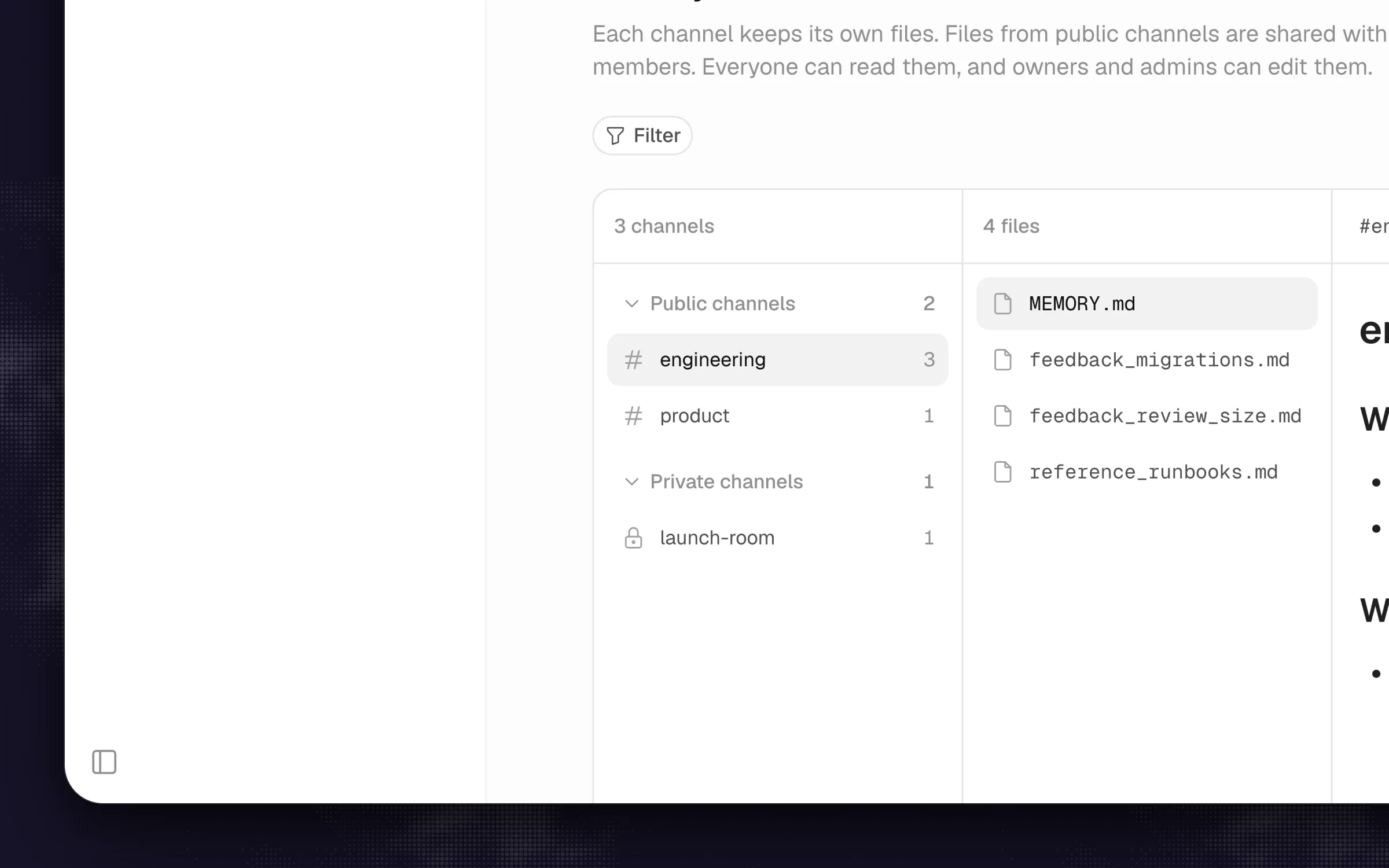 Merlin keeps memory per Slack channel, so what one channel teaches stays with that channel.
My read: Per-user memory fits a personal assistant. Per-channel memory fits a team channel: when an engineer tells the bot in #billing how the retry queue works, the PM asking a question in #billing an hour later gets the right answer without anyone opening an admin panel.
Models and where they run
Dust
- Dust hosts access to more than 20 models across OpenAI, Anthropic, Google, Mistral and others, grouped into Basic, Standard, Premium and Ultra tiers (Premium routes to Claude Opus 5.5 as of October 2, 2026).
- It is SOC 2 Type II certified, offers both US and EU data residency, and supports Microsoft Teams (text only) plus a browser extension for Chrome, Firefox, Edge and Arc (Dust in Teams, browser extension).
Merlin
- Merlin does not host models or spin up a cloud VM per user. It orchestrates the Claude Code and Codex CLIs already installed on your engineers' machines (how it works).
- The runtime uses the files, credentials and tools on that machine. Model provider credentials and MCP configuration are not uploaded to Merlin, and model usage draws from each machine owner's own Claude or ChatGPT plan, while Slack, Linear, GitHub and the model provider still process what a task needs (security).
My read: If you want one vendor invoice that gives non-technical staff access to 20+ models, a Chrome sidebar and EU data residency, Dust covers all of that. If your engineers are already paying Anthropic and OpenAI for Max or Pro plans and want their actual local environment doing the work, Merlin avoids paying for model tokens a second time.
What it costs a 10-person team
Both tools price cleanly on their public pages, and the math looks very different once you add your tenth teammate.
Dust
- On the self-serve Business plan (for teams up to 100, priced in EUR excluding VAT, seen on November 1, 2026), a Pro seat costs €24/month billed yearly or €30/month billed monthly, and includes 8,000 credits per seat per month. A Max seat costs €120/month billed yearly (€150/month monthly) with 40,000 credits. A Free seat comes with 500 lifetime credits.
- Credits cover both model tokens and tool actions (0, 1 or 3 credits per tool call), do not roll over, and pause a single message after 600 credits to ask whether you want to continue. Admins can enable capped overage, and programmatic usage bills at $0.01 per credit.
- For 10 people on Pro seats, you pay €240 a month billed yearly (€300 a month billed monthly), with the Business plan's cap of 3 managed connectors, 5 remote MCP servers and 5 Spaces.
Merlin
- Merlin charges per workspace by active users, with a 14-day Team trial and no credit card required (pricing, seen on November 1, 2026). Starter is $19/month (up to 5 active users, 1,000 requests), Team is $59/month (up to 50 active users, 5,000 requests), and Scale is $99/month (up to 200 active users, unlimited requests). There is no free tier.
- For a 10-person team, you pay $59 a month total on the Team plan, plus the Claude or ChatGPT subscriptions your engineers already pay for on the machines acting as runtimes.
My read: Dust's per-seat price includes the model credits, which is why 10 seats start at €240 to €300 a month before overages or an Enterprise upgrade for more than three connectors. Merlin's $59 is for the workspace and leaves model usage on the plans the engineers already pay for, so the real comparison is €240 to €300 for Dust (models included) against $59 plus those existing Claude or ChatGPT plans.
Which one should you pick
Three questions settle the choice for almost every team.
- Is the answer in your documents or in your code? If the bulk of your Slack questions are answered by searching Google Drive, Notion, Confluence and Zendesk, pick Dust. If the bulk of your questions turn into someone checking a repo, running a script, reading logs or opening a PR, pick Merlin.
- Who will maintain the agents? Dust works best when an ops lead, platform engineer or champion owns the Agent Builder, organizes Spaces and tunes prompts. Merlin works best when nobody wants to maintain a web builder: engineers link the machines they already work on, and the channel teaches Merlin the rest.
- Where do you want the work to finish? If you want people working inside a dedicated AI web app, a browser sidebar and shared Pods, pick Dust. If you want every question, scheduled run and PR link to stay inside Slack, Linear and GitHub, pick Merlin.
Plenty of 30 to 100 person companies can justify both: Dust for company-wide policy, sales and support docs, and Merlin in the engineering and product channels where conversations turn into pull requests.
Three things most comparisons skip
- Dust's 3-connector cap on the Business plan sneaks up on you. Most teams evaluating Dust want to connect Slack, Google Drive, Notion and GitHub on day one. That is four connectors, which pushes you past the self-serve Business plan into an Enterprise sales conversation.
- Dust's Slack bot cannot read the channel by default. Mentioning
@Dust +Agentin a thread only passes that single thread to the bot. Giving it awareness of the rest of the channel requires turning on the separate Slack data sync or configuring Slack tools on the agent. - Merlin is only as good as the machines behind it. Merlin does not give you a cloud sandbox or a hosted model pool. If no engineer on your team uses Claude Code or Codex, or if every runtime machine is closed in a backpack over the weekend, Merlin has nowhere to run.
FAQ
Dust describes itself as "Multiplayer AI for human-agent collaboration" and lets builders create custom agents with tools, triggers and a code sandbox. In practice, teams adopt it first for its synced company knowledge across Google Drive, Notion, Confluence and Slack, organized into permissioned Spaces. It is an agent platform whose strongest day-one job is acting as a company knowledge assistant.
Yes. You can call any published Dust agent in a channel with @Dust +AgentName, DM the bot directly, or have an admin set up auto-reply for a channel. By default, the bot only sees the thread it is mentioned in, so reading full channel history requires enabling Dust's separate Slack data sync or Slack tools.
Dust has a sandboxed Computer tool that can run code to analyze data and generate files, and its GitHub tool can create issues, comment and review pull requests. Its GitHub repository sync is read-only, so it does not push branches or open pull requests. If you want an agent in Slack that edits your repo, runs tests and opens a PR, that is what Merlin does through Claude Code and Codex.
Merlin does not index Google Drive, Notion or Confluence into a hosted search database. It can only read those tools if the engineer's runtime machine has an MCP server or CLI tool configured for them. For heavy document search across the whole company, Dust's managed connectors are purpose-built for the job.
Yes, and there is almost no overlap when you do. Teams use @Dust for questions that pull from synced company wikis, sales decks and support tickets, and @Merlin when a thread in #engineering or #product needs someone to inspect the codebase, run a check or ship a fix.
On Dust's Business plan, Pro seats cost €24 per user per month billed yearly (€30 monthly) with 8,000 credits per seat and a workspace cap of 3 connectors, putting a 10-person team at €240 to €300 a month. Merlin's Team plan costs $59 a month flat for up to 50 active users, and model usage stays on the Claude or ChatGPT subscriptions your engineers already pay for. Prices were seen on November 1, 2026.
Pick Dust when the answer lives in your documents and someone on the team will own the agents. Pick Merlin when the answer is a change to your code and the channel should steer it.
Try Merlin for free
Hand work to Claude Code and Codex from Slack, Linear and GitHub. Free for 14 days, no API keys, no card required.
Get started for free